It’s been an entire year since mum passed, that I didn’t update this blog. I kind of let things fall by the way-side, and to be honest – looking back with some hindsight, the last 3 years had been the toughest of my life. It had been utter chaos looking after my mum with failing health, juggling duties at work and a personal life that had been imploding (an ex who had issues and we just toxically made each other way worse for it).
So I’ve relaunched this blog onto https://jtiong.com
This is a personal blog to just float some ideas out there. It’s more to keep track of things that interest me. I should’ve started this at the start of the year, but things got away from me. So the promise as I start this, is that I update it at least once a day.
We’ll see how that goes, heh.
I think, it’s quite safe to say that 2020, has been an insane year.
I didn’t do my usual post at the end of 2019; and I didn’t do much for the start of this year either with my blog. There’s a lot of reasons for it; but on both a personal level, and indeed a global level – I think 2020 is a year that my generation will remember for quite a while.
It’s a year in which, the global markets stopped, then through sheer force of will, continued on. The age of the internet and remote services & tools were forced into a level of maturity that up until now, were only something the novel few could dip their toes such waters. Indeed, my own blog post (this post you’re reading now) is all about figuring out being able to work from anywhere, at any time.
2020 brought with it, COVID-19; which brought with it – significant health risks, and significant situations to my life that honestly, I never thought I’d see.
2020 was actually going to be a rough year for me anyway, as I moved towards focusing on caring for my elderly mother. I’d moved back home, and have been deciding what to start discarding in an almost Marie Kondo-esque fugue state. My home has always been filled to the brim with old knick knacks and gadgets, not to the excess you see on Marie Kondo’s show, but still – quite impressively full of old tech, clothes, and furniture.
There’s a lot to keep track of, and I’m in the process of decluttering my life. To do this, I’ve turned to a really interesting application that my friend and colleague, Matt, has pointed me to — Notion (https://notion.so). It’s kind of an all-in-one workspace style data collection application, kind of like Evernote.
It works across iOS, PC, Linux – it’s a web based application that’s very responsive. It provides a great way to take notes and keep organised, especially in the current hellscape of things in life right now.
It’s a new year – and really, time to move on from my previous lifestyle of just working and hardcore gaming.
I’m looking into removing the errant Cat5E cabling around my house, both for safety reasons (I have an elderly resident who can’t always avoid the cables and might trip up) and just general home pleasantness. I’m also left with a lot of computer hardware that – thanks to Project Cloud Citizen, I’m no longer in need of, such as massive servers in my house…
To that end – recently, I bought myself a Christmas present — a Google Wifi home mesh setup; and implemented it around the house. It’s my hope that I can transition the household to a wireless fix, instead of having everyone on a cabled solution.
2018 was a year that was very focused on improving my workflow on-the-go and out on my day-to-day work commitments. I ended the year by turning to Linux as my main operating system on my laptop; and I must admit – yes, the change in operating system has been disruptive – it’s actually had far less disruptive impact than first thought. I’m able to do the vast majority of my work with Linux, using a system that is much better suited to coding, Docker environment development, and overall lets me just get elbows deep into productivity.
2019 – is going to be a year of improving my ‘home base’. I find that due to the nature of my work over the last 12 months; I find the need for always-ready access to my code a necessity. However, I occasionally need to do a couple extra things which my laptop-centric workflow doesn’t allow as yet:
- I need to engage in creative work; Photoshop, etc.
- I need to unwind with a bit of fun, too! (going to the gym is more a physical release thing)
So after the events and results of Project Cloud Citizen – and the revival of my laptop as my core workhorse; I’m declaring 3 projects for 2019 on a personal level!
- Project Stronghold – designing the perfect space(s) at home for Rest, Play, and Creativity!
- Project Fortify – building up my health, and shoring up against future complications
- Project Foundation – My laptop proved its worth this weekend with both Windows and Ubuntu – tweaks to improve this 🙂
2019 will be about good ol’ hard work, growth, and improvement. We’ll see what the year brings!
This blog entry is more of a personal reminder – and now it’s somewhere on the internet in theory it shouldn’t ever disappear.
I do a lot of PHP related coding in my day-to-day. Be it website projects all the way through to browser-based applications, both professionally and personally – I think I’ve hit a point where VS Code – my editor of choice, is finally covering almost all my use cases.
The extensions in question:
- Alignment by annsk
- Diff by Fabio Spampinato
- Docker by Microsoft
- Format HTML in PHP by rifi2k
- GitLens by Eric Amodio
- PHP DocBlocker by Neil Brayfield
- PHP Symbols by lin yang
- phpcs by Ioannis Kappas
- Prettify JSON by Mohsen Azimi
- TabOut by Albert Romkes
The Analog Method for the Digital Age…
This year, started on a Monday, and coincidentally, I started a new experiment to stay organised and keep track of my day-to-day happenings. It’s called a Bullet Journal, and it’s a method of keeping a concise, goal/task-driven journal of daily happenings. It’s very free-form in nature, meaning that you don’t need a dedicated diary format to adhere to, or some specially printed book; any old exercise book can fit your needs!
My goals and desired outcomes were simple – I wanted a way to record my day to day events, whilst not losing focus of tasks and things that needed to be done, be it professionally, or personally. I also wanted to be able to do this, no matter where I am, as long as I had sufficient visibility, the journal, and a pen. I didn’t want to be beholden to battery power, or other nasty limitations.
And as a plus, I really enjoy the tactile feeling of just, writing something. For any seriously longer-form journal entries, there is of course, this very blog that you’re reading.
Before I go into my rant about Bullet Journals, and how I do them, and such – here’s the original site that I learnt about it from: https://bulletjournal.com — It’s kind of turned into some sort of online store/sales point – but the concepts are still visible and solid. There’s also about a hundred thousand people who’ve made videos about Bullet Journaling on YouTube and various other social media.
A rapid way of Journaling
The cornerstone of being able to use a bullet journal is based on a concept called Rapid Logging. It’s essentially a way to capture information, and notes as bulleted lists (with a small range of bullet types/symbols). It kind of looks like this (sorry about the huge gaps, these source images come with quite a bit of padding, and really, I thought it looked quite good!):
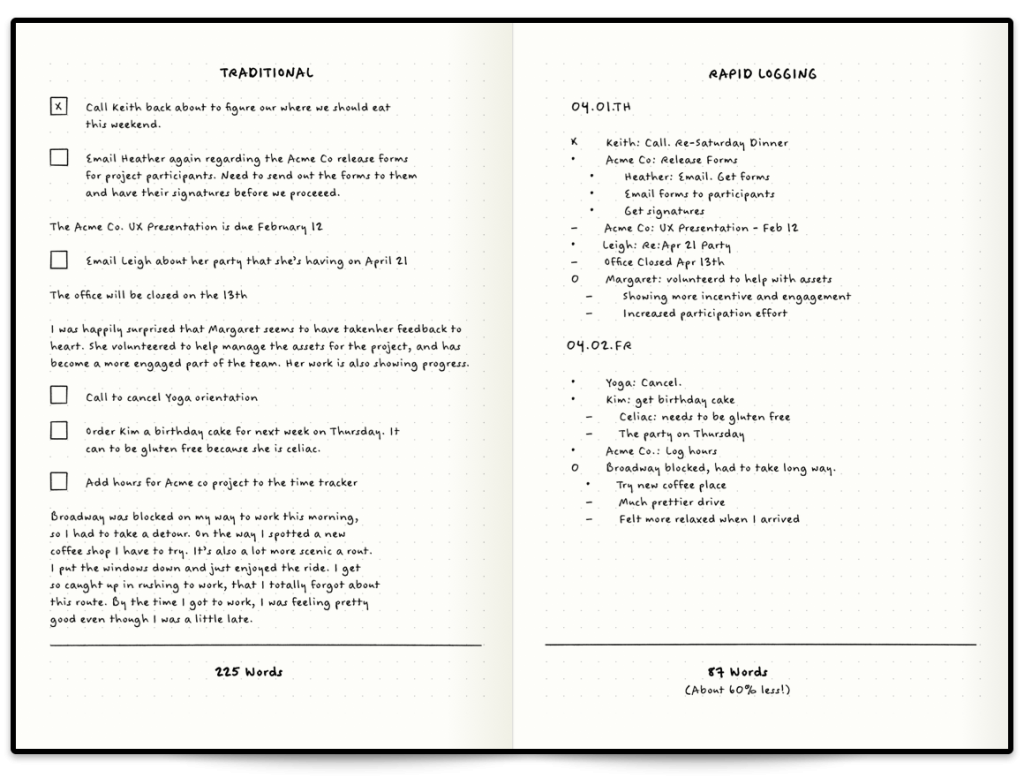
On the left, you see how someone might have a journal entry that’s somewhat longer form, but quite typical of a diary. On the right – you have something a little more ‘lean’. This is rapid blogging. You’ll notice that there’s different symbols for everything; and every bullet journal has their own symbols and guide (I’ll go through mine later) – but for now, the default ones you see in the tutorial image above are split into several types.
Has bullet journalling helped?
Yes. Emphatically, and simply, yes. It’s a focused, habitual and easy way to keep track of things, remind yourself of your goals and ideas, and really take a breather in your busy day.
My Personal BuJo Experience
Since this is my first bujo, and as reach the end of 2018 (and coincidentally, near the end of the book I use for it) – I thought I’d do a bit of a retrospective on the way I’ve used it, and things I’ve learnt.
My first BuJo involved a fair number of mistakes; initially so bad that I ripped out the first 20 or so pages of the book! (yikes!) But after some planning, and with (not quite) enough forethought, I managed to eke out a usable solution. I tried a variety of different symbols, and worked on how detailed I should make my daily log entries (everything from weather, to BSL and daily spends) and by the final quarter of 2018, I finally came up with a simple box and circle bullet point system, with simple daily labelling to help.
And in actual fact – by happy coincidence, I realise I can even type the method I use out:
[ ] = task
[x] = task done
[>] = rescheduled task
[-] = cancelled task

( ) = event/appointment
(x) = event done
(>) = rescheduled event
(-) = cancelled event

- thought/note
! important thought/note/reminder
? question/investigation
This absolutely doesn’t mean I’m going to use a typed version of my bullet journal however; the key point of the bujo is that it’s a physical, tactile experience that gets the brain some exercise! Being freeform also allows me to quickly customise pages or scribble out extra notes and so forth. However this DOES give me some ideas on how to do something of a bujo for devs 😉
Anyway, moving on – as we go into 2019 – the new BuJo I’ve worked on setting up today is going to include a couple of features I’ve seen around that I’d like to try out – such as a year in pixels, based on the mood of the day, I can colour in a square in a grid, with a corresponding colour to mood – and at the end of the year I should have a fairly pragmatic overview of just how well things went that year.
After my trip to Taiwan, I noticed that I personally started to up the usage time my laptop got. In a sense, I missed the full blown functionality of a PC; which was limited on the iPad.
The iPad is fantastic, as an extra TV screen, or a digital scribblepad. But that’s it; I haven’t the heart to use it for more. I could use it for more in a pinch, but I’d rather not. I bought my laptop at a weird time in my life; a lot of things were uncertain, and to top it off, I bought it with a broken ‘Up’ arrow key. It’s irked me using it ever since. The key still works fine and the keycap kind of still stays on. But it’s broken, and I’ll always be wary of it when I’m using this laptop.
Regardless, this little machine has grown on me. And continues to grow on me. The Gigabyte Aero 14 isn’t a bad device; it’s quite fantastic for my personal needs, and with it becoming my main work device; Ubuntu 18.04 needs to be installed on it.
And that’s why I’m here today, blogging.
So far, it’s been a pretty good experience – Ubuntu managed to install smoothly; and the only gripe is the need to reboot my laptop anytime I do a switch between my GeForce graphics card and my Intel graphics processor. The battery life is more than double when I’m using the Intel GPU, but in order to use two external screens, I need to use my Geforce GPU. It’s a small compromise though, given how quickly Ubuntu can reboot on the laptop.
There’s something beautiful about being able to carry a single device where all my work is focused; and with the power of the cloud™ I’m able to comfortably back up my stuff, too!
Ubuntu 18.04 and going into 2019 – I may well become a full blown Linux user.
So, over the next couple of weeks, I’m going to be travelling overseas to Taiwan. It’s a vacation, my first in nearly a decade; and since my last vacation, a lot of technology has changed that perhaps makes this journey a little more comforting to a reclusive geek like myself. The airline I’m flying with, provides a USB socket in its international economy seats, with 5V DC and 500mA charge, meaning I can power a device somewhat comfortably to enjoy a variety of media, and entertainment. So without further ado, I’m going to go into something of a diatribe about preparing for the trip to soothe my inner geek.
The constraints
There’s a number of limitations on this vacation, predominantly governed by my travel arrangements (flights, trains, etc.) so listing them out:
- Portability; I’m using a Crumpler 8L backpack; the “Low Level Aviator”
- Power; My gadgets need to last a while, and/or be charged with in-transit USB (5V DC, 500mA – about the same as a USB 1.1 port)
- Media; and Storage for photos and videos from my phone
- Entertainment; I don’t expect to have much time, but in the down time and flights I might watch a show, or three…
- Gaming; of course 🙂
The goal of this post is to put down my thoughts so that I can build up an EDC kit for my trip.
The EDC Backpack
Aside from my wallet – “The Pilot” by Andar; and my iPhone on my person – I’ll have most of my gear in my backpack with me:
- iPad Pro 9.7″ – it’s only 32GB, but it should hold enough of my notes and such to continue being useful!
- Nintendo Switch – previously in Project Cloud Citizen, this would’ve been my GPD-WIN PC, more on this later;
- Bullet Journal – my bujo, I carry this with me pretty much everywhere
- Pen cases – will hold my pens of course, and insulin injection pens, as well as some bandaids and what have you
- Screwdriver kit – this is a little portable kit with a combined tape measure that I will keep with me just in case
- Glasses case – obviously, for the glasses I wear, as well as a spare pair inside
- Battery Pack
- Cables for iPhone/iPad/Switch
This trip is a good opportunity to really see what there is that I can and can’t do when I’m truly away from my home desktop, and must rely on Project Cloud Citizen. I’m packing quite lightly with this trip, and my day-pack is smaller than my usual laptop bag. I’m also trying to ditch the laptop in favour of the lighter-weight iPad, and gaming/entertainment is handled by both the tablet and my Nintendo Switch instead.
In my last Cloud Citizen post I mentioned that I was going to use my GPD-WIN for my gaming purposes; but I am actually thinking more along the lines of no longer using it. For a few reasons:
- Its battery is good, but not as great as the Nintendo Switch or the iPad
- It’s far more general purpose, and far more of a compromise in power/features – so I feel like I’ve sacrificed too much to use it
- The iPad can truly connect with my Cloud Citizen server as a remote client now
For anything really PC related or desktop related, I can actually use my iPad now to remote into my server as needed using a piece of software called Jump Desktop, it works great with a specific bluetooth mouse and my iPad, and should satisfy any mobile needs I might have. In fact, I intend to work on this site and blog while I’m in Taiwan to try and get a feel for it.
So as it seems, I’m going to start using just my iPad and Switch, for this trip. It’s a 9 day long trip; so it’s a fairly valid testing opportunity!
Let’s start the post off with a musical number. Shawn James wrote this song some years ago, and it’s actually grown on me since I saw the Reveal Trailer for The Last of Us Part 2. It’s a really heavy song – and recently my taste in music has taken a darker, more sombre tone. Not to mention The Last of Us remains one of the greatest gaming experiences of all time for me. It’s right there beside that first ‘room’ of The Legend of Zelda on the NES, that opening sequence of MegaMan X, the three corridors of Quake, that first castle fly-by in Super Mario 64…
So, with the completion of the Cloud Citizen project; I’ve got an idea that I think I’ll start blogging about – hopefully keeping a public blog of it will hold me a little more accountable to myself; about continual self-improvement. There are three core pillars (of which there are innumerable sub-categories) which I view myself wanting to continually improve:
- Health
- Home
- Work
So, over the next few weeks and months, I’ll be looking into making a few regular posts that’ll follow along those topics. My next project that I’ll be blogging about is Project EDC which acts as something of a compliment to the results of Cloud Citizen.
So, I’m going into the final month of probation at my current job; my project Cloud Citizen deployment has actually already started upgrading and now I’m moving from a laptop system to a desktop system to host my personal cloud services. The machine itself is a gaming-grade desktop, running Windows 10 Professional, and I’ll be enabling Docker on it to provide additional services I might need.
Specifications
- AMD Ryzen 7 1800+ CPU (3.6GHz)
- 16GB DDR4 16-18-18-36 3200MHz RAM
- 2 x 10TB HGST 7200RPM HDDs with 256MB Cache
- 1 x 250GB Samsung Pro M2 SSD
- ASUS Turbo Geforce 1070 GTX 8GB Card
It’s significantly more powerful than my laptop, with enough resources to last me a couple of years I’m hoping. It’s sitting in an old Fractal Design Core 1000 case (circa 2008) that’s really, just barely holding together, haha! I’m using the AMD Wraith Max from my recent home desktop upgrade (AMD Ryzen 7 2700+) to cool the Ryzen 7. It seems to be working extremely well!
It’s all in the Services
So, unlike the laptop implementation of my Cloud core for Cloud Citizen, I’m going to be rolling out services on JT-CXS almost entirely exclusively for myself, and provide provisional, temporary access to others as needed. I’ll be running a number of consistent apps that passed muster when I was running on the more fiddly JT-NXS system.
Services
- Plex – personal media streaming and organisation
- Ubooquity – personal eBook/Manga library resource
- Parsec – 60fps 1080p gaming streaming to my devices at home, and on-the-go
- Jump Desktop – iOS compatible desktop streaming at high FPS
Primary Roles
Cloud Citizen’s new machine – JT-CXS – still maintains it’s role of being my core computer, to enable me to work remotely from anywhere with a reasonably fast internet connection. It should let me:
- Develop software projects (Git, Visual Studio Code, Git Bash, Sublime Text, WinSCP)
- Plan the software projects and ideas I have (Zenkit, Visio)
- Work on Documents, and Publications (Office)
- Work on Media Production and Development (Adobe Creative Cloud)
All in all, with the extra grunt this machine provides – I’m really looking forward to being less restricted in all the things I can do over a cloud connection; and really, start looking towards using my iPad or ultralight notebook as my primary physical device.
An Every Day Carry (EDC) Kit
So – with my gadgets, I’m hoping to eventually reconstruct an EDC Kit that I can use to travel with. It’s all a little interconnected really – the investment in Cloud Computing means I can offset the processing power I need on-the-go; and make a lighter EDC kit for myself so that I can catch public transport, and manage myself when I’m out and about – which in turn means I’m more likely to use my car less (thus lessening my carbon footprint, and saving some dollars in the bank).
As the final component of Project Cloud Citizen – I think it’s pleasing to say that in this final week, a device has surfaced (from when I was cleaning my room and assembling a shiny new wardrobe system) that provides an answer to the gaming shortcomings I had previously by basing myself entirely on an iPad!
My EDC is very technical and work focused – and the three primary pieces of equipment in it, are the GPD-WIN, my iPad, and my journal. These are discussed below.
Introducing the GPD-WIN
For solely gaming – the GPD-WIN is the device I’ll use.
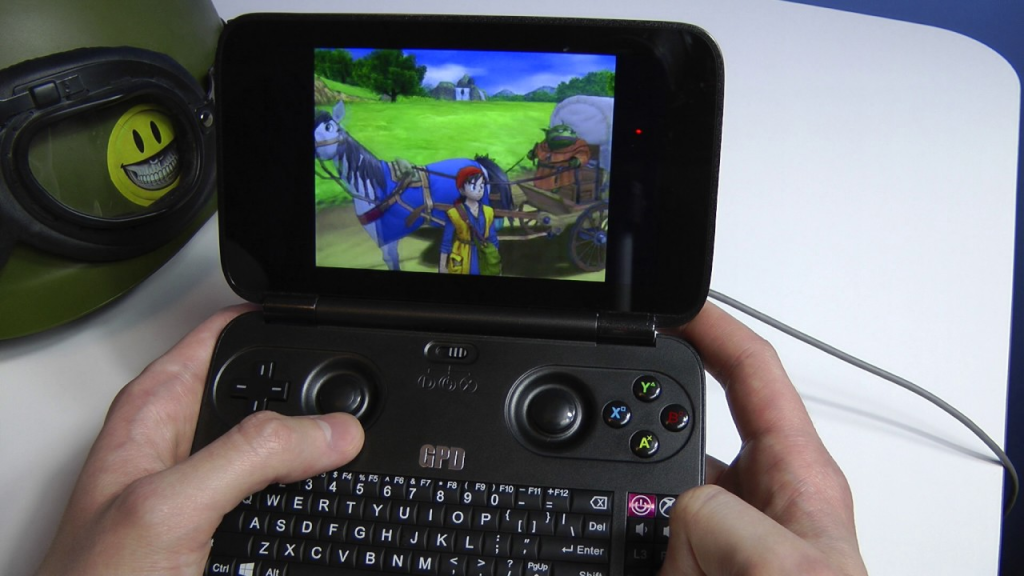
It was a perfect solution to being able to carry a device everywhere that’d let me game via the built-in Xbox Controller, and if need be, I could plug in a keyboard and mouse!
So, a couple of years ago, I bought a GPD-WIN, to try and carry around a pocket console for emulation and on-the-go coding, etc. Now at the time, I didn’t have JT-CXS to offload all the GPU processing to, so I was limited in the extreme to whatever the GPD-WIN itself could handle. Which really, was pretty much nothing beyond PS2 ROMs.
However, the device was capable of running Windows 10, and while that left next to nothing for storage, I didn’t need the storage – I could use the device as a thin-client for access to JT-CXS. It was a perfect solution to being able to carry a device everywhere that’d let me game via the built-in Xbox Controller, and if need be, I could plug in a keyboard and mouse! This meant that whilst I’m out and about and on-the-move, I had full access to my Game Libraries, and could play most modern games (and by a stretch I could use the terrible joystick-mouse mode, to play non-WASD games such as Civilization VI).
The iPad, that old workhorse
My iPad is a pretty special solution – it’s the entry-level iPad Pro 9.7-inch from 2017, and surprisingly, it’s been extremely helpful, despite a lack of 4G. When I get a chance to upgrade, I will be sure to get a device with Cellular capabilities.
The iPad will primarily be used for:
- Coding on-the-go
- Browser/Media Consumption
- Design + Planning
- Forex trading and financial management
The Bujo (Bullet Journal)
Bullet Journalling has changed my life. Seriously, it’s become a day-to-day system that helps me manage and self-reflect on a level that no digital system has ever been able to achieve. It’s a simple (or as complex as you want) system of writing a daily log in a book that helps you compartmentalise and keep track of all the crap that’s flying around in your life. I’ll probably blog a bit more about this later on, but here’s the intro ‘how-to’ video:
I use the Moleskine Soft Squared Notebook (L) to keep my Bujo in order; expensive, but I love the feel of the book in general, and its simple, unassuming, no-nonsense design. In fact, I’ve just made a note to myself to start working on buying more of these notebooks so I don’t run out in the future.
And so we come to the end of Project Cloud Citizen. Sure there are tweaks and fixes needed, but for the overall part I’m able to travel around with a newly organised EDC bag, and perform all the duties and tech work I need, without breaking a sweat, or being chained down to a desk now. It’s not complete freedom, it’s just usingi the power of the cloud to extend that ‘leash’ I have to my work, so that I can move around and enjoy what I need, whever I need.
This is mostly a personal note on how to setup a workflow with my Web Development (PHP/MySQL & Docker based) projects. Usually, with pretty much any project, the workflow goes as follows:

Figure: My workflow prior to this article
To host my own repositories of codes per project, I actually use GOGS which is short for Go Git Service – it’s written of course, in google Go, and is essentially a self-hosted Github clone. It’s by one of the devs from the Gitlab team, and it’s far more lightweight and easier to use in a personal scope, than Gitlab (Gitlab is still wonderful, but I think it’s better suited to teams of 2 or more people).
Git hooks are amazing!
The above workflow diagram though, is missing one really critical stage – getting the code to production – a.k.a. deployment. Typically on any deployment, after the above workflow, I’d either remote in, or set up a cron job to pull from master. There’s some problems with this method of doing things:
- I’m doing a git pull which is based on merges, and can really cause some shit if there’s a conflict (there shouldn’t be, but just in case)
- I’m remoting into the server each time I have to pull for some commits, this takes up time. I’m a serial commit/push-as-save person
- It’s completely against the ethos of a developer. If I’m doing something repeatedly, I should find a way to automate it!
So, enter stage – Git hooks. Git hooks are amazing! They’re actually natively supported by Git (powered by Git) and I only really just started learning about using them. I vaguely recall encountering them earlier in my growth as a dev, but I must’ve shelved it at some point and given up trying to learn hooks (probably around the same time I cracked it at Drone CI, and Jenkins CI/CD).
Anyway, the overall concept of using a Git Hook is that I reach the final stage of the workflow I drew at the start of this article Git push to remote repository – the idea is that the Git repo then registers this push in something called a post-receive hook. It then performs some functions and essentialy plonks a pull of the latest code of my repo, into the production environment.
At first, I started off with something super simple, from my jtiong.com (this website!) repository as an example:
#!/bin/sh
ssh [email protected] 'cd /var/www/jtiong.com && git fetch && git reset --hard origin/master'
Unfortunately, this didn’t seem to work. I kept getting remote: Gogs internal error messages, and figured out it was something to do with my SSH keys not working in the authorized_keys and known_hosts files of the docker container to server shell and vice versa. After a lot of Google-fu and tinkering around, I eventually came up with the following which worked (note, it’s been edited to be a generic solution).
#!/bin/bash
ssh -o StrictHostKeyChecking=no [email protected] -p 22 -i /home/git/.ssh/id_rsa 'cd /project/folder/path && git fetch && git reset --hard origin/master'
It’s not entirely necessary, but I used the -p and -i options to specify both the SSH port and identity file used with the SSH connection (just for greater control, you should be able to remove them, your results may vary). The key section of the above command that I want to highlight is the -o StrictHostKeyChecking=no option that I’ve set. This got rid of any Host Key issues between the docker container and the host server for me. So if you’re encountering issues with your Host Key Verification or similar, this might fix your problems!
With the git command now, I used git fetch && git reset --hard origin/master instead of just doing a git pull. Why? Because git pull uses merge methods and can result in some conflicts with code, and issues that are just messy and a bad experience to untangle. Using git reset, moves the code’s pointer to a different commit without merging anything. It just overwrites it, making it slightly safer for deployment!
But of course… Why do things in just a simple way? This particular hook configuration is great for something like my personal site where I don’t mind if I’m pushing breaking bugs to production (within reason). However, when I’m doing work for clients, I need to be a little bit more careful – and I use a more typical production, staging, development branching method with my Gitflow.
Here’s what I use now:
And wonderfully – this lets me have separate branches, as required and updates the appropriate (sub)domain as needed! The wonder of Git Hooks has now streamlined how I develop projects, and deploy them in a much more pain-free manner! And so I dramatically take another step in my journey and growth as a developer haha 😛