I run this blog off a really old Windows PC acting as a server – it’s been great, and serves my needs for years (at least since pre-COVID!)
Recently a lot of my online services and apps that I run have been dockerised and through the simple use of docker compose, I’ve always enjoyed the simplicity of using some proprietary software that required Windows, as well as just running this site off Docker for Windows.
Until now – I’ve since installed WSL2 and moved this container onto the WSL2 filesystem, and let me tell you – the performance is night and day between the site when it was running through all the translation stuff for Docker Windows, and Docker “natively” in WSL2.
I can’t believe it…!
And now I’m going to start looking at migrating all the rest of my stuff across in an effort to maximise performance.
Continuing on with what is probably the biggest code project I’ve done in recent memory (that’s a low bar given I’d “retired” from the tech industry for a while) – I’ve made a Network Status page that was essentially the contents of jtiong.network, and brought it here into the Labs section of jtiong.com
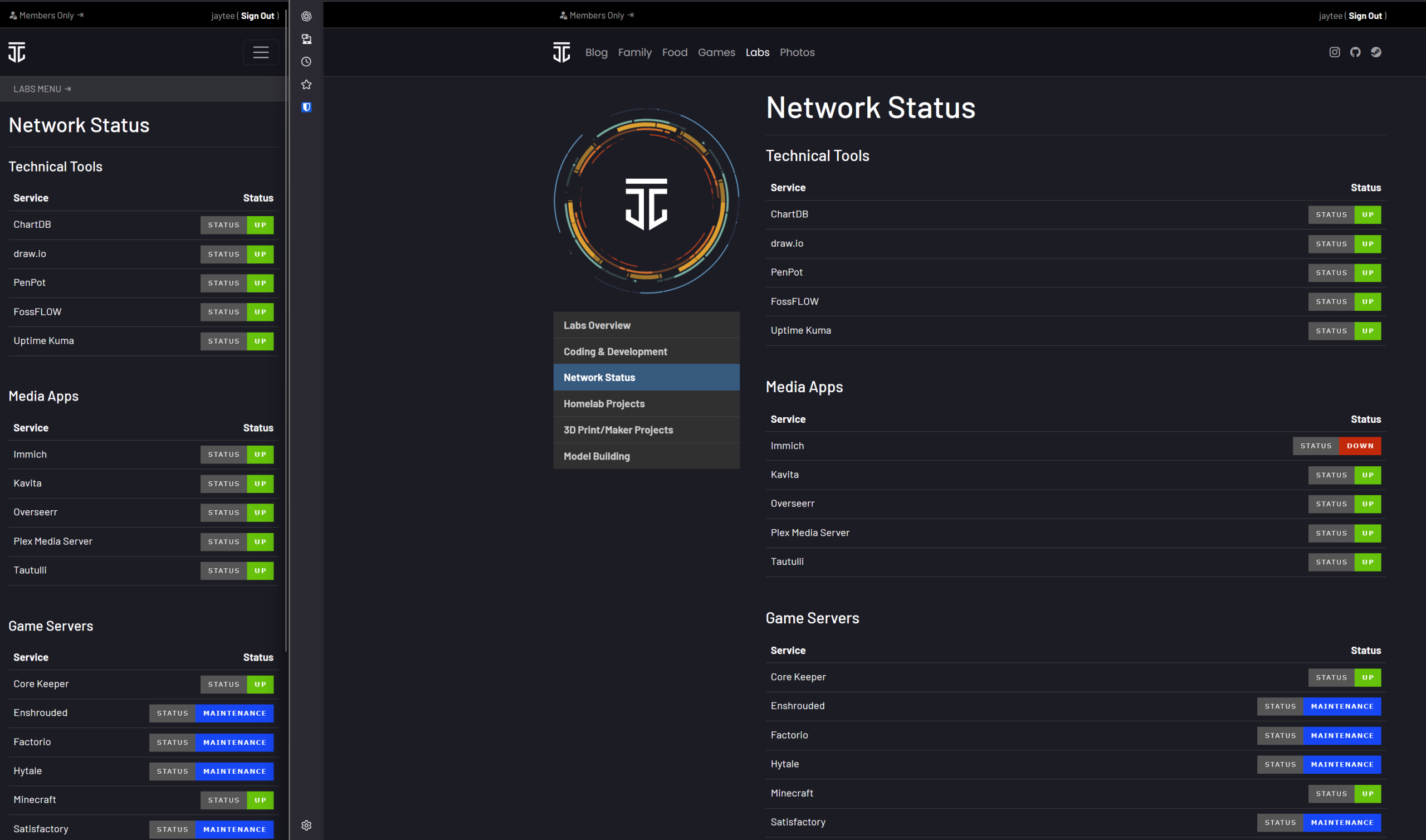
The site pulls Badges (using For the Badge styling) that are generated by an Uptime Kuma deployment I have running off my personal infrastructure. You can check out the deployment here!
One more domain I can disable the auto-renew on 👍
It’s a milestone in the “project” of building up jtiong.com because jtiong.network is the first complete domain name that I can decommission.
The new update to jtiong.com brings with it not only the Blog – but also an attempt to roll in all the content of my other domains into it. I come across an interesting dilemma – I haven’t really got a plan for the design of the site per se… I have content – yes, that’s easily pulled from the existing Minecraft info website (at the soon to be defunct jtiong.games domain), but no actual design idea.
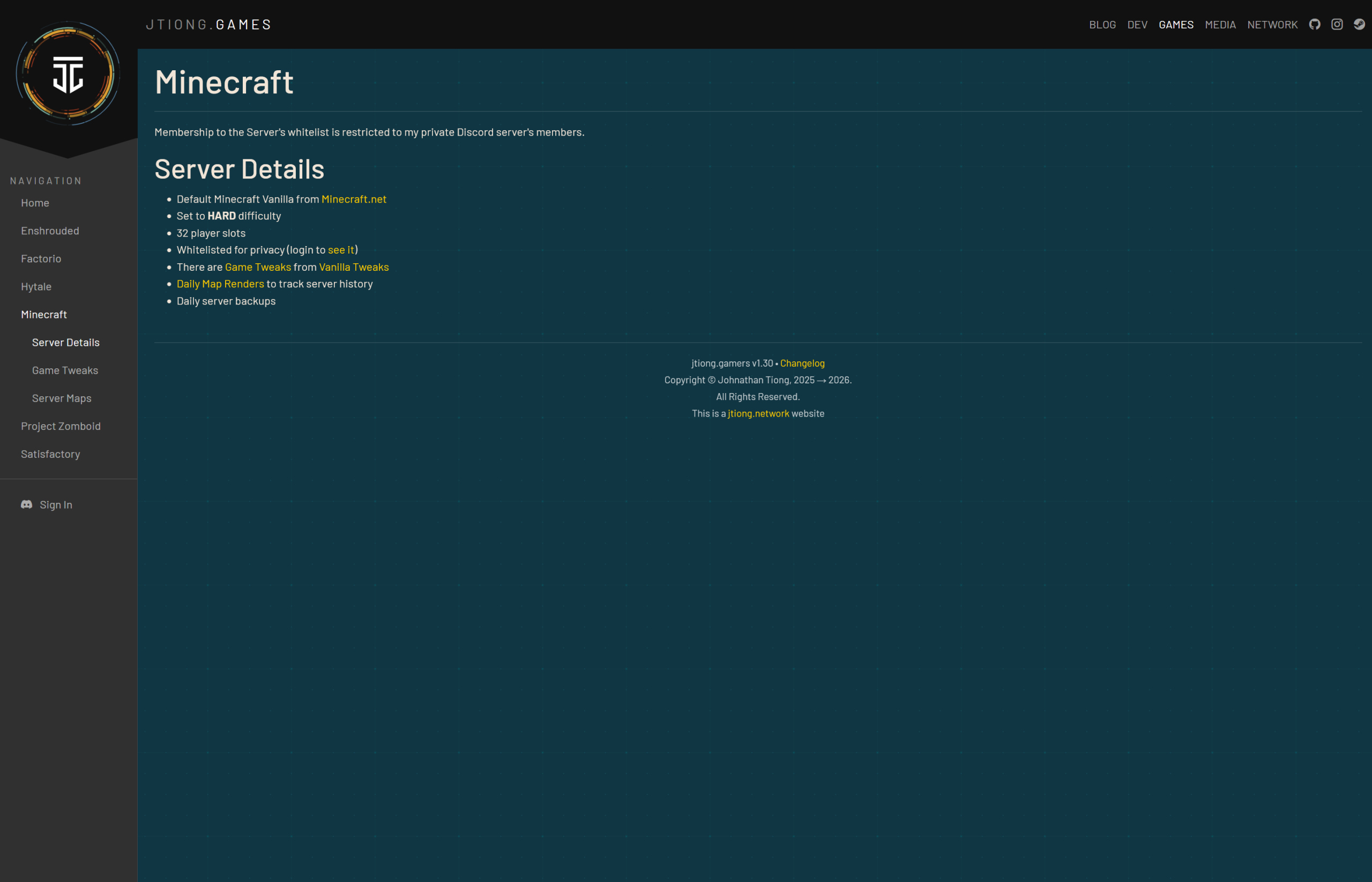
The Old Design
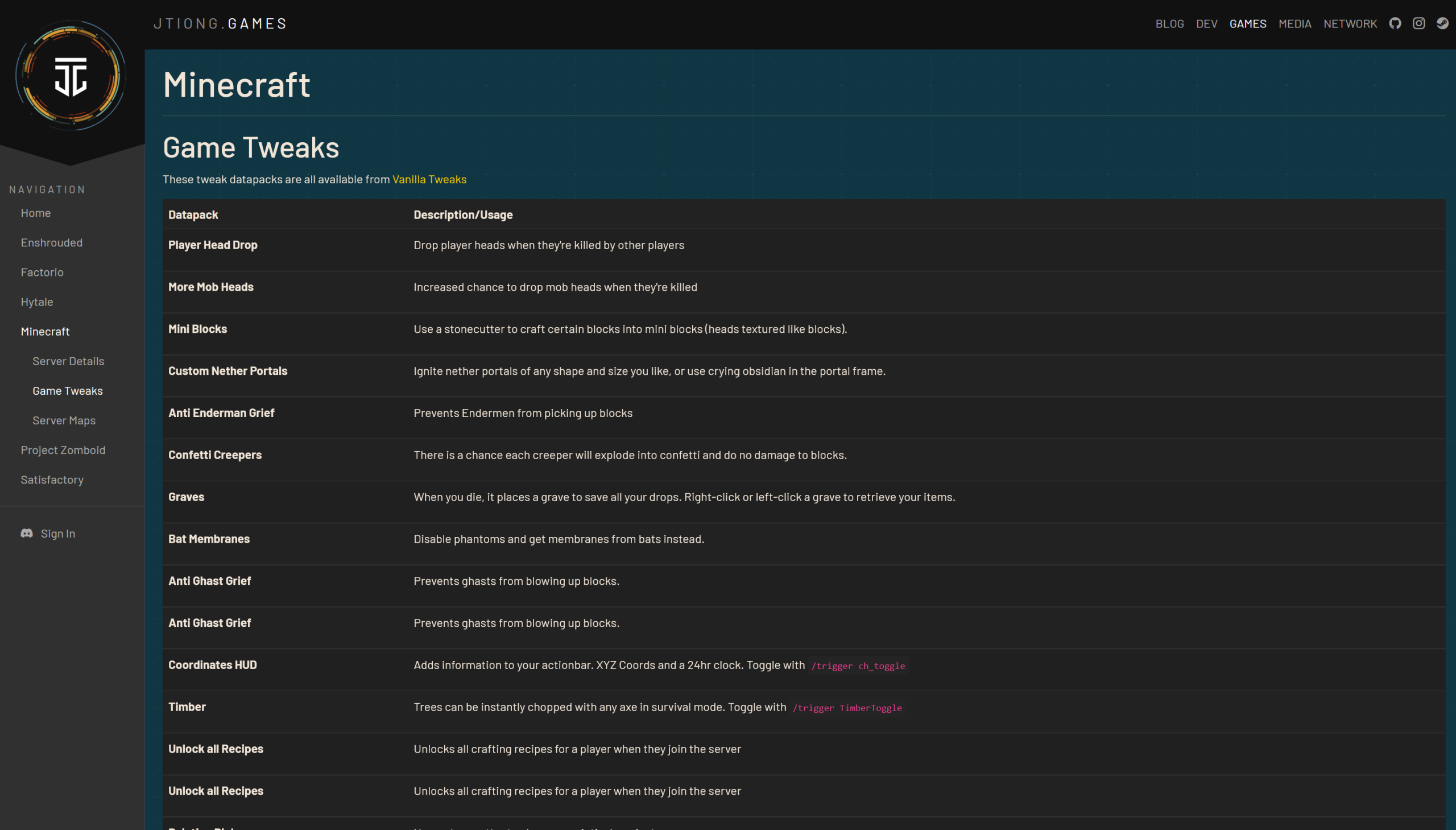
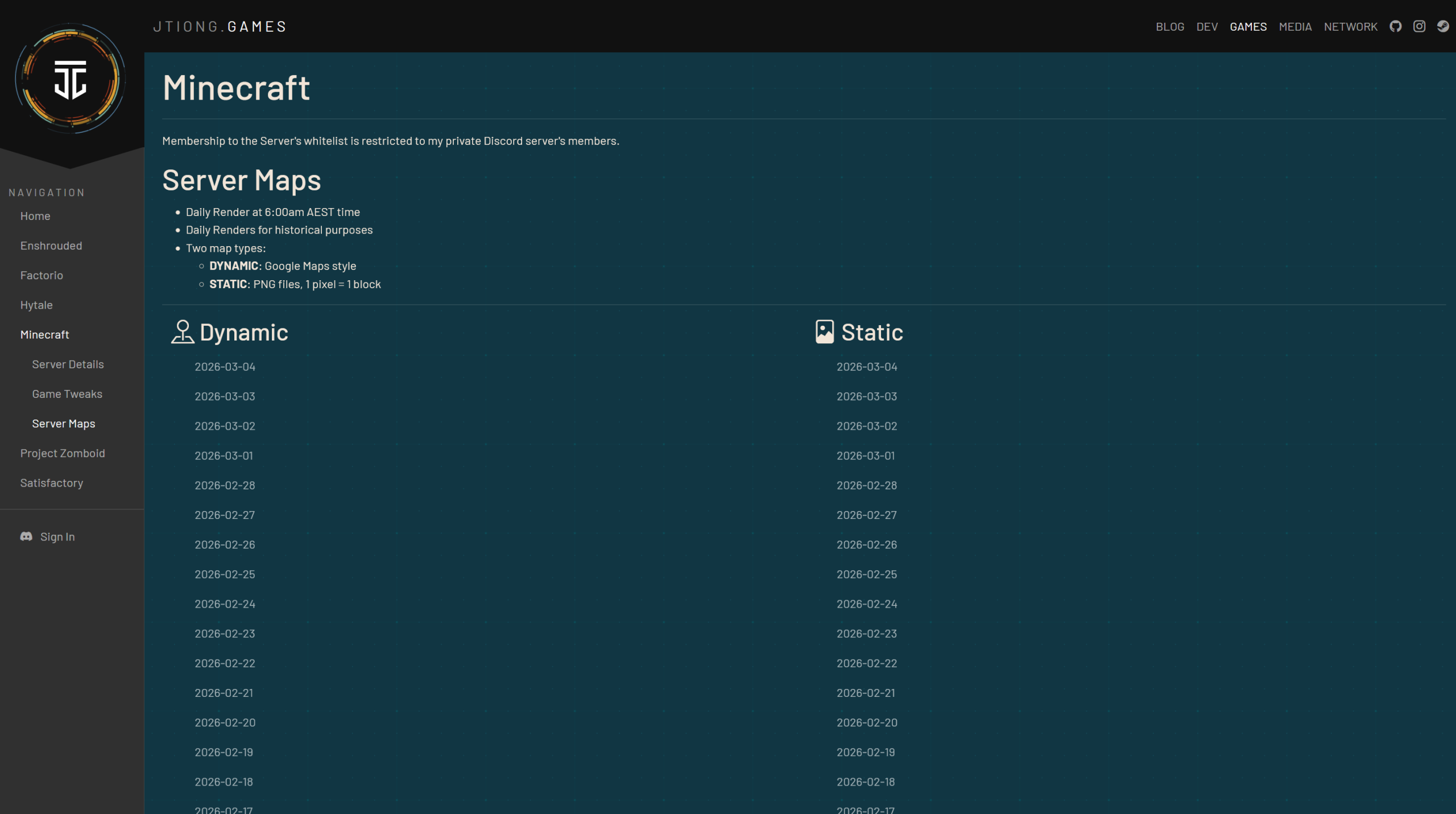
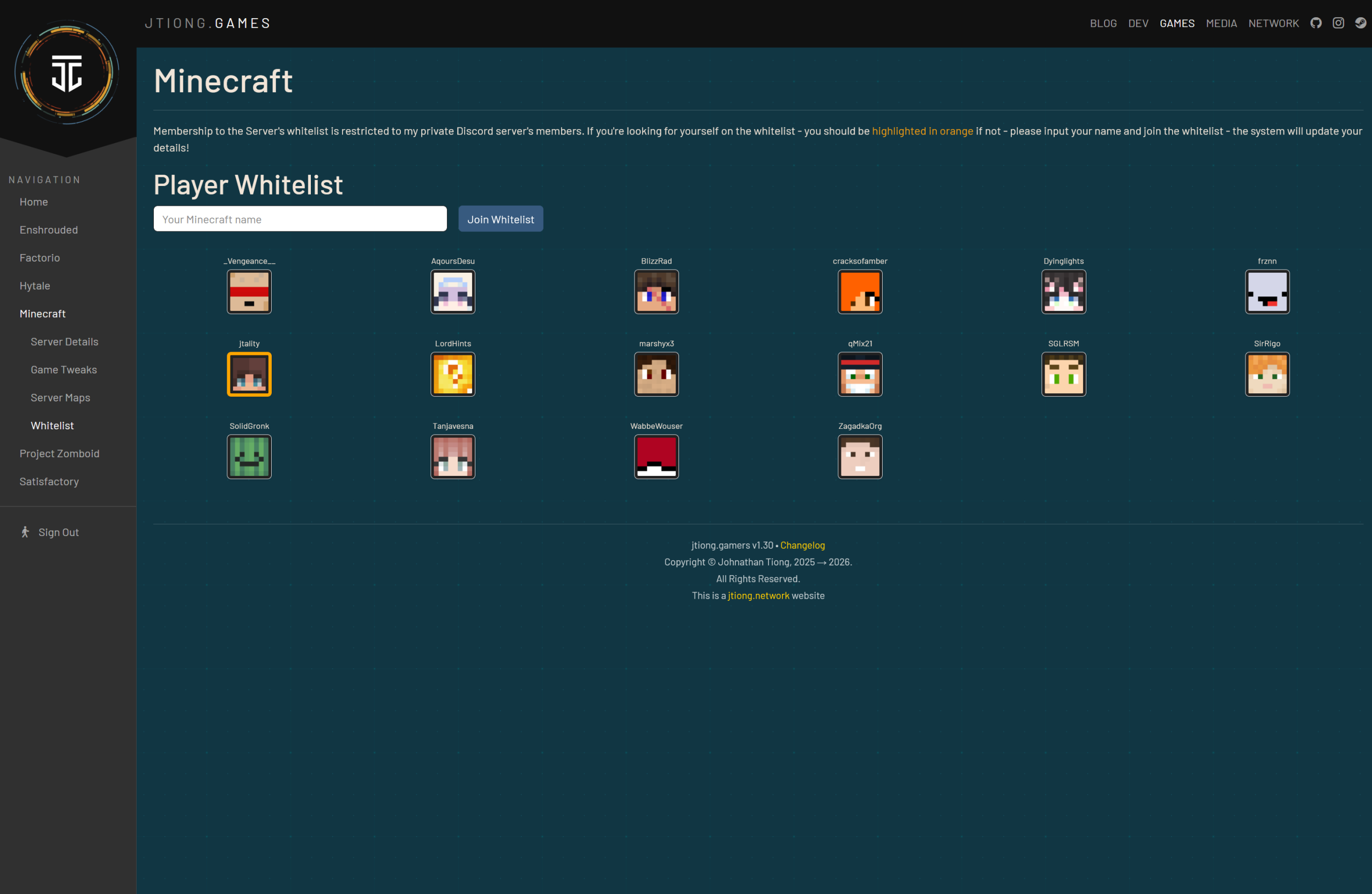
Below is a set of screenshots of the jtiong.games Minecraft section:
Deciding Requirements…
The “original” design had a number of features I’d really like to pull over to this current site – like the Whitelist section – I was particularly proud of that section having fought with bootstrap CSS to try and get a nice layout happening. The Whitelist also allowed authenticated users to dynamically add themselves to the Whitelist without any manual intervention on my part. It was convenient, and looked cool!
Here’s the thing though, all that information, all those features – they’re split up across 4 or 5 separate pages! And I don’t think I should have an online form where my friends can arbitrarily add people to the server’s Whitelist – just for posterity’s sake. It is meant to be our FOREVER SERVER after all. People who join the server should be vetted and added when a human moderator is able to.
The Requirements
Thanks to my ranting above — I have an idea for some design requirements now:
- Condense the server information into less pages
- Find a way to integrate the Server Map nicely into the site design
- Display the whitelist in a reasonable way (a list maybe?)
- Integrate a way to see posts I make about Minecraft (and the server) into the page(s)
- Make this section easily viewable on mobile (this is a hard requirement across the whole site)
The New Design
Behold! The new design!
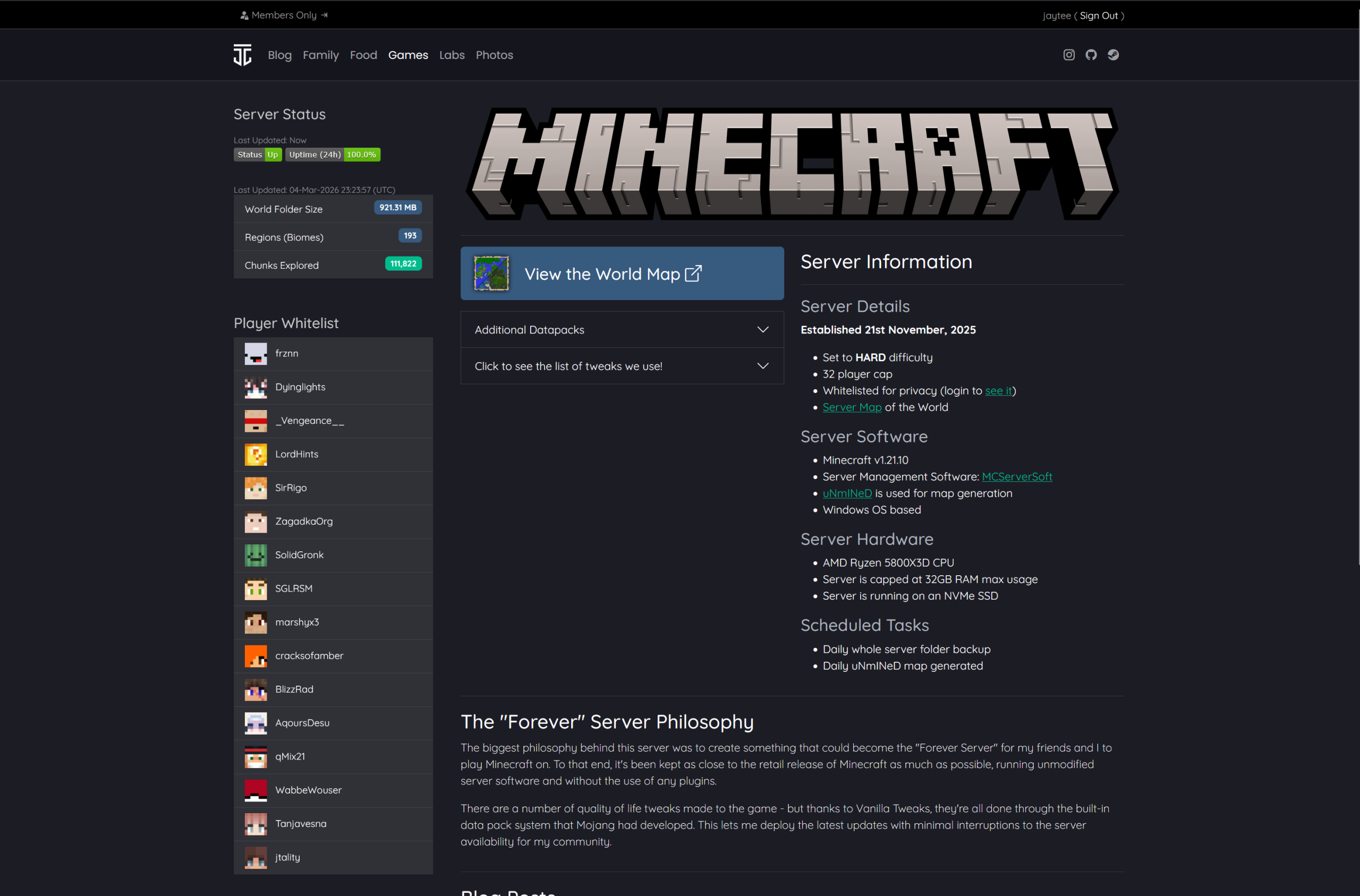
(opens in new window)
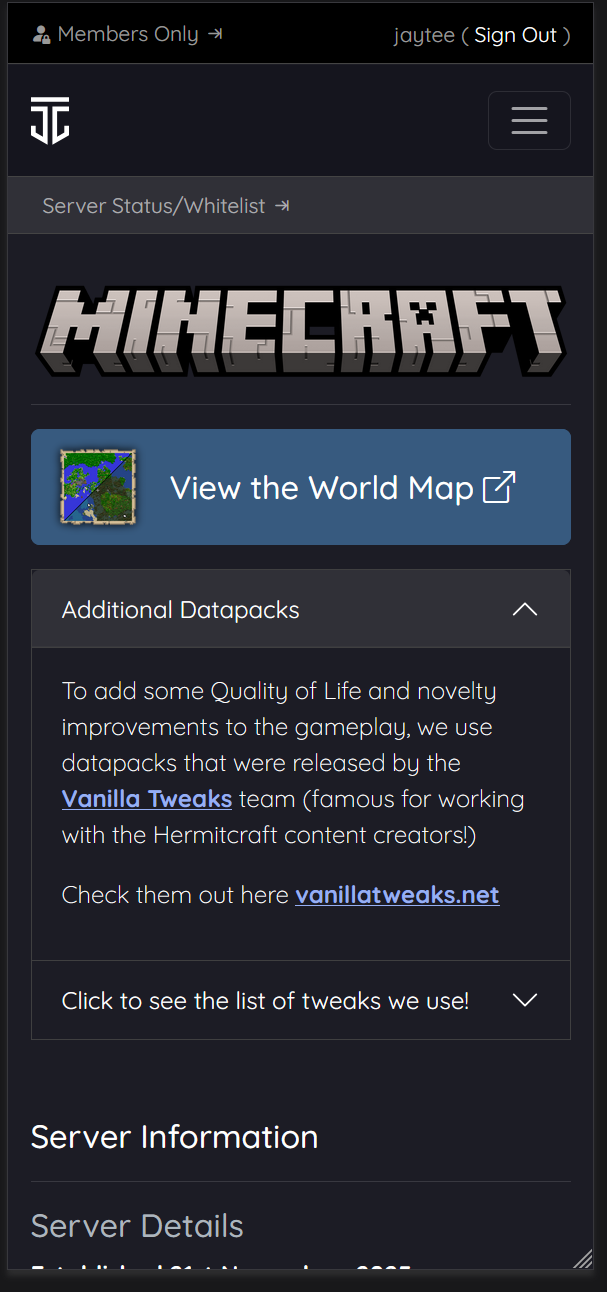
Almost everything about the server, fits on the one page! With the exception of the World Map – a visitor can view everything they need about the server, although the Player Whitelist is hidden for unauthenticated visitors.
There’s a few adjacent tasks for jtiong.com’s upgrade to proceed in tandem with the rest of this section’s update, but for the time being, this’ll serve all my requirements!
Welp, seems to be an almost yearly thing – although to be honest there’s no plan to how I do things with my jtiong.* sites — it’s all very whimsical 😅
I’ve started working on a new site theme called “Chubby Snorlax‘ – a sort of sequel to “Minty Charmander” (the theme you see now on this site – as written about here).
This was mostly brought about by wanting to freshen things up when I started updating my jtiong.games website. The site itself is going to be used as a personal game server documentation and humble bragging website for all the stuff I run and mod for family and friends.
Behold!
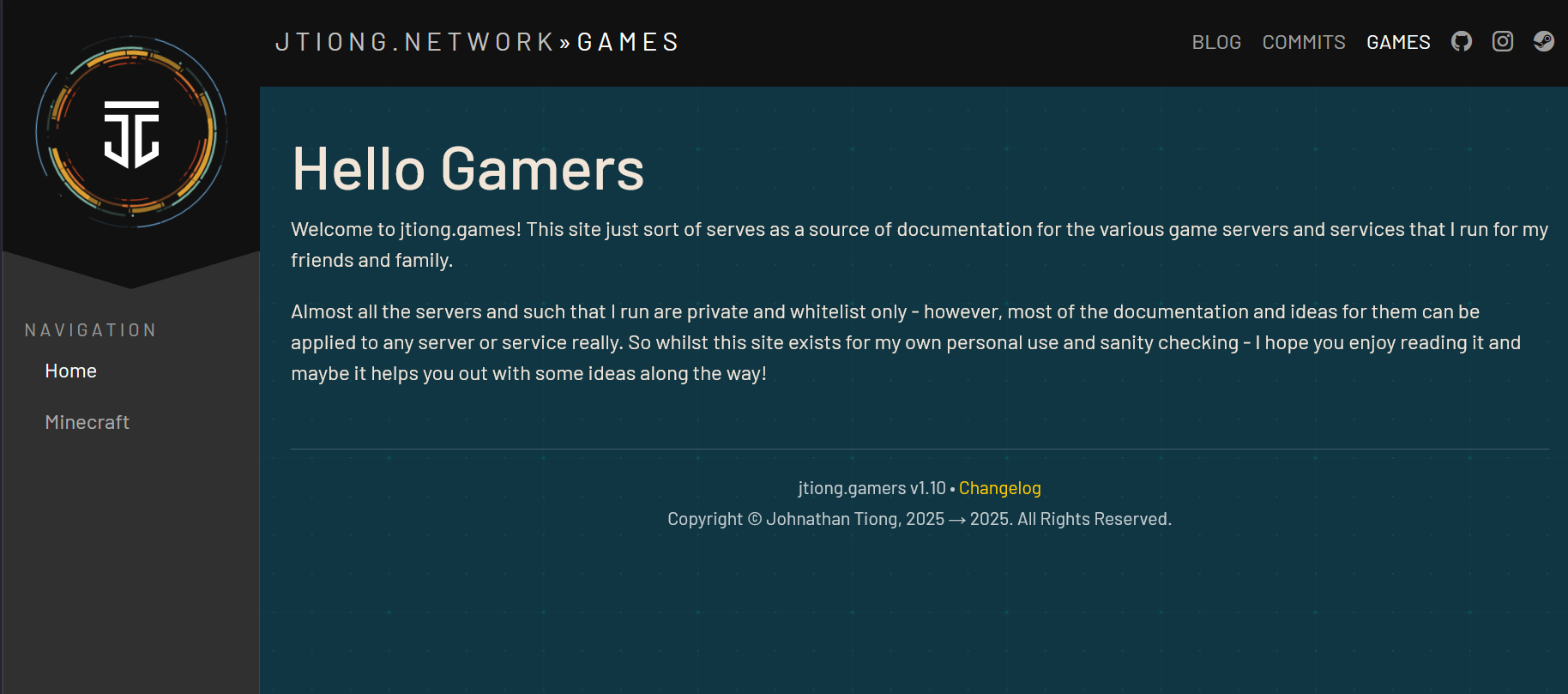
The site design pulls back more towards engineering documentation style layouts with a little bit of a flair taken from my jtiong.network site. It’s part of an intended update to all my domain names that I’ll write about (I suppose…) in the future.
The design itself is mostly complete – with the final steps being to make sure that any content I put into the theme is represented fittingly with the design (ie. there’s no weird layout issues or formatting issues). After that, I’m not going to immediately update this blog’s theme; but rather I’ll deploy Chubby Snorlax into the jtiong.dev site first, alongside some behind the scenes updates to that site!
Minty Charmander was a fairly easy update – I was able to create a WordPress compatible theme, then roll out a similar style that matched to jtiong.dev – however, this time the workload has increased to three websites (.blog, .dev, .games) at least. So complexity of the project does grow – each site has its own unique functionality, .blog being a WordPress powered site, .dev being a stylized website that interacts with GitHub, and .games being almost entirely handwritten HTML/PHP content. I’m trying to unify their look & feel, as well as bring them all under an umbrella sort of branding “jtiong.network” like a media network or some such. It’s just a fancy hobby name for my rapidly costlier hobby.
(more…)I’d been craving the old community of Minecrafters we had during the COVID lockdowns a few years back; so I’ve decided to re-launch the Minecraft server for my community. It’s been a long long time and I hope everyone joins the server or at least leaves their mark on it in whatever little way!
I want to keep the server as low maintenance as possible by trying to stick to just Mojang official releases of Minecraft’s Server – no PaperMC or Spigot or any other modded servers. This will also reduce the temptation to make Minecraft into some weird modded dystopia where people have to install a half dozen java packages just to join.
It’s been a while since the last update!
I think it’s no surprise to a lot of people that the cost of living is making things like streaming services, media and general online services a little bit more unaffordable in this day and age. We’re all trapped by them though, and require them to some degree.
To that end, I’ve spent the last little while during my down-time running several services and resources for my family and friends. This is all well and good – everything works fine, and there’s minimal issues really. But in the spirit of homelabbing, would it really be a hobby if I didn’t set up some hyper-intricate domain name scheme that would let my family and friends access said services?
What’s changed since 2024?
Newly Deployed Apps & Services
- Tailscale (Headscale) implemented across my devices
- Uptime Kuma for service status and monitoring
- Paperless-NGX for document management both personal and for business
- Kavita for e-books, comics, manga and more!
- DumbAssets for tracking assets of stuff I own
- ChartDB for database design for some personal projects
- Draw.io for diagram and chart drawing
- RomM for retro game ROM backups management
App & Service Changes
- Caddy replaced Nginx Proxy Manager for locally hosted stuff
Infrastructure Changes
- DOMAIN NAMES – I’ve now updated a whole bunch of domain names
- jtiong.com
- jtiong.com
- jtiong.dev
- jtiong.media
- jtiong.network
- jtiong.games
As you can see there’s a whole network of domains now 😜
Each domain has it’s own set of subdomains which of course, expose various services and software for my family and friends to use 🙂
The branding & theme was named by my partner, Annie 🙂
I actually started this specific post as an addendum to my previous post; but realised that there’s enough in here that I want to talk about on both a personal and technical level that it should warrant its own entry.
Why “Minty Charmander”?
Well, Annie thought the colour scheme reminded her of a Charmander, and combined with the light green highlights – “Mint” 🙂
The colour scheme uses a number of my favourite colours in a limited palette – purposefully, as I recall from some old design course literally a couple decades ago now, that in UX a small number of colours that can be interchanged and not conflict with each other, was better than a large dynamic swatch of colour for getting information across.
I am using the ol’ trusty Bootstrap framework for the UI and layout of everything. I don’t have any real special rationale for using Bootstrap – it’s just what I’m most familiar with; I think as I ease myself back into coding from a long break, it’s nice to just crawl before I can walk, before I can run 😅
Planetscale?!
Laziness and the idea that I needed a stable service to run a DB for my little projects convinced me to continue with Planetscale – yes, it costs $47 USD a month, but it’s more stable, and more nicely managed than I could ever do with a random self hosted solution.
I decided to continue paying it for the time being, pending further efforts to make things self hosted down the track, but for the time being – it’s nice to have a DB that is:
- highly available;
- able to spawn itself into a main, and dev branch
I could probably implement this without a paid system – but I feel like the DB service works as a backend for multiple systems (as it would if I were to self-host) – and that’s a single point of failure that I couldn’t upkeep like a service that is designed to stay online professionally.
End of the day, it’s actually pretty easy to justify the cost of this database for myself; and I’ve spent more on dumber stuff in the past. At least this is a sensible subscription 😜
So, what’s next?
Well, the branding is mostly done, but there’s a few missing things like Search results statistics, and category browsing callouts, to name a couple of things. I’ll be taking my time fixing everything, and eventually hope to start using this blog a lot more to diary more things that I get up to on a more personal level, as opposed to just dumping whatever pseudo-technical stuff comes across my mind!
As my Homelab and private discord community has grown, I’ve needed to roll out more than just websites, but also web applications, and differently ported things that need to be proxied back to a domain or subdomain address. The old setup was horrible… so I set about fixing it once and for all in November and December, 2022.
The Problem…
I’m stuck with something that looks like this:
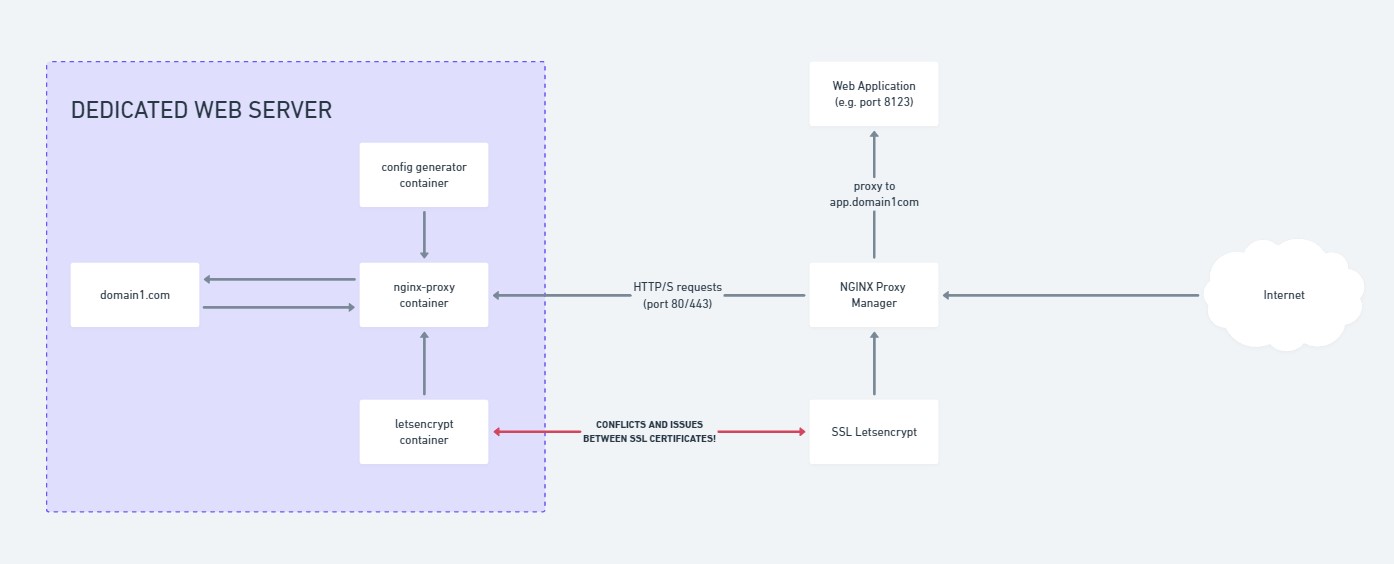
This essentially means for each website I deploy, I’d need to essentially double proxy myself; and it was honestly a little bit confusing to work with SSL certificates.
How did it come to this?
One of the legacies of my time at Hostopia was building a Docker based local test environment that was portable and rapidly deployable; using an nginx-proxy container, with apache containers for the websites behind the proxy container.
The beauty of this setup was that I could quickly roll out a website as needed anywhere with the magic of Docker. And for my initial purposes, that was fine.
The problem arises when I try to roll out secondary services, like GitLab, Minecraft Maps, Game Server UIs etc. which are all related to various non standard HTTP(S) ports, but need to be reverse proxied to subdomains, etc. (an example being https://map.northrealm.info — which is a Minecraft Server Map that runs on port 8123). I’d have to have ALL THOSE RESOURCES on a single server. Or each additional server could be a double proxy to account for extra servers. This isn’t very efficient.
And secondly the bigger problem – was organising and renewing SSL certificates, it was a hassle tracking and renewing or making new certificates as needed as it was being double routed first through Nginx Proxy Manager, then secondarily on the local docker container host the app/site was located on!
So as for why it was configured like this? A mix of speed, and laziness in doing things “The right way™”. What was supposed to be quick and easy eventually just became a hassle that wasn’t working properly.
The Solution
My services infrastructure now looks like this:
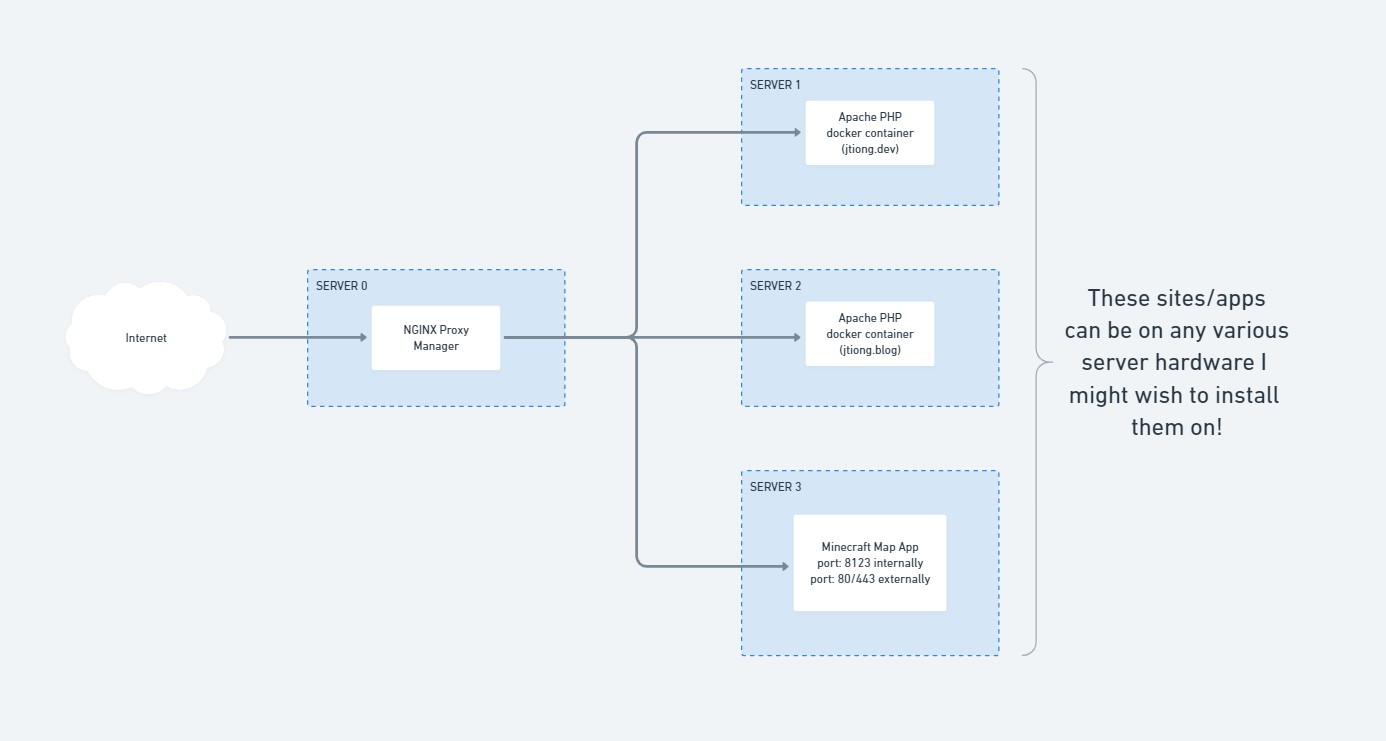
It might not seem like much – but it’s now server hardware agnostic, and I don’t need to install a separate cluster of containers to manage locally any sites or apps per server.
NginxProxyManager (NPM) now acts as that cluster of infrastructure containers that span the full home network as opposed to being tied down to one host. Custom nginx configurations are created “per host” in the app, and they handle how pages and content are served for sites, or direct traffic specifically for a given application.
Much better I say! 😀
*Facepalm*
There are plenty of ways to skin a cat; and this is definitely better than the original setup! It’s also not a perfect solution, but this blog post wasn’t written in an attempt to find absolute perfection (I believe it’s something to strive for, you can’t achieve it unless you’re a divine power) – and it’s more to document the journey of my ignominy and learnings as I go about running a homelab that actually gets some use 🙂
So, my friends are big proponents of using https://ossrs.io (Open Source Simple Realtime Server) – which (in the way I’m intending to use it) will ingest RTMP streams from various OBS clients (my friends) and save their footage in a folder, which I can then use to edit various highlight reels from our gaming nights together.
The benefits are:
- Storage – it’s saved on my end, so friends don’t need to worry about storage
- Speed – the footage is broadcast directly to me and saved, they don’t need to send me files after the fact
- Simplicity – they don’t need to worry about anything – most of them have OBS configured for streaming already
It works something like:
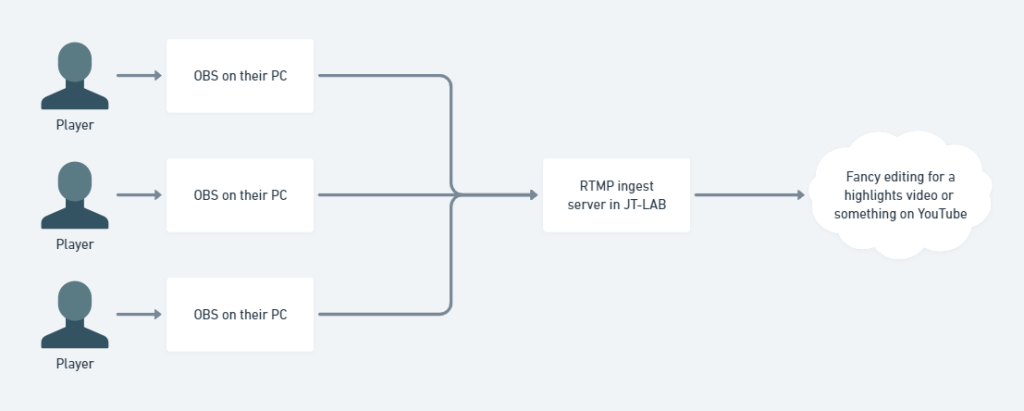
Pretty straightforward, pretty easy.
By default I’ve configured everything to save in 1800-second long .flv files (30 minutes) – this could mkv or otherwise, but the quality is fine enough for my non-cinema-quality productions.
It’s a convenient little service I’ve set up now for any future gaming nights as well. It’ll be great to get footage as needed and stored.
Now to find some sort of Media Asset Management system…
I’ve got several servers which I work on, and quite often, this involves running regular cron’d tasks that perform various backups and configuration updates for me at odd schedules (as an example, my Rust server wipes fortnightly, and needs a config update to change the server name to reflect the last date wiped).
To do things like this, I’ve usually just written a script in PHP and run that at a given interval (daily or otherwise). There’s no real reason I chose PHP to write these scripts aside from familiarity with the language, and no doubt the rest could be easily achieved be it through Python, Shell Script or any other language out there.
For now though, PHP serves my needs just fine.
The problem is, I don’t actually keep these scripts backed up anywhere, or organised in any sort of manner!
The age of GitLab
Over the last couple days, I’ve implemented GitLab into my homelab stack (JT-LAB), and will be using it to store most of my code as a “source of truth” and subsequently sync things to GitHub afterwards (depending on the projects of course).
To the Game Servers, Four Branches…
Based off the various server types; specific branches would be used. For now, these would be:
- Rust
- Minecraft
- Factorio
- Satisfactory
Each game would be represented in its own branch, and based off that branch, would deploy a specific set of commands as needed. For the most part, only Minecraft retains itself in persistence, and the rest rely either on a voted wipe, or scheduled wipe paradigm.
To the File Systems, Five Branches…
Then we have servers with actual file resources and assets that I’d like to keep; things like Photos, Design Assets, old code references, etc. These would be:
- Media
- Design
- Research
- Education
- Maintenance
And nine, nine branches were gifted to the Websites
I also run a number of websites for friends and family on a pro-sumer level. I won’t really list these projects, but they do total up to 9! So it all kind of fits the whole LOTR theme I was going for with these titles.
One Repo to Rule them all…
The decision to build everything into one repository to manage all the core backup operations means I have less to track; for a personal system, I think this is fine. Monolithic design probably isn’t the way to go for a much larger operation than mine though!
Announcing…
Cronjobs
So this is the hypothesized project I’d like to build over the next few days; in combination primarily with jtiong.dev which will help track the commits and such that I do. Writing these projects up here as project whitepapers on a more formal basis might help with some resume stuff going forward for my future career 🙂