So, I’ve got a “main” website – https://jtiong.com (which is currently Error 500’ing)
Which runs on a fairly old version of Laravel. Since it’s inception; the site was used mainly as a central one-stop shop for everything about my presence on the internet. Oh how times have changed.
Nowadays, it makes more sense with a number of domains I own, to split up the content and footprint of my stuff on the internet from a singular jtiong.com website, into a number of different sites based upon what people trying to find me for, or to categorise the activities I do.
Domains I have include:
- jtiong.com (this site) – my personal blog, which is strictly just personal, non-professional stuff
- jtiong.dev – where I hope to eventually host some sort of software development info about myself
- jtiong.network – currently a serverless site experiment, however I hope to change this
- jtiong.com – a central landing page from which people click through to the other domains
So what does this mean?
Two new projects! The .com and .dev domains which will be important as part of my “online resume” so, I really should get them done sooner rather than later…!
However, this also means I need to really look into how I implement these!
Laravel will be driving:
- jtiong.com – a landing page/gateway system
- jtiong.network – services and resources for friends & family
I’m looking at using the Socialite package for Laravel to integrate login via Discord, this’ll mean that certain links and features will only be visible based off friends & family that have certain roles in my Discord server; or at least, that’s been the original intent.
My Own Framework (which I call Spark) – will be driving:
- jtiong.dev – dev blogs, resources
This dev site will be more of a technical dump to keep me consistently working on my coding skills. The setup of this site is a traditional website that’ll ride on the tails of my intended GitLab installation. The fallback of course, is to just use the GitHub API, but I’ll only start looking at that later.
The site should just start listing out my commits and on what projects they’re made on to try and keep things accountable and interesting. It’s just a cool little showcase project.
More features might be added later relevant to doing development work in the future!
My sister and her partner have been on a weekend getaway and I’ve been at home working and looking after Panko.
During such a time I’ve been pretty busy and Panko has been stuck amusing himself and moping outside my home office.
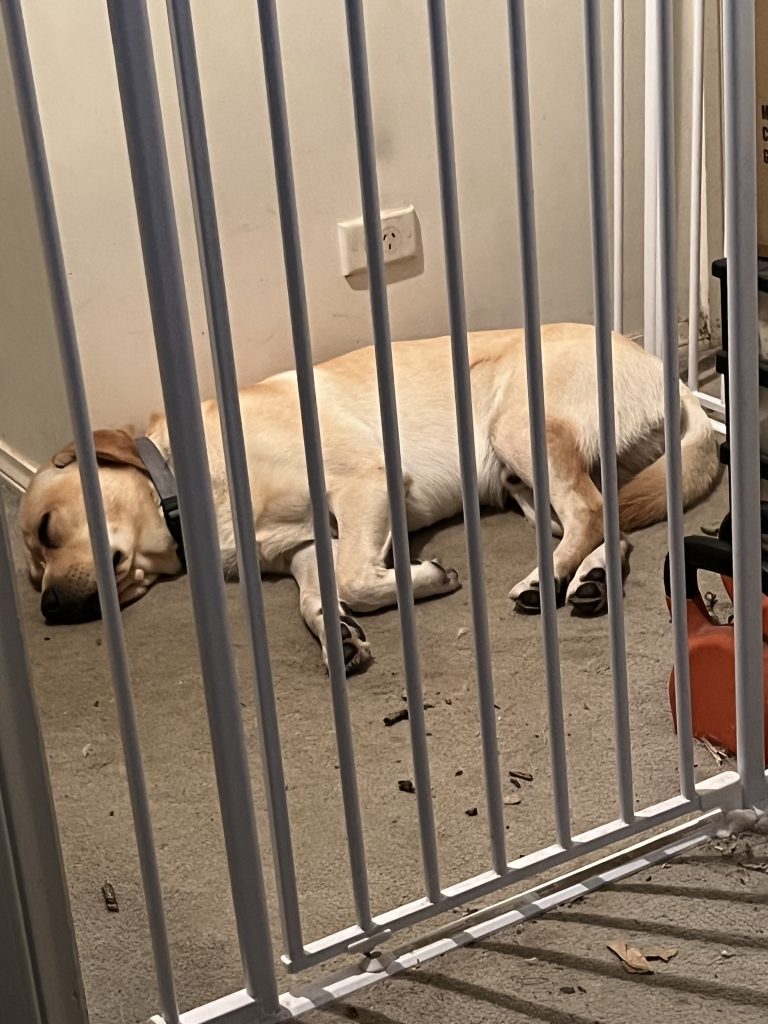
The guilt has finally hit me and I’m going to clean up my office so that Panko can hang out with me and chill in my home office. This means I’ll need to clean up all the computer bits, cable manage everything and make sure the room is doggo safe for him to chill in with me. I won’t proof it tot the point that he has free entry but if I’m in the office (I usually am) he can come in and chill too so he doesn’t let his anxiety get the better of him.
The things I do for this dog.
I’m moving all the blog posts I can from my old custom written blog, to this site. So weird posts might start appearing going backwards in time haha 😛
It’ll be nice to have everything in the one site, though.
Update: After 5 hours, it’s finally all done D:
Mum passed away at 1:17am this morning.
I think, it’s quite safe to say that 2020, has been an insane year.
I didn’t do my usual post at the end of 2019; and I didn’t do much for the start of this year either with my blog. There’s a lot of reasons for it; but on both a personal level, and indeed a global level – I think 2020 is a year that my generation will remember for quite a while.
It’s a year in which, the global markets stopped, then through sheer force of will, continued on. The age of the internet and remote services & tools were forced into a level of maturity that up until now, were only something the novel few could dip their toes such waters. Indeed, my own blog post (this post you’re reading now) is all about figuring out being able to work from anywhere, at any time.
2020 brought with it, COVID-19; which brought with it – significant health risks, and significant situations to my life that honestly, I never thought I’d see.
2020 was actually going to be a rough year for me anyway, as I moved towards focusing on caring for my elderly mother. I’d moved back home, and have been deciding what to start discarding in an almost Marie Kondo-esque fugue state. My home has always been filled to the brim with old knick knacks and gadgets, not to the excess you see on Marie Kondo’s show, but still – quite impressively full of old tech, clothes, and furniture.
There’s a lot to keep track of, and I’m in the process of decluttering my life. To do this, I’ve turned to a really interesting application that my friend and colleague, Matt, has pointed me to — Notion (https://notion.so). It’s kind of an all-in-one workspace style data collection application, kind of like Evernote.
It works across iOS, PC, Linux – it’s a web based application that’s very responsive. It provides a great way to take notes and keep organised, especially in the current hellscape of things in life right now.
The Analog Method for the Digital Age…
This year, started on a Monday, and coincidentally, I started a new experiment to stay organised and keep track of my day-to-day happenings. It’s called a Bullet Journal, and it’s a method of keeping a concise, goal/task-driven journal of daily happenings. It’s very free-form in nature, meaning that you don’t need a dedicated diary format to adhere to, or some specially printed book; any old exercise book can fit your needs!
My goals and desired outcomes were simple – I wanted a way to record my day to day events, whilst not losing focus of tasks and things that needed to be done, be it professionally, or personally. I also wanted to be able to do this, no matter where I am, as long as I had sufficient visibility, the journal, and a pen. I didn’t want to be beholden to battery power, or other nasty limitations.
And as a plus, I really enjoy the tactile feeling of just, writing something. For any seriously longer-form journal entries, there is of course, this very blog that you’re reading.
Before I go into my rant about Bullet Journals, and how I do them, and such – here’s the original site that I learnt about it from: https://bulletjournal.com — It’s kind of turned into some sort of online store/sales point – but the concepts are still visible and solid. There’s also about a hundred thousand people who’ve made videos about Bullet Journaling on YouTube and various other social media.
A rapid way of Journaling
The cornerstone of being able to use a bullet journal is based on a concept called Rapid Logging. It’s essentially a way to capture information, and notes as bulleted lists (with a small range of bullet types/symbols). It kind of looks like this (sorry about the huge gaps, these source images come with quite a bit of padding, and really, I thought it looked quite good!):
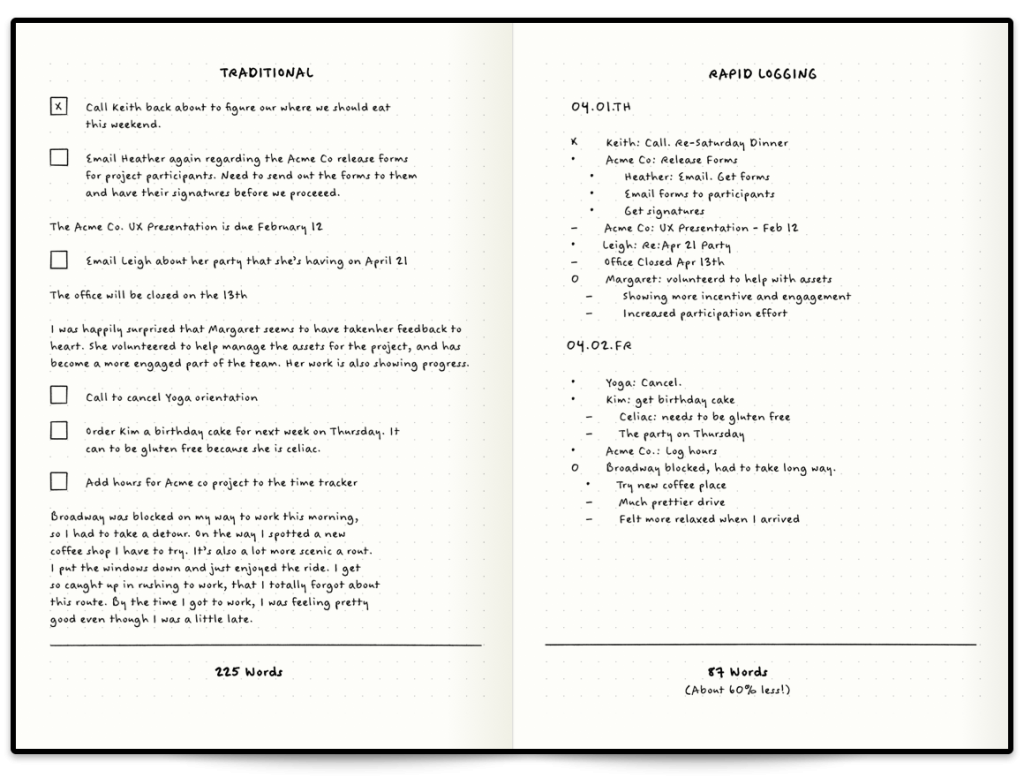
On the left, you see how someone might have a journal entry that’s somewhat longer form, but quite typical of a diary. On the right – you have something a little more ‘lean’. This is rapid blogging. You’ll notice that there’s different symbols for everything; and every bullet journal has their own symbols and guide (I’ll go through mine later) – but for now, the default ones you see in the tutorial image above are split into several types.
Has bullet journalling helped?
Yes. Emphatically, and simply, yes. It’s a focused, habitual and easy way to keep track of things, remind yourself of your goals and ideas, and really take a breather in your busy day.
My Personal BuJo Experience
Since this is my first bujo, and as reach the end of 2018 (and coincidentally, near the end of the book I use for it) – I thought I’d do a bit of a retrospective on the way I’ve used it, and things I’ve learnt.
My first BuJo involved a fair number of mistakes; initially so bad that I ripped out the first 20 or so pages of the book! (yikes!) But after some planning, and with (not quite) enough forethought, I managed to eke out a usable solution. I tried a variety of different symbols, and worked on how detailed I should make my daily log entries (everything from weather, to BSL and daily spends) and by the final quarter of 2018, I finally came up with a simple box and circle bullet point system, with simple daily labelling to help.
And in actual fact – by happy coincidence, I realise I can even type the method I use out:
[ ] = task
[x] = task done
[>] = rescheduled task
[-] = cancelled task

( ) = event/appointment
(x) = event done
(>) = rescheduled event
(-) = cancelled event

- thought/note
! important thought/note/reminder
? question/investigation
This absolutely doesn’t mean I’m going to use a typed version of my bullet journal however; the key point of the bujo is that it’s a physical, tactile experience that gets the brain some exercise! Being freeform also allows me to quickly customise pages or scribble out extra notes and so forth. However this DOES give me some ideas on how to do something of a bujo for devs 😉
Anyway, moving on – as we go into 2019 – the new BuJo I’ve worked on setting up today is going to include a couple of features I’ve seen around that I’d like to try out – such as a year in pixels, based on the mood of the day, I can colour in a square in a grid, with a corresponding colour to mood – and at the end of the year I should have a fairly pragmatic overview of just how well things went that year.
So, over the next couple of weeks, I’m going to be travelling overseas to Taiwan. It’s a vacation, my first in nearly a decade; and since my last vacation, a lot of technology has changed that perhaps makes this journey a little more comforting to a reclusive geek like myself. The airline I’m flying with, provides a USB socket in its international economy seats, with 5V DC and 500mA charge, meaning I can power a device somewhat comfortably to enjoy a variety of media, and entertainment. So without further ado, I’m going to go into something of a diatribe about preparing for the trip to soothe my inner geek.
The constraints
There’s a number of limitations on this vacation, predominantly governed by my travel arrangements (flights, trains, etc.) so listing them out:
- Portability; I’m using a Crumpler 8L backpack; the “Low Level Aviator”
- Power; My gadgets need to last a while, and/or be charged with in-transit USB (5V DC, 500mA – about the same as a USB 1.1 port)
- Media; and Storage for photos and videos from my phone
- Entertainment; I don’t expect to have much time, but in the down time and flights I might watch a show, or three…
- Gaming; of course 🙂
The goal of this post is to put down my thoughts so that I can build up an EDC kit for my trip.
The EDC Backpack
Aside from my wallet – “The Pilot” by Andar; and my iPhone on my person – I’ll have most of my gear in my backpack with me:
- iPad Pro 9.7″ – it’s only 32GB, but it should hold enough of my notes and such to continue being useful!
- Nintendo Switch – previously in Project Cloud Citizen, this would’ve been my GPD-WIN PC, more on this later;
- Bullet Journal – my bujo, I carry this with me pretty much everywhere
- Pen cases – will hold my pens of course, and insulin injection pens, as well as some bandaids and what have you
- Screwdriver kit – this is a little portable kit with a combined tape measure that I will keep with me just in case
- Glasses case – obviously, for the glasses I wear, as well as a spare pair inside
- Battery Pack
- Cables for iPhone/iPad/Switch
This trip is a good opportunity to really see what there is that I can and can’t do when I’m truly away from my home desktop, and must rely on Project Cloud Citizen. I’m packing quite lightly with this trip, and my day-pack is smaller than my usual laptop bag. I’m also trying to ditch the laptop in favour of the lighter-weight iPad, and gaming/entertainment is handled by both the tablet and my Nintendo Switch instead.
In my last Cloud Citizen post I mentioned that I was going to use my GPD-WIN for my gaming purposes; but I am actually thinking more along the lines of no longer using it. For a few reasons:
- Its battery is good, but not as great as the Nintendo Switch or the iPad
- It’s far more general purpose, and far more of a compromise in power/features – so I feel like I’ve sacrificed too much to use it
- The iPad can truly connect with my Cloud Citizen server as a remote client now
For anything really PC related or desktop related, I can actually use my iPad now to remote into my server as needed using a piece of software called Jump Desktop, it works great with a specific bluetooth mouse and my iPad, and should satisfy any mobile needs I might have. In fact, I intend to work on this site and blog while I’m in Taiwan to try and get a feel for it.
So as it seems, I’m going to start using just my iPad and Switch, for this trip. It’s a 9 day long trip; so it’s a fairly valid testing opportunity!
Recently, it dawned on me that it’s only been 3 months into 2018, where I started a shiny new career at a shiny new company; and in those 12 weeks, approximately half of that time has been spent:
- launching a brand new software platform where the original complement of developers have completely up and left, without any documentation being left behind
- done deep code exploration and software archaeology trying to solve bugs and improve this platform which has been launched
- design and reimplement new processes for the (brand new) software dev team
- get situated with everything in the new company
It’s been completely pedal-to-the-metal non-stop and I absolutely love it. However, in such a short time I certainly feel like I’ve been here for a year at least already coding away on everything.
All during this, I’ve endured some online drama with my favourite MMO, and the guild I started with a partner, who’s since gone separate ways – and I’ve been caught up trying to keep it rolling, while also keeping up with some of the latest games and what I’ve been doing in all my other personal projects.
It’s a super interesting challenge to realise that whilst I’ve started prioritising my career and work more so than my gaming adventures and attempts at starting a gaming business (I’ve wrapped up things with eLeague.gg and Multiplayer United is on the back-burner for now), things are overwhelming for anything outside of my day-to-day job.
It feels like a natural progression now that Project: Cloud Citizen is well underway (see my prior blog posts) that I should look into how I manage the rest of my digital adventures. Namely, what I do in Gaming.
To be honest, I have a tendency to lose my place of where I was up to in Games that I play – and I lose interest the more ‘lost’ I feel with games. Probably just old age catching up with me 😛
Nevertheless, to solve that issue, I’ve created The Gaming Adventures Trello Board a kind of to-do list of things to achieve in a variety of games.
The hope is that I get the most of out my gaming – and actually achieve something in the games. There’s zero pressure on any of the outcomes in that Trello board, it’s more a tool to help me remember whatever I was last doing in gaming.
We’ll see over the coming weeks whether or not keeping such a list helps as a valid timeline of what I’m doing in gaming or not.
My last update was quite a while ago…! Coincidentally it’s also about a topic that I think I should write about again, just to see what’s changed since then!
In my time away, I’ve since started stabilising things regarding my personal career as a coder/developer/designer, and really, have started looking for a place online to write and journal my story. Enter this blog!
So, hopefully, you’ll see me updating this thing a bit more regularly, with a few more personal musings than before.