So, I run a number of domain names – all variously themed around jtiong.* where * could be dev, blog, network, food, media, games, etc.
A good variety of gTLDs just for vanity’s sake really.
Here’s essentially the full list:
- .blog
- .dev
- .food
- .games
- .media
- .network
Sure it seems like no big deal, but when you think about it – each domain renews annually for about $30-$50 per year each. That’s right – I’m spending about $250 per YEAR on just domain names.
And across them all there’s probably about 20 to 30 subdomains for various apps, services and sites. When really, all I need is one domain name and I can just do an infinitely long nest of subdomain names as needed.
So, it’s not really a huge consequential cost in the grand scheme of things – but I’ll consolidate everything into the single jtiong.com domain (that you’re on right now). I suppose over the years (I’ve now had this blog running almost a decade) – it’d add up to an ever growing cost to keep all those domain names registered.
Saves a whole lot of messing around with homelab stuff too 🤣
My Windows based gaming PC has recently had a change I’ve been slowly feeling over the last year or so…
Windows is starting to feel like a service. A subscription I have to pay that chips away at the financial base I’ve been trying to build for myself over the years. This does include things like Spotify and such – and I know it’s too little too late to avoid such services – there’ll be things I always need, like Apple Care for my phone, or iCloud and Apple+ for my portable devices, Google services for my business related things, and a few other bits and bobs.
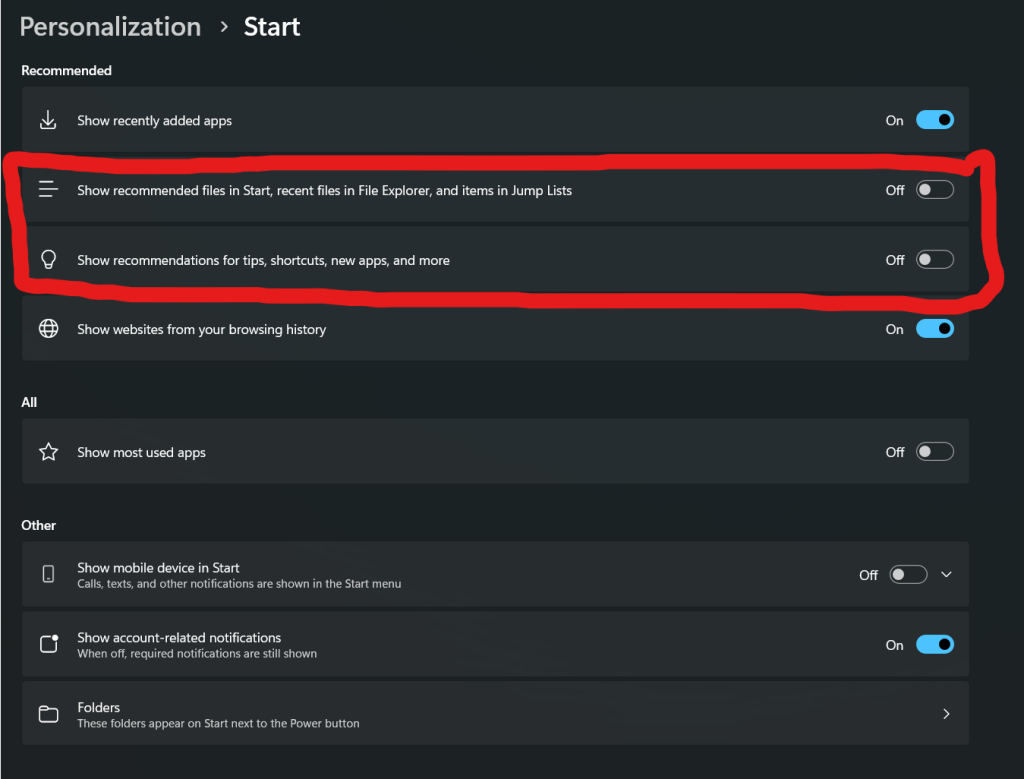
However, my desktop since taking a step away from my career as a software developer, has taken a backseat – and Windows has started to make it feel like things are a subscription to my own hardware. Forced AI tool insertions (go away, Copilot), advertising tracking INSIDE my OS and desktop – opening the Start menu shows me ads for apps, and it tracks my file history on stuff?!
And worst of all – why can’t I make a local user for my PC (easily) now? Why force me to use a Microsoft Account by default?
There’s a lot of egregious things that Microsoft is now doing, by trying to cross various lines – like adding Microsoft sign-in to MS Paint and providing BitLocker encryption keys to the FBI, and in fact, storing those keys in the cloud – where any bad actor who manages to break through Microsoft’s security (which they have repeatedly done so in the past) can acquire the keys to the kingdom, so to speak.
I know you can deactivate storing your BitLocker keys with your Microsoft account, but saving them to the cloud shouldn’t be the default option. I suppose all these potential breaches in privacy are the cost of convenience for the every day end-user.
I can’t exclusively walk away from Windows – I doubt I’ll ever be able to, but I’ll be able to minimize the exposure of it. As far as I can personally tell for my own usage, the only apps I ever use that are Windows exclusive now are:
- Adobe Creative suite – mostly for professional design related stuff PDF, PSD, IND, AI file formats will forever be the bane of my existence
- Microsoft Office suite – again, same as above – mostly for professional work, legal documents, contracts and accounting data all require this, although it’s slowly starting to diversify…
- Bambu Studio and Fusion 360 – work related, for printing out components and rapid prototyping production, this just simply can’t be ignored
- Games that require kernel level anti-cheat – this is becoming a far smaller problem than I thought it was originally – games like Battlefield 6, Valorant, etc. all for the younger generation of gamers that my old bones can no longer keep up with. And their audiences are dwindling anyway as people realize how much of a rip-off hamster wheel they’re on.
All the games I currently enjoy right now, and all the home lab, and entertainment stuff I do enjoy have ways of running on Linux. I don’t think I’ve ever encountered such a time before, and I didn’t actually expect to hit this point in my lifetime 😂
But, should I really join Team Penguin?
So “click engagement” memes aside – all the influencers are talking about moving off Windows; perhaps I am just getting influenced heavily, but there’s a mote of sense behind it.
Whilst there’s a lot of upsides at present in regards to moving away from Windows for my personal PC. I’d be remiss to not consider the negatives of moving away too. And while seemingly small and insignificant, the “blockers” are actually very significant indeed!
1. Hardware
- Linux HATES Nvidia’s drivers situation at present, which is never great, and it’s more unstable than on Windows so I’d potentially have impacted performance on some games and apps I use.
- Streamdecks – I have two elgato stream decks – a classic “Mk. 2” (3 x 5 – 15 button deck) and a Stream Deck + with the 4 action dials and slider screen
- These stream decks integrate with games like FFXIV, Star Citizen, and
- Apps like Photoshop, Illustrator, and
- also control my audio devices which I split into various channels (media, games, chat)
- They simply just don’t work properly in Linux
- My Earbuds – I use Steelseries Arctis Gamebuds and a Steelseries Arctis Nova Pro Wireless headset depending on physical fatigue around my head 🤣
- These devices don’t work with Steelseries GG software, which doesn’t work in Linux well
All in all, very compelling reasons to not switch to Linux. If I can’t easily deal with sound as I’m constantly changing my headphones, or streaming audio correctly when I screen share with friends, family and clients, it kind of defeats the utility of my PC as a whole.
2. Software
- Adobe can run, but not natively – and its performance is hampered, and at any time an update may break the functionality of Adobe Photoshop, and Illustrator – keystone applications in my business(es).
- Office 365 – as annoying as it is, it’s a Microsoft product, it’s going to work better on Windows
- Fusion 360 – this also can’t run on Linux presently, and some parts of my business require it
So whilst gaming is taken care of, sadly the business end of my computer use isn’t covered anymore (unlike when I was a full blown software dev) which is disheartening.
3. Legacy & Accessibility
This isn’t as spooky as it sounds, but if I were to be incapacitated in some way and unable to use my PC and my loved ones needed to access my stuff, sure I’m blessed enough to have wonderful friends who could help out, but end of the day, in those quiet moments in the evenings, my loved ones might need to access my PC/Servers – and Windows is something familiar to them at least.
And as of right now, this is something that Linux is definitely lacking in. There’s no way to fix that specifically unfortunately.
A decision
I think my desire to switch to Linux, is kind of trying to subconsciously return the halcyon days of simple OS usage like Windows 2000 and Windows XP! Those were the glory days – it was simple to hack away at your PC and have it run fast, without any of the bloat.
Unfortunately the small but significant issues I have with software, drivers and hardware not working – are big enough that I’ve decided I’m going to stay with Windows for the foreseeable future. Even with all their atrocious missteps towards becoming an “Agentic OS”, and all the nagging logins like Microsoft Online sign on for basic applications, built-in classics like Notepad not working, and more — all for the purpose of meeting their install base KPIs.
I hope Microsoft starts to take a step in the right direction with optimising and simplifying Windows 11, but we’ll see what the future brings. Their track record so far isn’t so great.
Welp, seems to be an almost yearly thing – although to be honest there’s no plan to how I do things with my jtiong.* sites — it’s all very whimsical 😅
I’ve started working on a new site theme called “Chubby Snorlax‘ – a sort of sequel to “Minty Charmander” (the theme you see now on this site – as written about here).
This was mostly brought about by wanting to freshen things up when I started updating my jtiong.games website. The site itself is going to be used as a personal game server documentation and humble bragging website for all the stuff I run and mod for family and friends.
Behold!
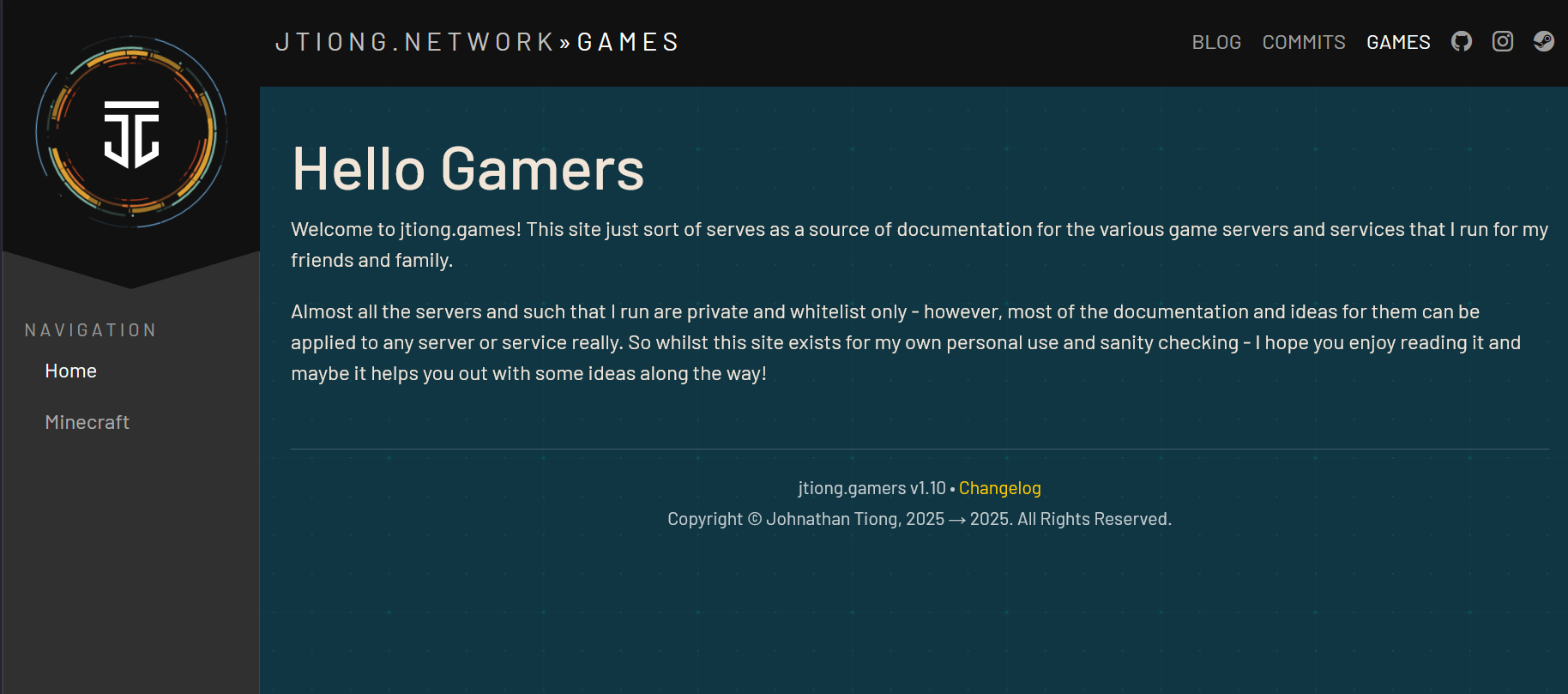
The site design pulls back more towards engineering documentation style layouts with a little bit of a flair taken from my jtiong.network site. It’s part of an intended update to all my domain names that I’ll write about (I suppose…) in the future.
The design itself is mostly complete – with the final steps being to make sure that any content I put into the theme is represented fittingly with the design (ie. there’s no weird layout issues or formatting issues). After that, I’m not going to immediately update this blog’s theme; but rather I’ll deploy Chubby Snorlax into the jtiong.dev site first, alongside some behind the scenes updates to that site!
Minty Charmander was a fairly easy update – I was able to create a WordPress compatible theme, then roll out a similar style that matched to jtiong.dev – however, this time the workload has increased to three websites (.blog, .dev, .games) at least. So complexity of the project does grow – each site has its own unique functionality, .blog being a WordPress powered site, .dev being a stylized website that interacts with GitHub, and .games being almost entirely handwritten HTML/PHP content. I’m trying to unify their look & feel, as well as bring them all under an umbrella sort of branding “jtiong.network” like a media network or some such. It’s just a fancy hobby name for my rapidly costlier hobby.
(more…)It’s almost been a year to the day since I last wrote any line of code that I committed to a git repo on GitHub.
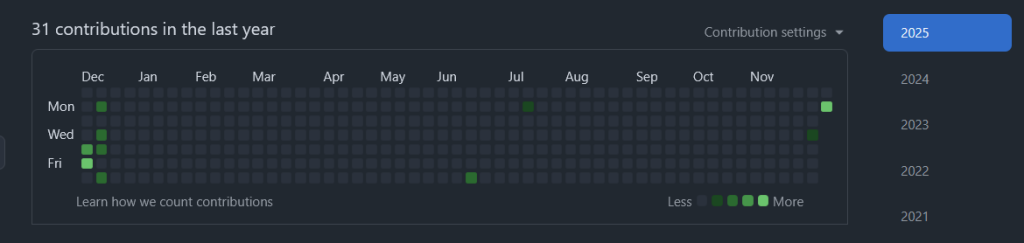
Burnout’s definitely been a real thing, and it’s been a real struggle to get back into the joy I had from tinkering and building things (no matter how jank the code) online.
In between fixing my health and personal life, and the challenges of being a cafe owner, I finally managed to push out some code to a new repo for a website.
I was surprised at how much I struggled using my simple docker container for php-apache, and getting it to interact with Caddy reverse proxy for my little project(s).
I’m glad I pushed through and finally did something about it!
It’s been a frantic 3 months or so since getting the cafe and the learning curve has been steep and once again, I turn to organising my home lab and home services to try and keep my technical skills going (and boy have they fallen short since leaving tech).
NPM has served me pretty faithfully all these years – but it wasn’t ever properly “configured” (API tests and connectivity checks would never work due to API failures somehow).
Containing all the sites
Every website that NPM used to point to was routed through a php-fpm container that had virtual hosts configured for it – this meant each time I had a site to have additional advanced nginx config parameters put in for every entry in it. This was a pain to do and prone to a lot of issues and errors.
It looked a lot like this:
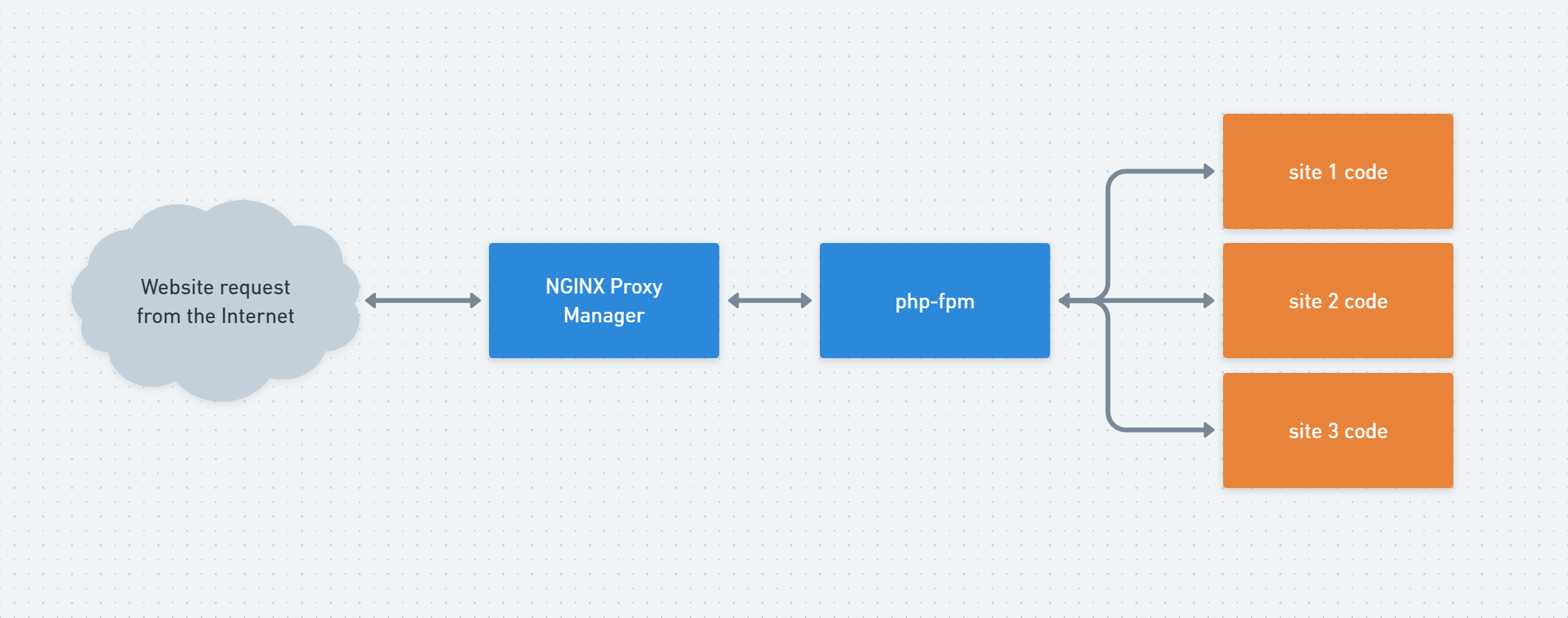
This served my purposes quite well. But it WAS clunky to configure and add new sites to it.
Even more so, the biggest drawback was adding something like uptime-kuma or any other app to my server. Adding it as a subdomain in NGINX Proxy Manager was a muck around for some bizarre reason, and adding additional apps that worked on arbitrary ports through the web UI was troublesome. I suppose my biggest complaint at the end of the day was the webUI was somehow easy to use yet cumbersome 😱
I’ve been out of the tech game long enough to be able to claim ignorance to best practices now I think, but Caddy’s straightforward “chuck everything in a Caddyfile” approach simplified a lot of things for me – and made it straightforward routing traffic to apps, or different website domains as I needed.
None of this is new, and all of this is what I used to do in my dev environments back in the day. But I hadn’t touched it in so long it feels nice to be doing something so close to the “good old days”.
Baby steps…
Well… my last post mentioned the numerous domains I own – all “jtiong” themed – and one particular site was jtiong.games
This particular domain and its purpose was more to act as a nice set of subdomains for connecting to whatever various game servers I’d be hosting (most notably Minecraft). And really, that’s all I did. I built the boilerplate code for the jtiong.games website
I suppose one thing at a time. I’ll try to find more time to put down some more commits and enjoy the process of building up my little corner of the web with no timelimits or deadlines 🙂
It’s been a while since the last update!
I think it’s no surprise to a lot of people that the cost of living is making things like streaming services, media and general online services a little bit more unaffordable in this day and age. We’re all trapped by them though, and require them to some degree.
To that end, I’ve spent the last little while during my down-time running several services and resources for my family and friends. This is all well and good – everything works fine, and there’s minimal issues really. But in the spirit of homelabbing, would it really be a hobby if I didn’t set up some hyper-intricate domain name scheme that would let my family and friends access said services?
What’s changed since 2024?
Newly Deployed Apps & Services
- Tailscale (Headscale) implemented across my devices
- Uptime Kuma for service status and monitoring
- Paperless-NGX for document management both personal and for business
- Kavita for e-books, comics, manga and more!
- DumbAssets for tracking assets of stuff I own
- ChartDB for database design for some personal projects
- Draw.io for diagram and chart drawing
- RomM for retro game ROM backups management
App & Service Changes
- Caddy replaced Nginx Proxy Manager for locally hosted stuff
Infrastructure Changes
- DOMAIN NAMES – I’ve now updated a whole bunch of domain names
- jtiong.com
- jtiong.com
- jtiong.dev
- jtiong.media
- jtiong.network
- jtiong.games
As you can see there’s a whole network of domains now 😜
Each domain has it’s own set of subdomains which of course, expose various services and software for my family and friends to use 🙂
Previously I ran a server rack on a 1000/1000mbps symmetrical service to my home (Ethernet provisioned from an ISP) to provide a number of personal media services to myself, friends and family.
Having had to relocate across 3 properties in the last 12 months however, drastically changed things – and I’ve since fallen back to a single 4RU server that’s packed to the gills with storage, and uses generic off-the-shelf consumer parts to keep going. There’s been a lot of benefits to this actually.
- It’s simple to get replacement parts
- Noise is kept to a minimum
- Reliability and up-time is a little less than enterprise hardware, but otherwise acceptably usable
With my recent trip to Japan and return – I’ve found the need to actually back up all my photos and media into a singular place that’s much easier to manage. So now I just run a single monolithic server called JT-SERVER which provides all the services I need.
Services I’ve built up to use nowadays are:
- Plex Media Server
- Nginx Proxy Manager – which routes to:
That’s it – nowadays there’s very little I do in the way of other things. A game server is still desirable but it’s not the highest priority for now. Maybe in the near future I might run:
- Minecraft (resuming previous efforts)
- Satisfactory (occasional)
- Factorio (occasional)
But otherwise most gaming requirements and needs for my “village” of friends and family aren’t necessary.
I think over the course of 2024, I’ve had to be much leaner, out of necessity. And I’ve come to find that some things just aren’t that necessary for “me and mine”. As I go into 2025, I head in with the goal of not buying any new technology, but rather just maintaining the status quo of what I have, and building a necessary platform of services for myself and my loved ones. It’ll be minimal, and a lot more wallet friendly, I think.
The branding & theme was named by my partner, Annie 🙂
I actually started this specific post as an addendum to my previous post; but realised that there’s enough in here that I want to talk about on both a personal and technical level that it should warrant its own entry.
Why “Minty Charmander”?
Well, Annie thought the colour scheme reminded her of a Charmander, and combined with the light green highlights – “Mint” 🙂
The colour scheme uses a number of my favourite colours in a limited palette – purposefully, as I recall from some old design course literally a couple decades ago now, that in UX a small number of colours that can be interchanged and not conflict with each other, was better than a large dynamic swatch of colour for getting information across.
I am using the ol’ trusty Bootstrap framework for the UI and layout of everything. I don’t have any real special rationale for using Bootstrap – it’s just what I’m most familiar with; I think as I ease myself back into coding from a long break, it’s nice to just crawl before I can walk, before I can run 😅
Planetscale?!
Laziness and the idea that I needed a stable service to run a DB for my little projects convinced me to continue with Planetscale – yes, it costs $47 USD a month, but it’s more stable, and more nicely managed than I could ever do with a random self hosted solution.
I decided to continue paying it for the time being, pending further efforts to make things self hosted down the track, but for the time being – it’s nice to have a DB that is:
- highly available;
- able to spawn itself into a main, and dev branch
I could probably implement this without a paid system – but I feel like the DB service works as a backend for multiple systems (as it would if I were to self-host) – and that’s a single point of failure that I couldn’t upkeep like a service that is designed to stay online professionally.
End of the day, it’s actually pretty easy to justify the cost of this database for myself; and I’ve spent more on dumber stuff in the past. At least this is a sensible subscription 😜
So, what’s next?
Well, the branding is mostly done, but there’s a few missing things like Search results statistics, and category browsing callouts, to name a couple of things. I’ll be taking my time fixing everything, and eventually hope to start using this blog a lot more to diary more things that I get up to on a more personal level, as opposed to just dumping whatever pseudo-technical stuff comes across my mind!
We have a new look for the blog! I hope you all like it 🙂
For those that are curious, below is how things used to look (not too long ago!)…
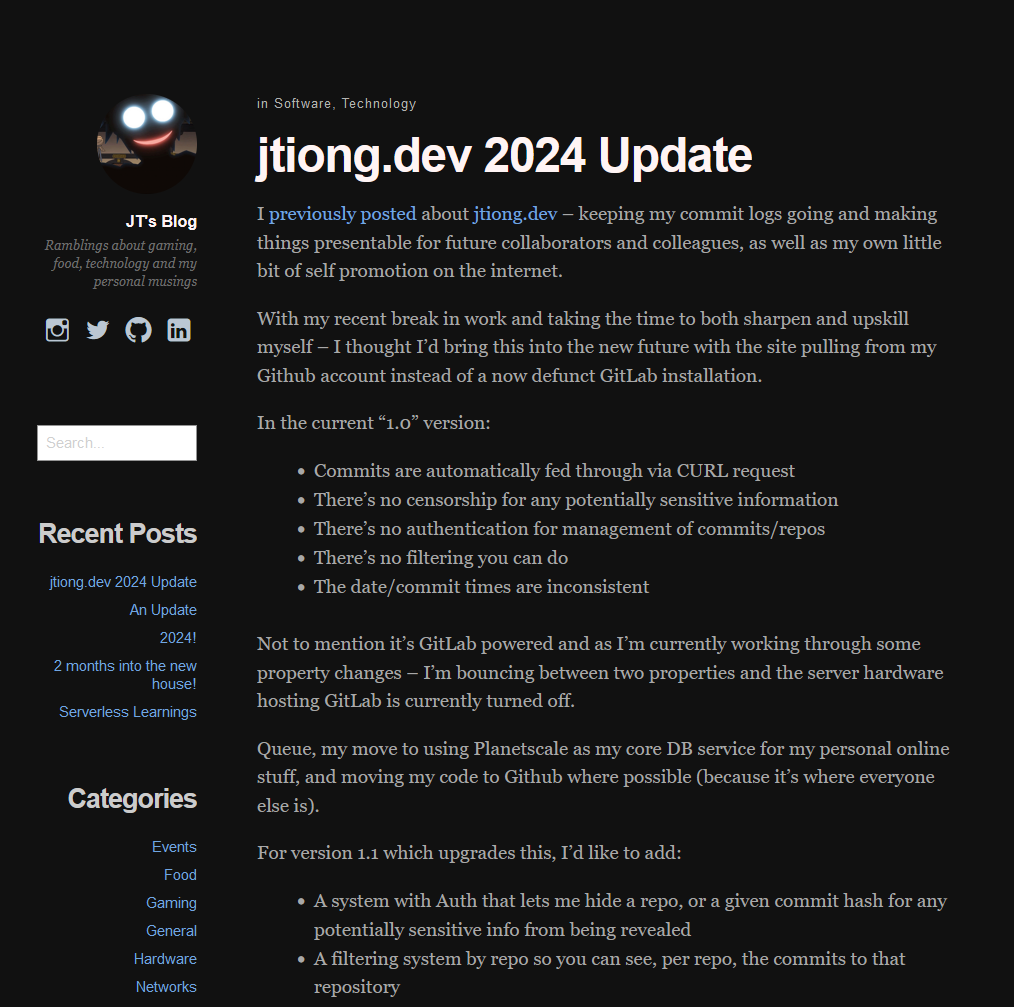
I’ve been using a theme called Independent Publisher now for about 7 years or so. And while I am indeed retired; I didn’t want to let my technical skills (as little as they are) go to waste nowadays. So I updated the look to both jtiong.dev, and jtiong.com to match similarly in branding now 🙂
It’s been more than a moment since I last touched a WordPress Theme, and so I’ve no doubt that there’s bugs and issues with the new theme you see now (built from scratch lovingly over a day or so, as you’ll be able to see from the Commits on jtiong.dev!). But this change will give me plenty of things to do to fix and maintain for the future with this blog.
And now finally after most of a day’s work, my domains are starting to be a little bit more on-brand! ♥
I previously posted about jtiong.dev – keeping my commit logs going and making things presentable for future collaborators and colleagues, as well as my own little bit of self promotion on the internet.
With my recent break in work and taking the time to both sharpen and upskill myself – I thought I’d bring this into the new future with the site pulling from my Github account instead of a now defunct GitLab installation.
In the current “1.0” version:
- Commits are automatically fed through via CURL request
- There’s no censorship for any potentially sensitive information
- There’s no authentication for management of commits/repos
- There’s no filtering you can do
- The date/commit times are inconsistent
Not to mention it’s GitLab powered and as I’m currently working through some property changes – I’m bouncing between two properties and the server hardware hosting GitLab is currently turned off.
Queue, my move to using Planetscale as my core DB service for my personal online stuff, and moving my code to Github where possible (because it’s where everyone else is).
For version 1.1 which upgrades this, I’d like to add:
- A system with Auth that lets me hide a repo, or a given commit hash for any potentially sensitive info from being revealed
- A filtering system by repo so you can see, per repo, the commits to that repository
- More accurate representation of the commits/date/timeline
Implementation Logic
Just a couple of loops to go through Repos → Commits is all I really need for my personal scale. Below is a very simplified diagram:
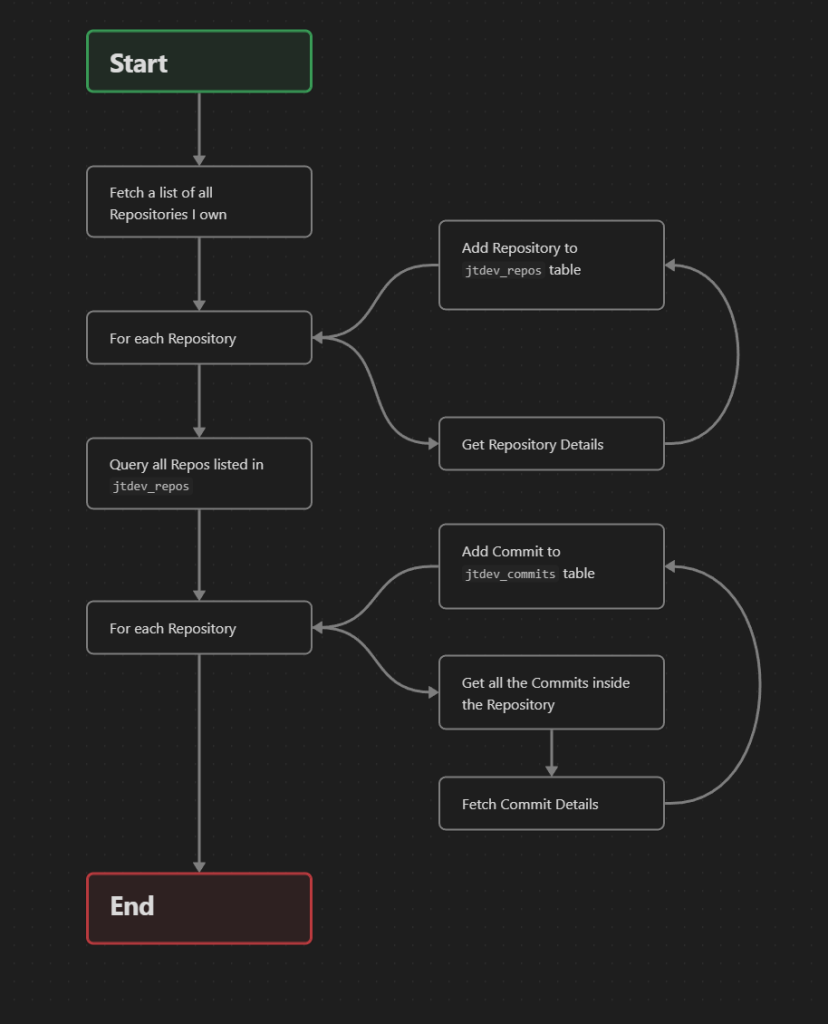
This’ll all be included into some cron tasks that run maybe hourly or so to avoid spamming GitHub.
It’s just simple little pleasurable busywork to be honest, but after about 6 months of not really touching any code and taking my time with stuff, it’s nice to get back into the groove!
Very recently my time at MindArc sadly came to an end; so I’ve been working to skill up with some of the things I’ve gleaned from my time there. Even though it was a short time, it was a great learning experience coming into an eCommerce agency.
I’m looking at using the following tech stack to resurrect my currently dead jtiong.com site!
- Cloudflare Workers
- Cloudflare Pages
- PlanetScale DB
- Remix.js
- Tailwind CSS
I’m adding on to the PHP skillset (although not abandoning it!) – with a few of my other tools I build still using PHP (such as this repo for one of my Rust game servers)
After my time at Padua learning Angular (which I found really confusing); and struggling for a bit – I think I’m ready to dive into using typescript with Remix to do a lot of stuff. This’ll be interesting…!