I think, it’s quite safe to say that 2020, has been an insane year.
I didn’t do my usual post at the end of 2019; and I didn’t do much for the start of this year either with my blog. There’s a lot of reasons for it; but on both a personal level, and indeed a global level – I think 2020 is a year that my generation will remember for quite a while.
It’s a year in which, the global markets stopped, then through sheer force of will, continued on. The age of the internet and remote services & tools were forced into a level of maturity that up until now, were only something the novel few could dip their toes such waters. Indeed, my own blog post (this post you’re reading now) is all about figuring out being able to work from anywhere, at any time.
2020 brought with it, COVID-19; which brought with it – significant health risks, and significant situations to my life that honestly, I never thought I’d see.
2020 was actually going to be a rough year for me anyway, as I moved towards focusing on caring for my elderly mother. I’d moved back home, and have been deciding what to start discarding in an almost Marie Kondo-esque fugue state. My home has always been filled to the brim with old knick knacks and gadgets, not to the excess you see on Marie Kondo’s show, but still – quite impressively full of old tech, clothes, and furniture.
There’s a lot to keep track of, and I’m in the process of decluttering my life. To do this, I’ve turned to a really interesting application that my friend and colleague, Matt, has pointed me to — Notion (https://notion.so). It’s kind of an all-in-one workspace style data collection application, kind of like Evernote.
It works across iOS, PC, Linux – it’s a web based application that’s very responsive. It provides a great way to take notes and keep organised, especially in the current hellscape of things in life right now.
Most of my work nowadays, involves documenting, designing and guiding the team I’m in charge of – and similarly, the importance of documentation has started to become all the more apparent to me. For a while now, I hadn’t been able to find the right system that’d let me create something of a private knowledgebase/wiki that I liked.
Cue in, Wiki.js – a gorgeous looking Wiki package, that while still very much in development – also very much runs with how my online infrastructure is designed. It’s powered through some docker-compose configuration, it has both git and local file backup capabilities, and lets me mount my data as I see fit.
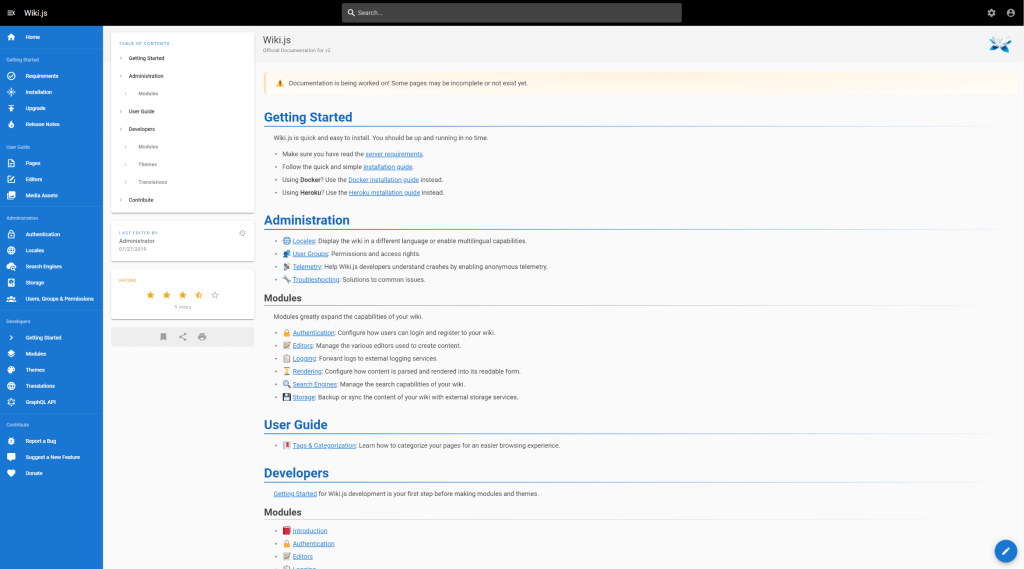
It’s not the most complete application right now – still being heavily in development, but it does some things better, and more beautifully than something like BookStack my previous Wiki of choice. And it doesn’t have the fluff of Confluence from Atlassian either.
A winner in my books.

Over the weekend, I wrote a service loading daemon for my Minecraft server that essentially allows me to interact with players to create custom, scripted actions and dynamically run commands – all tied into a Database thanks to the comfort of PHP!
I’ve aptly named the system the Minecraft Assistant Interactive Daemon (MAID for short). So far things have been working wonderfully but we’re still exploring the possibilities with this tool; from gathering player positions, to inventory security, and more! The system is based around a PHP script running in a ‘daemon’ mode that never times out, and monitors the console of the server – it reacts to things that then happen via the console (picks up commands, events, and so forth) – and updates as needed – be it via a website, database, or otherwise.
A big benefit of how I’ve implemented MAID is that I can run a Vanilla based Minecraft server, that still allows for the latest versions released by Microsoft to run – without essentially affecting functionality.
The current plan is to have:
- Custom vault control – players can protect valuables in a web-managed inventory/delivery system
- Production of materials – a “maid hiring” system, where players can pay an amount of emeralds for various maids that’ll help them acquire resources
The system is essentially a PHP based plugin wrapper on Minecraft – it doesn’t directly interface or interfere with the Minecraft client’s functionality, but instead runs as a parallel service alongside the server. So the only real drawback is a lack of real-time in-game interaction and even then, some degree of interaction can be created via the command-block system; all the features of Command Blocks are directly accessible to the MAID system.
I’m keeping it in a private repo for the time being; but in the near future I might look into releasing it 🙂
So some months back, I backed this mechanical keyboard, the Keychron K2 on Kickstarter – I’d been on the hunt at the time for a wireless keyboard that really, I wanted to use with all my personal devices. A keyboard to ‘rule them all’ for all the areas of computing I have in my life.
I had three main areas that I wanted to use the keyboard on:
- My desktop PC
- My work PC
- My PS4 at home
Aside from that, I wanted it to also be wireless, and not have me tethered to a machine – I wanted to be able to pick it up, slip it into my backpack, and carry it between the office and home. Bluetooth connectivity was a must in case I decided to use it with a number of other devices I had laying around. The Keyboard arrived on Wednesday last week – and I’ve been using it as much as I can over the last 5 days.

So far, I’ve been thrilled with the keyboard – its touch feel, the key action – the sound, and the size of it make it a very satisfying package to use as my daily driver keyboard.
Only complaint I’ve had so far:
- I hate the placement of the Page Up, Page Down, Home and End keys -they could be better arranged on the right-hand side of the keyboard. I feel that the order (from top to bottom) would be better off as Home, Page Up, Page Down, End
You can see the layout complaint I have below in the diagram of the keyboard’s layout:

Aside from that – the lighting is great, keys are easily removable and the keyboard is super maintainable! I’m a huge fan of this keyboard, and can’t stop gushing about its usability and space-saving TKL 87 key design. I barely miss the numpad (although it now means I need to rethink how I bind my keys for MMO playing!)
All-in-all though, this keyboard scores a very high 8.5/10 for me, and has taken its place in my inventory as my daily driver keyboard; for all my regular code bashing and computing.
This blog entry is more of a personal reminder – and now it’s somewhere on the internet in theory it shouldn’t ever disappear.
I do a lot of PHP related coding in my day-to-day. Be it website projects all the way through to browser-based applications, both professionally and personally – I think I’ve hit a point where VS Code – my editor of choice, is finally covering almost all my use cases.
The extensions in question:
- Alignment by annsk
- Diff by Fabio Spampinato
- Docker by Microsoft
- Format HTML in PHP by rifi2k
- GitLens by Eric Amodio
- PHP DocBlocker by Neil Brayfield
- PHP Symbols by lin yang
- phpcs by Ioannis Kappas
- Prettify JSON by Mohsen Azimi
- TabOut by Albert Romkes
After my trip to Taiwan, I noticed that I personally started to up the usage time my laptop got. In a sense, I missed the full blown functionality of a PC; which was limited on the iPad.
The iPad is fantastic, as an extra TV screen, or a digital scribblepad. But that’s it; I haven’t the heart to use it for more. I could use it for more in a pinch, but I’d rather not. I bought my laptop at a weird time in my life; a lot of things were uncertain, and to top it off, I bought it with a broken ‘Up’ arrow key. It’s irked me using it ever since. The key still works fine and the keycap kind of still stays on. But it’s broken, and I’ll always be wary of it when I’m using this laptop.
Regardless, this little machine has grown on me. And continues to grow on me. The Gigabyte Aero 14 isn’t a bad device; it’s quite fantastic for my personal needs, and with it becoming my main work device; Ubuntu 18.04 needs to be installed on it.
And that’s why I’m here today, blogging.
So far, it’s been a pretty good experience – Ubuntu managed to install smoothly; and the only gripe is the need to reboot my laptop anytime I do a switch between my GeForce graphics card and my Intel graphics processor. The battery life is more than double when I’m using the Intel GPU, but in order to use two external screens, I need to use my Geforce GPU. It’s a small compromise though, given how quickly Ubuntu can reboot on the laptop.
There’s something beautiful about being able to carry a single device where all my work is focused; and with the power of the cloud™ I’m able to comfortably back up my stuff, too!
Ubuntu 18.04 and going into 2019 – I may well become a full blown Linux user.
So, it’s been about a week since I’ve been back from Taiwan, and I’ve finally had a moment to catch my breath with work and all the things that happened while I was away from the office, life and such.
To basically sum everything up – Project Cloud Citizen works. It meets my needs with my work and media requirements. Between the Nintendo Switch, mobile and iPad itself, my gaming needs are met too. There’s a few caveats however…
Caveats for why Cloud Citizen is a ‘success’
I’m no longer a hardcore gamer
This is probably the biggest caveat I can think of. Gone are the needs of 100% minimal input lag gaming; I’m not cruising around in some competitive FPS, and most of my gaming needs can be very casually met. I was satisfied mostly gaming on the Nintendo Switch, and the occasional odd iPad game.
I’m not as media creative focused anymore
I still tinker around every now and then in Photoshop and with some graphics; I don’t think this’d be possible with full blown video editing suites. Rudimentary graphic design is still very much possible, as long as you’re willing to compromise with colour reproduction and image quality while editing your work. The finished product will very much still be to spec, but due to the nature of streaming, you might not see your work with perfect clarity.
Cloud Citizen works for me
Photos
I was able to upload and retrieve just about every photo I took within a few seconds, on-demand during the trip. Taiwan has cheap, unlimited 4G for tourists (Alice and I picked up a 10-day SIM) with extremely consistent coverage everywhere in Taipei and Hualien. Whilst this is mostly a success due to the availability of mobile internet; the usability is a success from my phone/iPad with Cloud Citizen.
Remote Work
Whilst I was overseas, my team deployed a new project that had been in the works for about half a year. Thanks to Cloud Citizen, I was able to remote into my server, and via a remote setup on my iPad with a mouse — I was able to contribute meaningfully to the processes.
I could indeed use my iPad as my main computing device, as long as it’s backed up by the power of a full fledged desktop environment back at HQ…
If it’s a success, does that mean…?
That I’ll be using my iPad as my main device? After this whole experience, I feel that yes, I could indeed use my iPad as my main computing device, as long as it’s backed up by the power of a full fledged desktop environment back at HQ. It has made me reassess my needs (and wants) for mobile computing; and I come to the conclusion that I need something a little more robust.
My work, and often whatever I’m doing digitally, tends to be code based. And my workflows currently involve a lot of Docker container usage for my work. The #1 issue that I have with the iPad is that I have no way for testing my PHP code locally. Sure, this could be overcome by remoting into a PC and doing everything from there, and whilst it’s not terrible, it’s also not ideal (for example, if I’m overseas I might not have access to the internet, or be on a very data-restricted plan).
This, in essence, makes my choice for me going forward into 2019… I’m going to need to return to using my laptop. It’s no slouch, and it’s comfortably going to run all the Docker stuff I need; combined with some other applications – I think I should be quite comfortable with development on the go with it.
It’s unfortunate that yes, while I consider Cloud Citizen a success; it’s only a partial success with the particular ecosystem I brought with me to Taiwan.
So, over the next couple of weeks, I’m going to be travelling overseas to Taiwan. It’s a vacation, my first in nearly a decade; and since my last vacation, a lot of technology has changed that perhaps makes this journey a little more comforting to a reclusive geek like myself. The airline I’m flying with, provides a USB socket in its international economy seats, with 5V DC and 500mA charge, meaning I can power a device somewhat comfortably to enjoy a variety of media, and entertainment. So without further ado, I’m going to go into something of a diatribe about preparing for the trip to soothe my inner geek.
The constraints
There’s a number of limitations on this vacation, predominantly governed by my travel arrangements (flights, trains, etc.) so listing them out:
- Portability; I’m using a Crumpler 8L backpack; the “Low Level Aviator”
- Power; My gadgets need to last a while, and/or be charged with in-transit USB (5V DC, 500mA – about the same as a USB 1.1 port)
- Media; and Storage for photos and videos from my phone
- Entertainment; I don’t expect to have much time, but in the down time and flights I might watch a show, or three…
- Gaming; of course 🙂
The goal of this post is to put down my thoughts so that I can build up an EDC kit for my trip.
The EDC Backpack
Aside from my wallet – “The Pilot” by Andar; and my iPhone on my person – I’ll have most of my gear in my backpack with me:
- iPad Pro 9.7″ – it’s only 32GB, but it should hold enough of my notes and such to continue being useful!
- Nintendo Switch – previously in Project Cloud Citizen, this would’ve been my GPD-WIN PC, more on this later;
- Bullet Journal – my bujo, I carry this with me pretty much everywhere
- Pen cases – will hold my pens of course, and insulin injection pens, as well as some bandaids and what have you
- Screwdriver kit – this is a little portable kit with a combined tape measure that I will keep with me just in case
- Glasses case – obviously, for the glasses I wear, as well as a spare pair inside
- Battery Pack
- Cables for iPhone/iPad/Switch
This trip is a good opportunity to really see what there is that I can and can’t do when I’m truly away from my home desktop, and must rely on Project Cloud Citizen. I’m packing quite lightly with this trip, and my day-pack is smaller than my usual laptop bag. I’m also trying to ditch the laptop in favour of the lighter-weight iPad, and gaming/entertainment is handled by both the tablet and my Nintendo Switch instead.
In my last Cloud Citizen post I mentioned that I was going to use my GPD-WIN for my gaming purposes; but I am actually thinking more along the lines of no longer using it. For a few reasons:
- Its battery is good, but not as great as the Nintendo Switch or the iPad
- It’s far more general purpose, and far more of a compromise in power/features – so I feel like I’ve sacrificed too much to use it
- The iPad can truly connect with my Cloud Citizen server as a remote client now
For anything really PC related or desktop related, I can actually use my iPad now to remote into my server as needed using a piece of software called Jump Desktop, it works great with a specific bluetooth mouse and my iPad, and should satisfy any mobile needs I might have. In fact, I intend to work on this site and blog while I’m in Taiwan to try and get a feel for it.
So as it seems, I’m going to start using just my iPad and Switch, for this trip. It’s a 9 day long trip; so it’s a fairly valid testing opportunity!
I’ve always been tinkering around with Gitlab, GOGS, and other various services like Github, Bitbucket, etc. to try and store my code in some place that’s not as fallible as the personal servers and storage I keep around. I’ve recently stumbled across Visual Studio Team Services (VSTS) which seems to be an outstanding offering from Microsoft (I already use their free Visual Studio Code editor, which does a stunning job as my editor of choice)
It’s pretty cool so far, and I’ve started moving across some of my GOGS hosted repos to it, so that I have less reliance on my own paid services; it’s cost-saving for me, and VSTS actually has a really nice deployment/testing Pipeline creation tool. It’s nearly entirely drag and drop, and save for a few little bugs, it works perfectly for my personal needs.
Just for my future reference, when running SSH CLI commands, I need to disable fail on STDERR as git will write to the STDERR for any git results, meaning it’d make the build fail; which we don’t want!
…save for a few little bugs, it works perfectly for my personal needs.
Secondly, I think I’ve also settled on using VIsual Studio Code as my pseudo-IDE of choice. It has quite an expansive toolset that I can bolt onto it that really lets me control and do actions for nearly everything. For it to qualify as a full-blown IDE would mean the integration of a browser window so I never have to leave it.
I’ve been using Visual Studio Code as my editor of preference for the past 6 months or so at my current workplace; and I’ve grown accustomed to it, even if some people consider it a bit slower than other editors, or slightly less functional than an IDE. So far, it has met my everyday needs, and I think I’m fairly comfortable in saying that it is my tool of choice for development.
The combination of these tools, now means that I’ve got a development process available to me which does away with the extra resource usage of hosting my own code repositories; and allows me to build smooth, integrated pipelines that’ll deploy my projects as needed.
They all roughly follow:
- Create a project;
- Master, Release, Develop, Feature and Hotfix branches as per Gitflow
- As each Pull Request merges into Master;
- SSH into servers using Private Key
cd /to/deployed/production/folderandgit fetch && git reset --hard origin/master
Some notes:
I’d execute any particular unit tests as required, in between steps 3 and 4. And I am aware that following Gitflow for a single developer project is probably overkill, but it’s a practice I like to keep familiar with, as I use it every day in my day-to-day job where there’s more than just myself developing code on a project.
I’m thrilled to announce that I’m going to be launching a Conan Exiles server personally for friends and family to play on. As a fan of the survival game genre – Conan Exiles offers a pretty unique blend of resource gathering, adventuring, and exploring a wilderness filled with monsters, animals and gods.
Just for my own reference – the server settings (in their unedited form) are below. An explanation of the settings is available here:
MaxNudity=0
ServerCommunity=0
ConfigVersion=9
BlueprintConfigVersion=19
PurgeNPCBuildingDamageMultiplier=(5.000000,5.000000,10.000000,15.000000,20.000000,25.000000)
PlayerKnockbackMultiplier=1.000000
NPCKnockbackMultiplier=1.000000
StructureDamageMultiplier=1.000000
StructureHealthMultiplier=1.000000
NPCRespawnMultiplier=1.000000
NPCHealthMultiplier=1.000000
CraftingCostMultiplier=1.000000
PlayerDamageMultiplier=1.000000
PlayerDamageTakenMultiplier=1.000000
MinionDamageMultiplier=1.000000
MinionDamageTakenMultiplier=1.000000
NPCDamageMultiplier=1.000000
NPCDamageTakenMultiplier=1.000000
PlayerEncumbranceMultiplier=1.000000
PlayerEncumbrancePenaltyMultiplier=1.000000
PlayerMovementSpeedScale=1.000000
PlayerStaminaCostSprintMultiplier=1.000000
PlayerSprintSpeedScale=1.000000
PlayerStaminaCostMultiplier=1.000000
PlayerHealthRegenSpeedScale=1.000000
PlayerXPRateMultiplier=1.000000
PlayerXPKillMultiplier=1.000000
PlayerXPHarvestMultiplier=1.000000
PlayerXPCraftMultiplier=1.000000
PlayerXPTimeMultiplier=1.000000
DogsOfTheDesertSpawnWithDogs=False
CrossDesertOnce=True
ThrallExclusionRadius=500.000000
MaxAggroRange=9000.000000
FriendlyFireDamageMultiplier=0.250000
CampsIgnoreLandclaim=True
AvatarDomeDurationMultiplier=1.000000
AvatarDomeDamageMultiplier=1.000000
NPCMaxSpawnCapMultiplier=1.000000
serverRegion=0
RestrictPVPTime=False
PVPTimeWeekdayStart=0
PVPTimeWeekdayEnd=0
PVPTimeWeekendStart=0
PVPTimeWeekendEnd=0
RestrictPVPBuildingDamageTime=False
PVPBuildingDamageTimeWeekdayStart=0
PVPBuildingDamageTimeWeekdayEnd=0
PVPBuildingDamageTimeWeekendStart=0
PVPBuildingDamageTimeWeekendEnd=0
CombatModeModifier=0
ContainersIgnoreOwnership=True
LandClaimRadiusMultiplier=1.000000
BuildingPreloadRadius=80.000000
ServerPassword=
ServerMessageOfTheDay=
KickAFKPercentage=80
KickAFKTime=2700
OfflinePlayersUnconsciousBodiesHours=168
CorpsesPerPlayer=3
ItemConvertionMultiplier=1.000000
ThrallConversionMultiplier=1.000000
FuelBurnTimeMultiplier=1.000000
StaminaRegenerationTime=3.000000
StaminaExhaustionTime=3.000000
StaminaStaticRegenRateMultiplier=1.000000
StaminaMovingRegenRateMultiplier=1.000000
PlayerStaminaRegenSpeedScale=1.000000
StaminaOnConsumeRegenPause=1.500000
I’m a bit of a purist and don’t want to detract too much from a vanilla experience. Likewise, I may also work towards doing a server reset on a fairly long schedule (unsure yet, but I’m thinking every 90 days).