
It’s really interesting to try and build out all the solutions of a modded Minecraft server, into a vanilla server! This morning, I encountered an issue where Villagers were unable to execute their regular mechanics (repair items, farm, breed, etc.) due to me disabling mobGriefing in the server’s game rules – this prevents them trampling crops, blowing up blocks, etc.
I ended up needing a solution via CommandBlocks which I’ve now had to carefully hide into the architecture of my little home so that other players on the server don’t inadvertently disturb it. I attached the following command to my CommandBlock, and set it to Repeat, Unconditional, and Always Active:
execute as @e[type=creeper,nbt=!{ExplosionRadius:0}] run data merge entity @s {ExplosionRadius:0}There’s only one small disadvantage right now – Creepers don’t actually deal any damage anymore…! I guess this kinda makes them… huggable?
Northrealm as a whole – proceeds well! It’s less a sort of MMO style map/game as it is just a creative, adventurous sandbox right now. Eventually I might start building in specific styles and locations into different regions; but it’s more important to just stick to building what’s fun and chilling in the server.
It’s fun, in and of itself – coming up with solutions to our server’s problems without the need for heavily modifying the server itself!
So some months back, I backed this mechanical keyboard, the Keychron K2 on Kickstarter – I’d been on the hunt at the time for a wireless keyboard that really, I wanted to use with all my personal devices. A keyboard to ‘rule them all’ for all the areas of computing I have in my life.
I had three main areas that I wanted to use the keyboard on:
- My desktop PC
- My work PC
- My PS4 at home
Aside from that, I wanted it to also be wireless, and not have me tethered to a machine – I wanted to be able to pick it up, slip it into my backpack, and carry it between the office and home. Bluetooth connectivity was a must in case I decided to use it with a number of other devices I had laying around. The Keyboard arrived on Wednesday last week – and I’ve been using it as much as I can over the last 5 days.

So far, I’ve been thrilled with the keyboard – its touch feel, the key action – the sound, and the size of it make it a very satisfying package to use as my daily driver keyboard.
Only complaint I’ve had so far:
- I hate the placement of the Page Up, Page Down, Home and End keys -they could be better arranged on the right-hand side of the keyboard. I feel that the order (from top to bottom) would be better off as Home, Page Up, Page Down, End
You can see the layout complaint I have below in the diagram of the keyboard’s layout:

Aside from that – the lighting is great, keys are easily removable and the keyboard is super maintainable! I’m a huge fan of this keyboard, and can’t stop gushing about its usability and space-saving TKL 87 key design. I barely miss the numpad (although it now means I need to rethink how I bind my keys for MMO playing!)
All-in-all though, this keyboard scores a very high 8.5/10 for me, and has taken its place in my inventory as my daily driver keyboard; for all my regular code bashing and computing.
Well now, over the last month or so; I’ve been running a Minecraft server that I’ve tentatively called Northrealm, after a dear friend, Claire Northman. Claire passed away in 2012; and it’s an event that I’ve carried close to my heart ever since.
It’s been a complicated run for this ‘server’ of sorts – over the last near-decade, I’ve been tinkering with a variety of Minecraft servers that are modded, in various levels of interaction – in an effort to build the ‘ideal’ fantasy world that would represent everything Claire loved about Minecraft.
Finally, I settled on the idea of just running a plain, standard, Minecraft server. One that my friends and I can play on, and build upon using only the unmodified, basic installation of Minecraft. Luckily for me, the game’s reached a point where a lot of features that were once mods, are now doable within the confines of standard Minecraft!
Anyway, I’ve started by opening the gaming/Minecraft section of my site – it’s completely bare, except for an interactive map that gets generated at about 4:34am UTC every day. The map has zoom/drag capabilities, and should be fairly high res enough for people to use. It’s powered by Overviewer!
You can view a larger version of the map by visiting https://minecraft.jtiong.com as well. (NB: these links don’t work anymore! – JT, 29/05/2022)
Coming features over the next few days will include:
- An ability to create an account, and apply to join the whitelist for this server
- Some rules and regulations on this
- A materials pipeline that somehow interacts with players online and offline
The third point in particular, is of interest to me, because I’d really love for players on the server to be able to “build” something on the site, which then generates an amount of materials over a time period, which can then be deducted from a player’s inventory. My initial thoughts on the flow of such a system would be:
While a player is online – they will have the ability to:
- Construct basic workshops – these can refine raw materials, create basic components
- Recruit workers, these workers affect the speed a workshop functions at
Eventually, I think, I’d like to increase the functionality – but that’ll require some more thought! A post for another time 🙂
Previously one of the projects I mentioned in my last blog post was Project Stronghold – where I build basically something akin to a games room/home office. I quite enjoy retrogaming – and a good deal of modern gaming (on consoles or PC, or in VR) as well.
I just thought I’d post here to present an inspiring picture of how I’d like to attach most of the controllers in this situation:

Obviously, the cabinetry in my own home is not like this – with different shelving and configurations to consider. But I’d like some form of storing these controllers in the room I intend to utilise, for the next few years.
It’s a new year – and really, time to move on from my previous lifestyle of just working and hardcore gaming.
I’m looking into removing the errant Cat5E cabling around my house, both for safety reasons (I have an elderly resident who can’t always avoid the cables and might trip up) and just general home pleasantness. I’m also left with a lot of computer hardware that – thanks to Project Cloud Citizen, I’m no longer in need of, such as massive servers in my house…
To that end – recently, I bought myself a Christmas present — a Google Wifi home mesh setup; and implemented it around the house. It’s my hope that I can transition the household to a wireless fix, instead of having everyone on a cabled solution.
2018 was a year that was very focused on improving my workflow on-the-go and out on my day-to-day work commitments. I ended the year by turning to Linux as my main operating system on my laptop; and I must admit – yes, the change in operating system has been disruptive – it’s actually had far less disruptive impact than first thought. I’m able to do the vast majority of my work with Linux, using a system that is much better suited to coding, Docker environment development, and overall lets me just get elbows deep into productivity.
2019 – is going to be a year of improving my ‘home base’. I find that due to the nature of my work over the last 12 months; I find the need for always-ready access to my code a necessity. However, I occasionally need to do a couple extra things which my laptop-centric workflow doesn’t allow as yet:
- I need to engage in creative work; Photoshop, etc.
- I need to unwind with a bit of fun, too! (going to the gym is more a physical release thing)
So after the events and results of Project Cloud Citizen – and the revival of my laptop as my core workhorse; I’m declaring 3 projects for 2019 on a personal level!
- Project Stronghold – designing the perfect space(s) at home for Rest, Play, and Creativity!
- Project Fortify – building up my health, and shoring up against future complications
- Project Foundation – My laptop proved its worth this weekend with both Windows and Ubuntu – tweaks to improve this 🙂
2019 will be about good ol’ hard work, growth, and improvement. We’ll see what the year brings!
This blog entry is more of a personal reminder – and now it’s somewhere on the internet in theory it shouldn’t ever disappear.
I do a lot of PHP related coding in my day-to-day. Be it website projects all the way through to browser-based applications, both professionally and personally – I think I’ve hit a point where VS Code – my editor of choice, is finally covering almost all my use cases.
The extensions in question:
- Alignment by annsk
- Diff by Fabio Spampinato
- Docker by Microsoft
- Format HTML in PHP by rifi2k
- GitLens by Eric Amodio
- PHP DocBlocker by Neil Brayfield
- PHP Symbols by lin yang
- phpcs by Ioannis Kappas
- Prettify JSON by Mohsen Azimi
- TabOut by Albert Romkes
The Analog Method for the Digital Age…
This year, started on a Monday, and coincidentally, I started a new experiment to stay organised and keep track of my day-to-day happenings. It’s called a Bullet Journal, and it’s a method of keeping a concise, goal/task-driven journal of daily happenings. It’s very free-form in nature, meaning that you don’t need a dedicated diary format to adhere to, or some specially printed book; any old exercise book can fit your needs!
My goals and desired outcomes were simple – I wanted a way to record my day to day events, whilst not losing focus of tasks and things that needed to be done, be it professionally, or personally. I also wanted to be able to do this, no matter where I am, as long as I had sufficient visibility, the journal, and a pen. I didn’t want to be beholden to battery power, or other nasty limitations.
And as a plus, I really enjoy the tactile feeling of just, writing something. For any seriously longer-form journal entries, there is of course, this very blog that you’re reading.
Before I go into my rant about Bullet Journals, and how I do them, and such – here’s the original site that I learnt about it from: https://bulletjournal.com — It’s kind of turned into some sort of online store/sales point – but the concepts are still visible and solid. There’s also about a hundred thousand people who’ve made videos about Bullet Journaling on YouTube and various other social media.
A rapid way of Journaling
The cornerstone of being able to use a bullet journal is based on a concept called Rapid Logging. It’s essentially a way to capture information, and notes as bulleted lists (with a small range of bullet types/symbols). It kind of looks like this (sorry about the huge gaps, these source images come with quite a bit of padding, and really, I thought it looked quite good!):
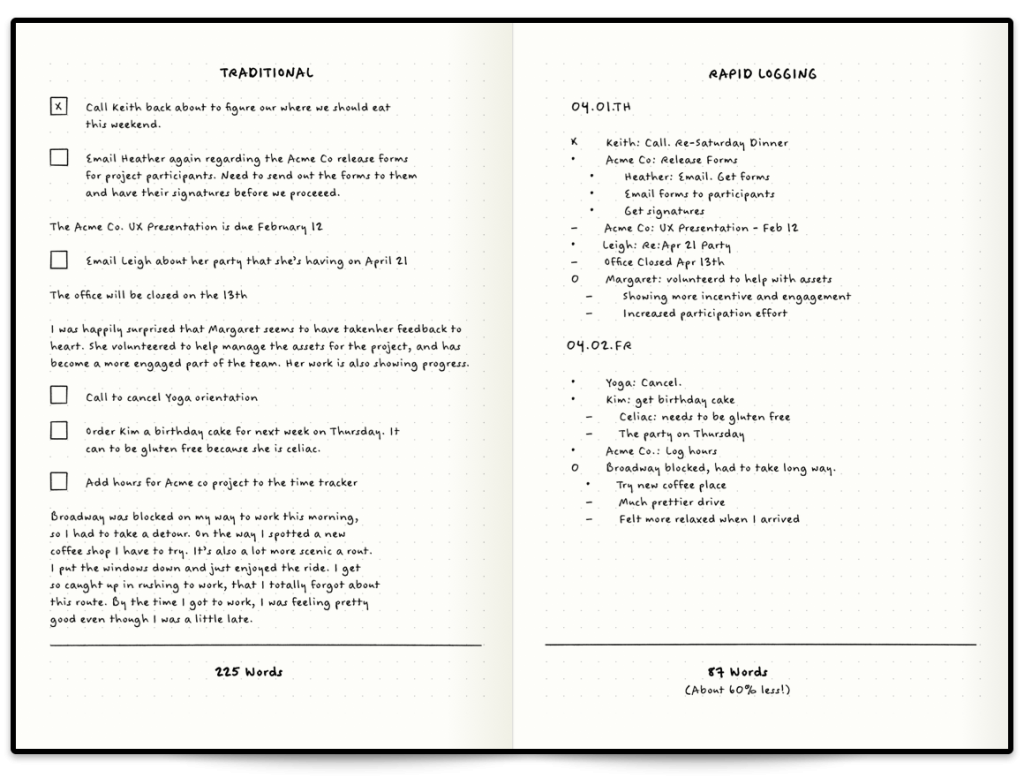
On the left, you see how someone might have a journal entry that’s somewhat longer form, but quite typical of a diary. On the right – you have something a little more ‘lean’. This is rapid blogging. You’ll notice that there’s different symbols for everything; and every bullet journal has their own symbols and guide (I’ll go through mine later) – but for now, the default ones you see in the tutorial image above are split into several types.
Has bullet journalling helped?
Yes. Emphatically, and simply, yes. It’s a focused, habitual and easy way to keep track of things, remind yourself of your goals and ideas, and really take a breather in your busy day.
My Personal BuJo Experience
Since this is my first bujo, and as reach the end of 2018 (and coincidentally, near the end of the book I use for it) – I thought I’d do a bit of a retrospective on the way I’ve used it, and things I’ve learnt.
My first BuJo involved a fair number of mistakes; initially so bad that I ripped out the first 20 or so pages of the book! (yikes!) But after some planning, and with (not quite) enough forethought, I managed to eke out a usable solution. I tried a variety of different symbols, and worked on how detailed I should make my daily log entries (everything from weather, to BSL and daily spends) and by the final quarter of 2018, I finally came up with a simple box and circle bullet point system, with simple daily labelling to help.
And in actual fact – by happy coincidence, I realise I can even type the method I use out:
[ ] = task
[x] = task done
[>] = rescheduled task
[-] = cancelled task

( ) = event/appointment
(x) = event done
(>) = rescheduled event
(-) = cancelled event

- thought/note
! important thought/note/reminder
? question/investigation
This absolutely doesn’t mean I’m going to use a typed version of my bullet journal however; the key point of the bujo is that it’s a physical, tactile experience that gets the brain some exercise! Being freeform also allows me to quickly customise pages or scribble out extra notes and so forth. However this DOES give me some ideas on how to do something of a bujo for devs 😉
Anyway, moving on – as we go into 2019 – the new BuJo I’ve worked on setting up today is going to include a couple of features I’ve seen around that I’d like to try out – such as a year in pixels, based on the mood of the day, I can colour in a square in a grid, with a corresponding colour to mood – and at the end of the year I should have a fairly pragmatic overview of just how well things went that year.
After my trip to Taiwan, I noticed that I personally started to up the usage time my laptop got. In a sense, I missed the full blown functionality of a PC; which was limited on the iPad.
The iPad is fantastic, as an extra TV screen, or a digital scribblepad. But that’s it; I haven’t the heart to use it for more. I could use it for more in a pinch, but I’d rather not. I bought my laptop at a weird time in my life; a lot of things were uncertain, and to top it off, I bought it with a broken ‘Up’ arrow key. It’s irked me using it ever since. The key still works fine and the keycap kind of still stays on. But it’s broken, and I’ll always be wary of it when I’m using this laptop.
Regardless, this little machine has grown on me. And continues to grow on me. The Gigabyte Aero 14 isn’t a bad device; it’s quite fantastic for my personal needs, and with it becoming my main work device; Ubuntu 18.04 needs to be installed on it.
And that’s why I’m here today, blogging.
So far, it’s been a pretty good experience – Ubuntu managed to install smoothly; and the only gripe is the need to reboot my laptop anytime I do a switch between my GeForce graphics card and my Intel graphics processor. The battery life is more than double when I’m using the Intel GPU, but in order to use two external screens, I need to use my Geforce GPU. It’s a small compromise though, given how quickly Ubuntu can reboot on the laptop.
There’s something beautiful about being able to carry a single device where all my work is focused; and with the power of the cloud™ I’m able to comfortably back up my stuff, too!
Ubuntu 18.04 and going into 2019 – I may well become a full blown Linux user.
So, it’s been about a week since I’ve been back from Taiwan, and I’ve finally had a moment to catch my breath with work and all the things that happened while I was away from the office, life and such.
To basically sum everything up – Project Cloud Citizen works. It meets my needs with my work and media requirements. Between the Nintendo Switch, mobile and iPad itself, my gaming needs are met too. There’s a few caveats however…
Caveats for why Cloud Citizen is a ‘success’
I’m no longer a hardcore gamer
This is probably the biggest caveat I can think of. Gone are the needs of 100% minimal input lag gaming; I’m not cruising around in some competitive FPS, and most of my gaming needs can be very casually met. I was satisfied mostly gaming on the Nintendo Switch, and the occasional odd iPad game.
I’m not as media creative focused anymore
I still tinker around every now and then in Photoshop and with some graphics; I don’t think this’d be possible with full blown video editing suites. Rudimentary graphic design is still very much possible, as long as you’re willing to compromise with colour reproduction and image quality while editing your work. The finished product will very much still be to spec, but due to the nature of streaming, you might not see your work with perfect clarity.
Cloud Citizen works for me
Photos
I was able to upload and retrieve just about every photo I took within a few seconds, on-demand during the trip. Taiwan has cheap, unlimited 4G for tourists (Alice and I picked up a 10-day SIM) with extremely consistent coverage everywhere in Taipei and Hualien. Whilst this is mostly a success due to the availability of mobile internet; the usability is a success from my phone/iPad with Cloud Citizen.
Remote Work
Whilst I was overseas, my team deployed a new project that had been in the works for about half a year. Thanks to Cloud Citizen, I was able to remote into my server, and via a remote setup on my iPad with a mouse — I was able to contribute meaningfully to the processes.
I could indeed use my iPad as my main computing device, as long as it’s backed up by the power of a full fledged desktop environment back at HQ…
If it’s a success, does that mean…?
That I’ll be using my iPad as my main device? After this whole experience, I feel that yes, I could indeed use my iPad as my main computing device, as long as it’s backed up by the power of a full fledged desktop environment back at HQ. It has made me reassess my needs (and wants) for mobile computing; and I come to the conclusion that I need something a little more robust.
My work, and often whatever I’m doing digitally, tends to be code based. And my workflows currently involve a lot of Docker container usage for my work. The #1 issue that I have with the iPad is that I have no way for testing my PHP code locally. Sure, this could be overcome by remoting into a PC and doing everything from there, and whilst it’s not terrible, it’s also not ideal (for example, if I’m overseas I might not have access to the internet, or be on a very data-restricted plan).
This, in essence, makes my choice for me going forward into 2019… I’m going to need to return to using my laptop. It’s no slouch, and it’s comfortably going to run all the Docker stuff I need; combined with some other applications – I think I should be quite comfortable with development on the go with it.
It’s unfortunate that yes, while I consider Cloud Citizen a success; it’s only a partial success with the particular ecosystem I brought with me to Taiwan.
So, over the next couple of weeks, I’m going to be travelling overseas to Taiwan. It’s a vacation, my first in nearly a decade; and since my last vacation, a lot of technology has changed that perhaps makes this journey a little more comforting to a reclusive geek like myself. The airline I’m flying with, provides a USB socket in its international economy seats, with 5V DC and 500mA charge, meaning I can power a device somewhat comfortably to enjoy a variety of media, and entertainment. So without further ado, I’m going to go into something of a diatribe about preparing for the trip to soothe my inner geek.
The constraints
There’s a number of limitations on this vacation, predominantly governed by my travel arrangements (flights, trains, etc.) so listing them out:
- Portability; I’m using a Crumpler 8L backpack; the “Low Level Aviator”
- Power; My gadgets need to last a while, and/or be charged with in-transit USB (5V DC, 500mA – about the same as a USB 1.1 port)
- Media; and Storage for photos and videos from my phone
- Entertainment; I don’t expect to have much time, but in the down time and flights I might watch a show, or three…
- Gaming; of course 🙂
The goal of this post is to put down my thoughts so that I can build up an EDC kit for my trip.
The EDC Backpack
Aside from my wallet – “The Pilot” by Andar; and my iPhone on my person – I’ll have most of my gear in my backpack with me:
- iPad Pro 9.7″ – it’s only 32GB, but it should hold enough of my notes and such to continue being useful!
- Nintendo Switch – previously in Project Cloud Citizen, this would’ve been my GPD-WIN PC, more on this later;
- Bullet Journal – my bujo, I carry this with me pretty much everywhere
- Pen cases – will hold my pens of course, and insulin injection pens, as well as some bandaids and what have you
- Screwdriver kit – this is a little portable kit with a combined tape measure that I will keep with me just in case
- Glasses case – obviously, for the glasses I wear, as well as a spare pair inside
- Battery Pack
- Cables for iPhone/iPad/Switch
This trip is a good opportunity to really see what there is that I can and can’t do when I’m truly away from my home desktop, and must rely on Project Cloud Citizen. I’m packing quite lightly with this trip, and my day-pack is smaller than my usual laptop bag. I’m also trying to ditch the laptop in favour of the lighter-weight iPad, and gaming/entertainment is handled by both the tablet and my Nintendo Switch instead.
In my last Cloud Citizen post I mentioned that I was going to use my GPD-WIN for my gaming purposes; but I am actually thinking more along the lines of no longer using it. For a few reasons:
- Its battery is good, but not as great as the Nintendo Switch or the iPad
- It’s far more general purpose, and far more of a compromise in power/features – so I feel like I’ve sacrificed too much to use it
- The iPad can truly connect with my Cloud Citizen server as a remote client now
For anything really PC related or desktop related, I can actually use my iPad now to remote into my server as needed using a piece of software called Jump Desktop, it works great with a specific bluetooth mouse and my iPad, and should satisfy any mobile needs I might have. In fact, I intend to work on this site and blog while I’m in Taiwan to try and get a feel for it.
So as it seems, I’m going to start using just my iPad and Switch, for this trip. It’s a 9 day long trip; so it’s a fairly valid testing opportunity!