
So, as of tonight I managed to complete Shadow of the Tomb Raider (just going to call this Shadow from now on for this article). I was a huge fan of this most recent Tomb Raider reboot, and happily played through the first two instalments of this trilogy (Tomb Raider, and Rise of the Tomb Raider). They detail, tombs being raided, and artefacts being ‘restored’ notwithstanding – the character growth and development of Lara Croft.
I have to say that I’m both a tad relieved I got to see the conclusion of the trilogy (perhaps not of this Lara’s tale though) but also slightly disappointed at the way the story was told, the writing it had and the overall gameplay. In terms of gameplay, I was a little bit more forgiving, it’s the third game in the trilogy, they were pretty much stuck with the whole same-same-but-different play on things; and quite literally it was a lot more of the action which did make the first two games a hit. There were a lot less QTEs which was great; but I found the game super buggy, and almost every time I died, it was because of the camera-angle-meets-movement-to-a-random-tangent syndrome.
What got me was the writing and the story. Shadow is very evidently, a game of forced passion. From the very beginning, you can tell the team starts out strong with some production values, which seem to peter out and it’s as though they ran out of steam at the 90% mark. There’s some incredible attention to detail displayed in the game’s language settings – NPCs can speak their native languages, the subtitles are nicely coloured and even with multiple characters speaking I never lost track of who was talking. Animations for the most part were good, but Rise of the Tomb Raider’s animations seemed to be so much better than this game’s – Lara’s facial expressions, the overall polish of it, felt much nicer than Shadow‘s efforts.
Environments, truly they were stunning, but adding in glitchy movement, with a camera I had to fight with on a few occasions – only a few, but they were memorable (probably due to rarity, but just frequent enough to be in recent memory) – as well as a confusing underwater enemy element at times due to their glitchy animations – I found myself dreading having to deal with water parts of the game.
I find myself constantly saying that there’s great things… but etc. And the negatives are almost on par with the positives. This game is still a worthwhile play for anyone invested in the story or whom completing a storyline is quite important. But I can’t find myself recommending people play this game over the other titles in this reboot. You can see that there’s so much promise there in the game, with the way certain things are told, how key plot points are revealed and the way the characters interact. But… they just left them. You can see the gleam of a fantastic game underneath the muddy, crappy covering that Square Enix has somehow managed to leave coated all over the game.
I love the effort that has been put into the game. Single player games with big stories, and production values are a dying breed. It’s clear though, that even more effort than the (most likely outrageously) big budget this game had could provide. There were all these changes I saw along the way that I thought could have made this game superb, but knowing a little about the coding side of things, I can imagine it would’ve been pain staking to fix, and difficult to catch from a developer’s perspective.
I find myself constantly saying that there’s great things… but
I want to say this is a great game, but sadly I can’t. Perhaps, the campy writing was an excerpt from their dev blog (see the line in the opening picture at the top).
6/10 from me. Get it on sale, if you’ve got the other games.
I’ve always been tinkering around with Gitlab, GOGS, and other various services like Github, Bitbucket, etc. to try and store my code in some place that’s not as fallible as the personal servers and storage I keep around. I’ve recently stumbled across Visual Studio Team Services (VSTS) which seems to be an outstanding offering from Microsoft (I already use their free Visual Studio Code editor, which does a stunning job as my editor of choice)
It’s pretty cool so far, and I’ve started moving across some of my GOGS hosted repos to it, so that I have less reliance on my own paid services; it’s cost-saving for me, and VSTS actually has a really nice deployment/testing Pipeline creation tool. It’s nearly entirely drag and drop, and save for a few little bugs, it works perfectly for my personal needs.
Just for my future reference, when running SSH CLI commands, I need to disable fail on STDERR as git will write to the STDERR for any git results, meaning it’d make the build fail; which we don’t want!
…save for a few little bugs, it works perfectly for my personal needs.
Secondly, I think I’ve also settled on using VIsual Studio Code as my pseudo-IDE of choice. It has quite an expansive toolset that I can bolt onto it that really lets me control and do actions for nearly everything. For it to qualify as a full-blown IDE would mean the integration of a browser window so I never have to leave it.
I’ve been using Visual Studio Code as my editor of preference for the past 6 months or so at my current workplace; and I’ve grown accustomed to it, even if some people consider it a bit slower than other editors, or slightly less functional than an IDE. So far, it has met my everyday needs, and I think I’m fairly comfortable in saying that it is my tool of choice for development.
The combination of these tools, now means that I’ve got a development process available to me which does away with the extra resource usage of hosting my own code repositories; and allows me to build smooth, integrated pipelines that’ll deploy my projects as needed.
They all roughly follow:
- Create a project;
- Master, Release, Develop, Feature and Hotfix branches as per Gitflow
- As each Pull Request merges into Master;
- SSH into servers using Private Key
cd /to/deployed/production/folderandgit fetch && git reset --hard origin/master
Some notes:
I’d execute any particular unit tests as required, in between steps 3 and 4. And I am aware that following Gitflow for a single developer project is probably overkill, but it’s a practice I like to keep familiar with, as I use it every day in my day-to-day job where there’s more than just myself developing code on a project.
I’m thrilled to announce that I’m going to be launching a Conan Exiles server personally for friends and family to play on. As a fan of the survival game genre – Conan Exiles offers a pretty unique blend of resource gathering, adventuring, and exploring a wilderness filled with monsters, animals and gods.
Just for my own reference – the server settings (in their unedited form) are below. An explanation of the settings is available here:
MaxNudity=0
ServerCommunity=0
ConfigVersion=9
BlueprintConfigVersion=19
PurgeNPCBuildingDamageMultiplier=(5.000000,5.000000,10.000000,15.000000,20.000000,25.000000)
PlayerKnockbackMultiplier=1.000000
NPCKnockbackMultiplier=1.000000
StructureDamageMultiplier=1.000000
StructureHealthMultiplier=1.000000
NPCRespawnMultiplier=1.000000
NPCHealthMultiplier=1.000000
CraftingCostMultiplier=1.000000
PlayerDamageMultiplier=1.000000
PlayerDamageTakenMultiplier=1.000000
MinionDamageMultiplier=1.000000
MinionDamageTakenMultiplier=1.000000
NPCDamageMultiplier=1.000000
NPCDamageTakenMultiplier=1.000000
PlayerEncumbranceMultiplier=1.000000
PlayerEncumbrancePenaltyMultiplier=1.000000
PlayerMovementSpeedScale=1.000000
PlayerStaminaCostSprintMultiplier=1.000000
PlayerSprintSpeedScale=1.000000
PlayerStaminaCostMultiplier=1.000000
PlayerHealthRegenSpeedScale=1.000000
PlayerXPRateMultiplier=1.000000
PlayerXPKillMultiplier=1.000000
PlayerXPHarvestMultiplier=1.000000
PlayerXPCraftMultiplier=1.000000
PlayerXPTimeMultiplier=1.000000
DogsOfTheDesertSpawnWithDogs=False
CrossDesertOnce=True
ThrallExclusionRadius=500.000000
MaxAggroRange=9000.000000
FriendlyFireDamageMultiplier=0.250000
CampsIgnoreLandclaim=True
AvatarDomeDurationMultiplier=1.000000
AvatarDomeDamageMultiplier=1.000000
NPCMaxSpawnCapMultiplier=1.000000
serverRegion=0
RestrictPVPTime=False
PVPTimeWeekdayStart=0
PVPTimeWeekdayEnd=0
PVPTimeWeekendStart=0
PVPTimeWeekendEnd=0
RestrictPVPBuildingDamageTime=False
PVPBuildingDamageTimeWeekdayStart=0
PVPBuildingDamageTimeWeekdayEnd=0
PVPBuildingDamageTimeWeekendStart=0
PVPBuildingDamageTimeWeekendEnd=0
CombatModeModifier=0
ContainersIgnoreOwnership=True
LandClaimRadiusMultiplier=1.000000
BuildingPreloadRadius=80.000000
ServerPassword=
ServerMessageOfTheDay=
KickAFKPercentage=80
KickAFKTime=2700
OfflinePlayersUnconsciousBodiesHours=168
CorpsesPerPlayer=3
ItemConvertionMultiplier=1.000000
ThrallConversionMultiplier=1.000000
FuelBurnTimeMultiplier=1.000000
StaminaRegenerationTime=3.000000
StaminaExhaustionTime=3.000000
StaminaStaticRegenRateMultiplier=1.000000
StaminaMovingRegenRateMultiplier=1.000000
PlayerStaminaRegenSpeedScale=1.000000
StaminaOnConsumeRegenPause=1.500000
I’m a bit of a purist and don’t want to detract too much from a vanilla experience. Likewise, I may also work towards doing a server reset on a fairly long schedule (unsure yet, but I’m thinking every 90 days).
Let’s start the post off with a musical number. Shawn James wrote this song some years ago, and it’s actually grown on me since I saw the Reveal Trailer for The Last of Us Part 2. It’s a really heavy song – and recently my taste in music has taken a darker, more sombre tone. Not to mention The Last of Us remains one of the greatest gaming experiences of all time for me. It’s right there beside that first ‘room’ of The Legend of Zelda on the NES, that opening sequence of MegaMan X, the three corridors of Quake, that first castle fly-by in Super Mario 64…
So, with the completion of the Cloud Citizen project; I’ve got an idea that I think I’ll start blogging about – hopefully keeping a public blog of it will hold me a little more accountable to myself; about continual self-improvement. There are three core pillars (of which there are innumerable sub-categories) which I view myself wanting to continually improve:
- Health
- Home
- Work
So, over the next few weeks and months, I’ll be looking into making a few regular posts that’ll follow along those topics. My next project that I’ll be blogging about is Project EDC which acts as something of a compliment to the results of Cloud Citizen.
So recently, I replaced my mum’s iPhone 5S with the iPhone 6 Plus I owned prior to my Samsung Galaxy Note 8. She was thrilled to have a larger screen, and a faster phone. Now, all I need is a way to port her mobile number across to an Optus SIM so I can data pool with her just in case she needs to head to out.
I out of curiosity, decided to try using the iPhone 5S as my main every day driver phone.
What I’ve always hated about the recent smartphone craze, is the need for larger screens, and bigger footprints for more power. I don’t suffer a long commute (I’m blessed with a carpark space in the middle of Sydney CBD, and I drive for my commute into the city), and it’s rare for me to be far enough away from a PC, tablet, or laptop that would require me to use my phone as the primary device.
I noted quietly the uses I have for my phone:
- Calls
- Messages (including SMS, and digital web-based messaging)
- Maps
- Occasionally reading
- Music listening
- Making a wifi hotspot
And that’s about it. I don’t exactly use my phone for media consumption, gaming or any kind of productivity really. So, my phone needs are quite a lot lower than your average smartphone enthusiast.
The downsides so far:
- The phone carked it this morning and I had to reboot it to get it working properly, it’s only my second day using this phone so I wonder if it’s the phone with a hardware issue?
- The phone’s antenna isn’t as powerful as the Note 8’s – I still get amazing coverage, but there is a noticeable reception bar difference sometimes.
The pros so far:
- Siri works really well for me. It lets me make calls while I’m driving, and that’s about it. The simplicity just works well for me.
- I can operate the phone very comfortably with one hand
- It’s one of the last iPhone SKUs with a headphone jack
At the moment, the iPhone 5S is meeting all my needs. In fact, I may end up selling the Note 8 if I reach the end of a few weeks and don’t find myself wanting the Note 8 anymore as a phone. 😮
So, I’m going into the final month of probation at my current job; my project Cloud Citizen deployment has actually already started upgrading and now I’m moving from a laptop system to a desktop system to host my personal cloud services. The machine itself is a gaming-grade desktop, running Windows 10 Professional, and I’ll be enabling Docker on it to provide additional services I might need.
Specifications
- AMD Ryzen 7 1800+ CPU (3.6GHz)
- 16GB DDR4 16-18-18-36 3200MHz RAM
- 2 x 10TB HGST 7200RPM HDDs with 256MB Cache
- 1 x 250GB Samsung Pro M2 SSD
- ASUS Turbo Geforce 1070 GTX 8GB Card
It’s significantly more powerful than my laptop, with enough resources to last me a couple of years I’m hoping. It’s sitting in an old Fractal Design Core 1000 case (circa 2008) that’s really, just barely holding together, haha! I’m using the AMD Wraith Max from my recent home desktop upgrade (AMD Ryzen 7 2700+) to cool the Ryzen 7. It seems to be working extremely well!
It’s all in the Services
So, unlike the laptop implementation of my Cloud core for Cloud Citizen, I’m going to be rolling out services on JT-CXS almost entirely exclusively for myself, and provide provisional, temporary access to others as needed. I’ll be running a number of consistent apps that passed muster when I was running on the more fiddly JT-NXS system.
Services
- Plex – personal media streaming and organisation
- Ubooquity – personal eBook/Manga library resource
- Parsec – 60fps 1080p gaming streaming to my devices at home, and on-the-go
- Jump Desktop – iOS compatible desktop streaming at high FPS
Primary Roles
Cloud Citizen’s new machine – JT-CXS – still maintains it’s role of being my core computer, to enable me to work remotely from anywhere with a reasonably fast internet connection. It should let me:
- Develop software projects (Git, Visual Studio Code, Git Bash, Sublime Text, WinSCP)
- Plan the software projects and ideas I have (Zenkit, Visio)
- Work on Documents, and Publications (Office)
- Work on Media Production and Development (Adobe Creative Cloud)
All in all, with the extra grunt this machine provides – I’m really looking forward to being less restricted in all the things I can do over a cloud connection; and really, start looking towards using my iPad or ultralight notebook as my primary physical device.
An Every Day Carry (EDC) Kit
So – with my gadgets, I’m hoping to eventually reconstruct an EDC Kit that I can use to travel with. It’s all a little interconnected really – the investment in Cloud Computing means I can offset the processing power I need on-the-go; and make a lighter EDC kit for myself so that I can catch public transport, and manage myself when I’m out and about – which in turn means I’m more likely to use my car less (thus lessening my carbon footprint, and saving some dollars in the bank).
As the final component of Project Cloud Citizen – I think it’s pleasing to say that in this final week, a device has surfaced (from when I was cleaning my room and assembling a shiny new wardrobe system) that provides an answer to the gaming shortcomings I had previously by basing myself entirely on an iPad!
My EDC is very technical and work focused – and the three primary pieces of equipment in it, are the GPD-WIN, my iPad, and my journal. These are discussed below.
Introducing the GPD-WIN
For solely gaming – the GPD-WIN is the device I’ll use.
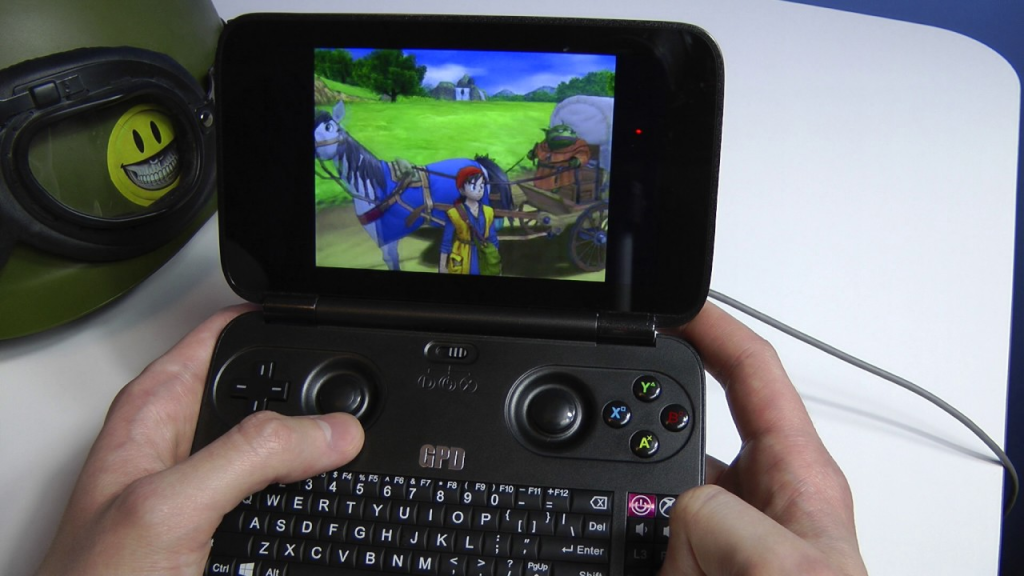
It was a perfect solution to being able to carry a device everywhere that’d let me game via the built-in Xbox Controller, and if need be, I could plug in a keyboard and mouse!
So, a couple of years ago, I bought a GPD-WIN, to try and carry around a pocket console for emulation and on-the-go coding, etc. Now at the time, I didn’t have JT-CXS to offload all the GPU processing to, so I was limited in the extreme to whatever the GPD-WIN itself could handle. Which really, was pretty much nothing beyond PS2 ROMs.
However, the device was capable of running Windows 10, and while that left next to nothing for storage, I didn’t need the storage – I could use the device as a thin-client for access to JT-CXS. It was a perfect solution to being able to carry a device everywhere that’d let me game via the built-in Xbox Controller, and if need be, I could plug in a keyboard and mouse! This meant that whilst I’m out and about and on-the-move, I had full access to my Game Libraries, and could play most modern games (and by a stretch I could use the terrible joystick-mouse mode, to play non-WASD games such as Civilization VI).
The iPad, that old workhorse
My iPad is a pretty special solution – it’s the entry-level iPad Pro 9.7-inch from 2017, and surprisingly, it’s been extremely helpful, despite a lack of 4G. When I get a chance to upgrade, I will be sure to get a device with Cellular capabilities.
The iPad will primarily be used for:
- Coding on-the-go
- Browser/Media Consumption
- Design + Planning
- Forex trading and financial management
The Bujo (Bullet Journal)
Bullet Journalling has changed my life. Seriously, it’s become a day-to-day system that helps me manage and self-reflect on a level that no digital system has ever been able to achieve. It’s a simple (or as complex as you want) system of writing a daily log in a book that helps you compartmentalise and keep track of all the crap that’s flying around in your life. I’ll probably blog a bit more about this later on, but here’s the intro ‘how-to’ video:
I use the Moleskine Soft Squared Notebook (L) to keep my Bujo in order; expensive, but I love the feel of the book in general, and its simple, unassuming, no-nonsense design. In fact, I’ve just made a note to myself to start working on buying more of these notebooks so I don’t run out in the future.
And so we come to the end of Project Cloud Citizen. Sure there are tweaks and fixes needed, but for the overall part I’m able to travel around with a newly organised EDC bag, and perform all the duties and tech work I need, without breaking a sweat, or being chained down to a desk now. It’s not complete freedom, it’s just usingi the power of the cloud to extend that ‘leash’ I have to my work, so that I can move around and enjoy what I need, whever I need.
So, I’ve never really been shy about using linux as an Operating System for my web servers; be it Debian, Ubuntu, CentOS or otherwise.
However, for the first time tonight I’ve decided to roll out Linux on a desktop that I’ll be using; it’s for the bedroom, where I might do some blog writing, or check my email, and some general productivity basics. Enter Ubuntu 18.04 LTS Desktop edition. Yup, that same Bionic Beaver version I was kidding about on Twitter a few days ago; I’ve started using it.
It’s only been about 15 minutes (the install itself took an additional 5 minutes on top of that) but within that 15 minutes, I’ve got Visual Studio Code running, I’m writing this blog post, and I’ve started installing Git. Seriously, from start to finish, that’s an incredible turnaround speed at which I’ve booted into the OS, started configuring it and immediately become productive.
I haven’t really gotten elbows deep into the guts of the OS in terms of customisation, but hot diggity there’s already a few nice things I like about it:
- I’m using my 34″ ultrawide as my default monitor in the bedroom, the 3440 x 1440 resolution is natively supported
- The whole interface feels really snappy and quite intuitive!
- I got VLC and Spotify running almost instantly (I had to login to Spotify, that was the biggest delay)
- Parsec streaming is no nonsense for when I need to use Windows stuff (Games, Adobe Suite etc)
So far, the OS does all the usual stuff I need, with the exception of gaming, but that was always the intent with a machine in the bedroom. The last thing I want is to be gaming and disturbing my significant other in the middle of the night.
Overall, really pleased with the OS. And can foresee myself using it more often from now on!
So, in a previous post about Project Cloud Citizen, I mentioned that I was possibly going to use my iPad with an iOS specific mouse. Enter, the Citrix X1 mouse, and the Jump Desktop App!
I’ve literally had the mouse for about 10 minutes, and it’s working a treat through Jump Desktop; it feels a little weird, but seems to be tracking fine. I’m actually stunned at how usable it is!
Sadly, all the gaming sync’d issues with the Dex Pad that I reported having, also seem to be mimicked with the iPad, Citrix X1 and Jump Desktop. There’s a small bit of hope however — certain game styles do work with the setup. Things like DIablo 3, Torchlight 2, etc. Games that don’t require constant, active input from something like the WASD control setup do work very nicely.
So there’s some middle ground there, I think my expectations overall, are too high for something like iPad cloud streaming for games right now; and that’s ok. Having things work on the iPad, within a self-contained little unit, with phenomenal battery life, and usability – perfectly matches my desire to be fully mobile, while also matching my desire to not carry something around that’s as heavy as a laptop, at least for the time being.
Too many Compromises
While there’s some games that work – really, the iPad works as a decent laptop replacement when I use it to remote into my Windows systems, with minimal disruption. Sadly, it’s not going to let me remote in and play games. All my other bits of productivity, would remain unaffected, and at the end of the day, that’s pretty important.
So end of the day, the iPad, combined with the Citrix X1 mouse does make the best laptop replacement – with instant on, superior battery life; I won’t ever really be without abilities for productivity. I just can’t really expect to play amazing games with only my mouse.
It’ll still be in my Every Day Carry
With a combination of PLEX, Netflix, Jump Desktop, and the Pencil/Citrix X1/Smart Keyboard combo, my iPad becomes a suitable, extremely lightweight laptop replacement. The instant-on, and insane battery life, give it a pretty awesome advantage. The size is still reasonably large enough that I can get work and media consumption on it done, and still handle it comfortably in one hand.
As mentioned in part 1 of The Samsung Dex Pad posts – I’m looking into cloud gaming with the Dex Pad as well. It’s so far provided a pretty good solution for working via RDP solutions, with a few (so far) trivial issues. This part covers a little more in-depth overview of the issues I’m currently facing with the Dex Pad…
Mouse Capture Issues
My weapon app of choice when it comes to streaming my desktop is Parsec – it’s worked amazingly well for 1080p 60fps cloud streaming from my Notebook so far, but unfortunately, while Parsec works great, and keeps my mouse nicely within the confines of the specified 1080p resolution; I have mouse tracking issues in FPS games, unfortunately. It’s somewhat annoying and upsetting that gaming doesn’t work correctly, however some Google-fu has shown me that it’s most likely a Samsung Dex issue, and really – there’s no telling when it’ll be fixed.
To see if things were just a Parsec issue, I also ended up downloading the Moonlight Gamestream app which is based on a FOSS version of NVIDIA’s Shield streaming tech (I luckily, run a GeForce 1080Ti video card).
To test my FPS gaming purposes – I decided to pick a game of Rust, which really, is quite asking for punishment, haha!
Turn around…
In Parsec, things did not go well ™. I couldn’t turn a full 360 degrees, and had to find myself lifting my mouse off the pad to do the tiny-mouse-pad-shuffle on my giant deskmat just to turn around a little bit.
Every now and then I get a little bit nervous…
Things were worryingly bad audio wise too, with sound crackling, and some blurring of texturing every now and then, so I suspect I was having WiFi bandwidth issues. I’ll need to test a fix (probably in a Part 3) of a USB hub and usb-to-Ethernet adapter.
Turn around…
Things were even worse trying to turn in Moonlight – I completely lost Mouse Capture abilities – although my mouse buttons for left/right-click were working. Keyboard input was fine, however.
Every now and then I get a little bit terrified…
And then my first PvP moment came. Almost instantly my attacked realized I couldn’t turn around, and to add to insult, he started taunting me over voice chat in-game. And here’s the other problem, I had no mic support. This is more a combination of the Dex and Parsec/Moonlight’s support for the devices.
Some fiddling required!
There’s a lot of work that’s needed in Samsung Dex (Pad). For example, not every sort of keyboard shortcut is pulled across to the Dex, sure the common ones are (ctrl + c, ctrl + v); but input gets entangled when I typed too fast for the Dex (I type about 130wpm) and why is shift + spacebar a shortcut for what language I’m using on my keyboard?? A quick Google search shows I’m not alone in being annoyed at this, and I’ve ended up having to download a separate app to just tweak and deal with Dex’s shortcomings.
It’s annoying, and the product is a work in progress I suppose – from a developer’s standpoint, I doubt there’s any reasonable way for the Samsung engineers to spend time working out the configurations that every user ever will need out of the Dex. But you’d think Korea’s largest company would have some resources for internationalization and basic research. It just wasn’t enough.
Here’s two apps that saved my Dex experience, and to top it off, I had to pay moneyfor one of them, which made me even more upset.
- Dex MAX – this app lets me repackage the APKs of other Apps as needed to fit full screen
- Desktop Hub (Dex Hub) – I had to pay $3.99 to unlock the ‘Pro’ version of this app, which helped me reconfigure a bunch of Dex built-in keyboard shortcuts, volume/screen usability tweaks and more
On top of all the shenanigans above, I’ve now also needed to enable developer mode which really, is a hugely unnecessary (albeit probably inevitable in terms of the lifetime of my ownership of the Note 8 and an Android phone) step. While I have no doubt that at some point in the future I would have enabled this mode and stuck my hand up the Note 8’s proverbial skirt, it annoys me that I have to do this for a first party accessory, just to get some applications to behave properly, and enable greater usability in app window management!
So, what does work?
Remote desktop works – be it through either Parsec (preferred) or via Microsoft’s RDP App inside Dex MAX for fullscreen compatibility. So there is that at least; it means I can do my work, designs, and projects as needed.
Natively, there’s Microsoft Office which all works completely fine on the Dex, it’s optimised for Dex in fact and I didn’t have any problems using it – being a near identical experience to the real desktop applications. Mad props to Microsoft for putting so much effort into their Office suite!
Plex also kind of works. I have to use the browser based version to watch my media, and it’s got some odd re-sizing issues (full screen mode goes black after about 10 seconds). Netflix actually works very well once developer mode and ‘True Window’ mode from Desktop Hub is enabled. The subtitles even seem clearer than the native apps on iOS and Playstation!
In the end…
Will I be using the Dex Pad? Yes. To keep it short and sweet, the Dex Pad lets me do a lot, with a thin client, without the extra hassle of a laptop. The ‘extra computing power’ of a laptop is moot for the situation I want to use it in (explicitly, as a thin client to do computing from my bedroom should I need it). I can enjoy most of my media, and all the productivity I might need with it.
Samsung is going to have to go more than halfway across the bridge to entice devs to start making products that work with it. Once the ball gets rolling though, look out Apple and Microsoft!
Gaming does work, but not entirely well. But there are some games which do, and gamepad gaming still works a treat so I’m not completely without. Admittedly, this is being used as a Cloud Gaming terminal, which I must stress the Dex was not intended for. In fact, even if it were intended for gaming as it mentions in passing, cloud based gaming would’ve been the last thing on their minds.
Again though, it’s an adventure and hassle in configuration that shows an incomplete experience with incredible potential. The Dex is the closest desktop replacement I’ve gotten for a non-PC/laptop device. And I so eagerly want to love it and use it that I’m even doing so now, and will be going ahead with using it for a lot of my evening computing.
But I cannot stress how impossible it would be, without already owning a beast of a PC, strenuous setup with the Cloud Citizen project, and a lot of compromises on my behalf to accept how things work. I am using the Dex far beyond the scope of Enterprise applications (essentially office productivity suite level applications). Studio applications work to some extent, I can see orthographic based 3D-applications working well here; using Unreal Engine Editor, Unity 3D, ZBrush, and Google Sketchup gave me quite a few headaches with mouse movement syncing working only partially.
I cannot recommend this product to anyone else. But I respect what Samsung’s trying to achieve here, and I personally will remain interested (and a user) in the Dex product lineup as we continue on into the future. There’s a lot of promise here, and Samsung could well have a golden ticket to a much much larger install base instantly, with the possibilities the Dex provides.
It just needs that extra support from the app developers, and more of Samsung’s own resources thrown at it too. It’s a great platform, but Samsung is going to have to go more than halfway across the bridge to entice devs to start making products that work with it. Once the ball gets rolling though, look out Apple and Microsoft!
So, this afternoon, I picked up the Samsung Dex Pad. Some of you will recall my earlier blog post bemoaning whether or not I can survive on just a tablet, and whilst I actually have a Citrix M1 Mouse for the iPad on its way, I also decided to pick up the Dex Pad, as a potential thin client replacement for my bedroom.

This little doohickey is the next revision of the Dex Station which was released with the Samsung Galaxy/Note 8 series. This version, released with the Galaxy 9 series – requires any 8 series devices to have Android Oreo as a base release for the OS for backwards compatibility.
It supports up to 2K resolution, has a built in cooling fan, and uses a platform based docking form factor, instead of a puck-shaped vertical factor. It makes a lot of sense actually, as it lets the phone be used as a trackpad or keyboard as required, should no extra input devices be available. It’s a very clever idea, one that I’m sure would be welcome to a lot of semi-mobile workstation users.
I’m actually writing this post at around about midnight, and it’s quite late, having just received the device to take a look at, the initial overall impression of the device, having spent about 10 minutes with it.
First off, this is what the browser looks like, running on a 1080p screen:

It’s perfectly usable, and I have no issues writing posts (in fact, this very post is being written via the Dex) for my blog, or doing basically productivity work. Where the big test comes in, will be on remote streaming for desktop, and gaming.
Dex MAX – an invaluable tool
So, to my horror, a lot of the apps on Dex don’t support full screen resolution – including Microsoft RDP. To fix this, I actually had to download this 3rd party companion application, Dex MAX – it’s a life saver. I probably would have returned the Dex Pad if this app did not exist.
It tries to force the apps to run full screen, and if it doesn’t work – you can enter expert mode and modify the manifests in the APKs to force a full screen mode! If that doesn’t work, then the devs will need to add native full screen support in a new version of the app.
Remote Desktop (Microsoft RDP Client)
As one of the primary reasons for an enterprise environment etc, I know a lot of organisations out there use Citrix, VMWare, etc. but you’d think that getting basic Dex support with Microsoft would be a key step. Especially considering how prolific the operating system is…
However, no, it doesn’t work without being modded by Dex MAX. Here’s a screenshot of it working in Dex MAX:

Now, it works perfectly fine as an RDP client, meaning about 90% of what I do is sorted. Productivity wise, I can scrape by as well as needed!
So all in all, it’s a pretty stable experience. It’s not the ultimate replacement, but for everything non-entertainment wise or just general browsing, it’s fine. It’s usable, and I probably will use it.
In part 2 – I’ll update my findings on gaming, which works (with many many caveats).