I’m a big fan of Trello. I love it a lot, it’s free, it’s simple, it’s intuitive. And recently, I’ve been looking into ways I can manage projects from a higher level view instead of a per project kanban-style in-depth view.
I’ve decided to see if Trello might actually be able to help with that.
Why do this?
Initially the value of doing this might seem frivolous; but it gives me a chance to see at any given time, the ‘active’ projects I have on my plate at any given time. Using a traffic light system, I’ll know the status of any various projects as well!
Instead of trying to keep a mental checklist of everything I’m up to, this Trello board should help me keep track of things that need to be done for a variety of different topics. Therein, I think, lies the value in doing this experiment. If successful, it’ll improve my time deficiencies, and issue tracking capabilities on a personal level.
Methodology
I’ll be using this Trello board (it’s also the Projects link on my main menu up the top of the site) to organise my Projects into different categories. Things will be sorted as:
- Each category forms a list
- Each project in that category is a card
- Tasks/To-Do in each project is in a checklist
- Comments are used to provide updates on the project
- Projects can be labelled based on the status of project:
- Green = Project is considered released (it may have upgrades and extra tasks to do)
- Yellow = Project is in active development
- Orange = Project is in conceptual/planning stages
- Red = Project halted/unstarted
Here’s a screenshot of a few projects in how I’ve organised things right now

Hopefully, by doing things this way, I will be able to keep a rolling project log through the Comments section of each of those project cards.
Expected Benefits
Greater focus on completing and achieving project outcomes; and less time spent procrastinating on what needs to be done amongst the many projects in my mind.
In conclusion (random musings)…
Prior to the start of this year, (we’re only 4 months in…) I really spent a lot of time looking at various tools and just using them at face value, never really looking into how I could best use them, nor did I feel the need to really de-clutter my life. However, the turning point I believe, was picking up the habit of Bullet Journalling, and the start of my new career opening some doors for me on how to declutter the most messy part of my life (aside from my career itself)) – my tech/gadgets and gaming habits.
I’ve since looked at the tools I have available to me, and really decided to try out using them to their better (if not greatest) effect so that I can hopefully be a bit more minimalist with my life, less wasteful and more efficient.
Since the start of the year, I’ve been working towards making the technology and capabilities of the tech I use in my every day life, a whole lot more comfortable and less cluttered.
I’ve been looking into a minimalist lifestyle after realizing whilst trying to plan on moving out – that I have way too much crap in my life to accommodate such a move.
There’s a pretty simple rule/goal I keep in mind now with each of the gadgets, tech or ideas I have:
It should, as seamlessly as possible, integrate into my everyday life and tasks. I shouldn’t have to worry about how I’m doing something, or if I can do something.
And the best way I can think of that, is to no longer be tied to a desk in order to do all the programming, design, development, gaming and media consumption.
It would enable me to have a much more enriched quality of life, being able to go out, and adventure around, and when it all gets a bit much, I can just reach through the internet and hug the comfort of my favourite IDE, or enjoy something from my personal, (and carefully) curated media collection.
I’m going to need to join The Cloud™. I’ll be calling this experiment, “Project Cloud Citizen“!
Sounds alright – and I think, very doable if you were based in North America, Western Europe, Korea, Japan, Singapore or Scandinavia. Coincidentally, friends in all those regions are the ones who talked to me about this.
It’s a way more difficult thing to achieve in Australia, where traditionally, the concept of a decent upload speed for data sharing and enrichment, hasn’t existed until the arrival of Netflix, and even then, leaders of society in Australia still think it’s just next-gen TV.
Getting away from the office desk at home
As it currently stands, I’m fortunate enough to work at an office that allows me to keep a laptop present in the office, that in theory, is connected at all times.
This laptop isn’t a snooze in terms of specs:
- Gigabyte Aero 14
- Intel i7-7700HQ
- NVIDIA GeForce GTX 1060
- Kingston 16GB (1 x 16GB)
- Gigabyte P64v7 Motherboard
- 500GB SSD (TS512GMTS800)
- Windows 10 Home
Why do this?
Reason #1
I want to be untethered from the restrictions of only being able to show friends & family games, or media that would be accessible within my home office.
I’d like to be able to develop code and access a remote system that is my own without having to carry around or go through an elaborate setup process.
Nowadays, more than ever, a combination of my iPad Pro and Samsung Note 8 cover all my usage that isn’t coding, or gaming. And even then, they begin to encroach on coding, and sometimes gaming!
Reason #2
Where I use my PC at home is an oven with my current PC setup; no joke, I run an incredibly complicated setup that I think is overkill for pretty much everybody except the most hardcore of PC gamers.
It’s messy, it’s finicky, it’s expensive as all heck and it provides the best damn gaming experience I’ve had the pleasure of using.
But in the sweltering Australian summer, it’s untenable with my neighbour’s air conditioning exhaust being about a metre away from my window, and the combined heat of my PC + 3 monitors, and consoles + TV, it becomes somewhat unhealthy, if not overly sweaty.
This is cheaper than buying air-conditioning myself
Reason #3
On a personal level, I feel like the majority of the time that I don’t want to go somewhere or spend time elsewhere outside of the haven I’ve built at home, is because I feel like I don’t have the access to my files and work to tinker with as I go along.
Coding and tinkering with various web projects has become an almost safety blanket to what I do.
The first test
Over the course of a weekend, I went ahead and did some very rudimentary testing of some functions I’d be performing.
Of course; a speed test is in order:

I’m pretty content with the speeds! My main concern was the upload speed of my laptop; which as you can see, can more than handle the 1080p streaming I was intending to do with it.
I’m surprised the USB 3.0 to Ethernet dongle I was using didn’t crap out! (cheers to my mate: Matt for providing the adapter)
Note to self though, in the future I’ll need to take photos or screenshots of my screen streaming for image quality comparisons (I know streaming will always be worse in terms of visual acuity, but by how much is worth quantifying)
Gaming
Over the weekend, I used a combination of TeamViewer, Hamachi and Steam In-Home Streaming to get a few games going. The image quality felt something akin to watching a twitch stream; there was occasional ribboning of colours in fast-moving games, but aside from that, it worked flawlessly. The almost low-spec restrictions of the laptop forced me to consider playing some of the more indie games in my backlog too.
Rocket League, Hammerwatch, Torchlight all got a go – and I have to say, the only times the frames or input stuttered were more the lack of power behind the laptop and its unoptimised configurations (they were all set to high settings etc.).
Media
Plex had a couple of movies I played to both a friend and myself (Kingsman is a great movie!) simultaneously.
The quality was superb, and stress on the laptop was more than manageable!
Productivity
Admittedly, I did this through TeamViewer, which is rubbish for such situations anyway. However, it was acceptable! There was some input lag, but that’s more TeamViewer’s crappiness as opposed to any other laptop issues. This I expect, should be resolved with proper Remote Desktop access (I’ll need to change to Windows 10 Pro).
Overall, I think the first test was a success, and it’s time to start planning a serious configuration for this application!
I’ll try to keep it well documented 😛
So, it’s been quite a while! Today I’d like to make a fairly quick post about my most recent toy, and the impact it’s actually had (within 24 hours – that’s pretty impressive!) on the way I’m working and doing eLeague.gg stuff!
Behold, my newest gadget (toy) – the Gigabyte P57X-1070-603S:
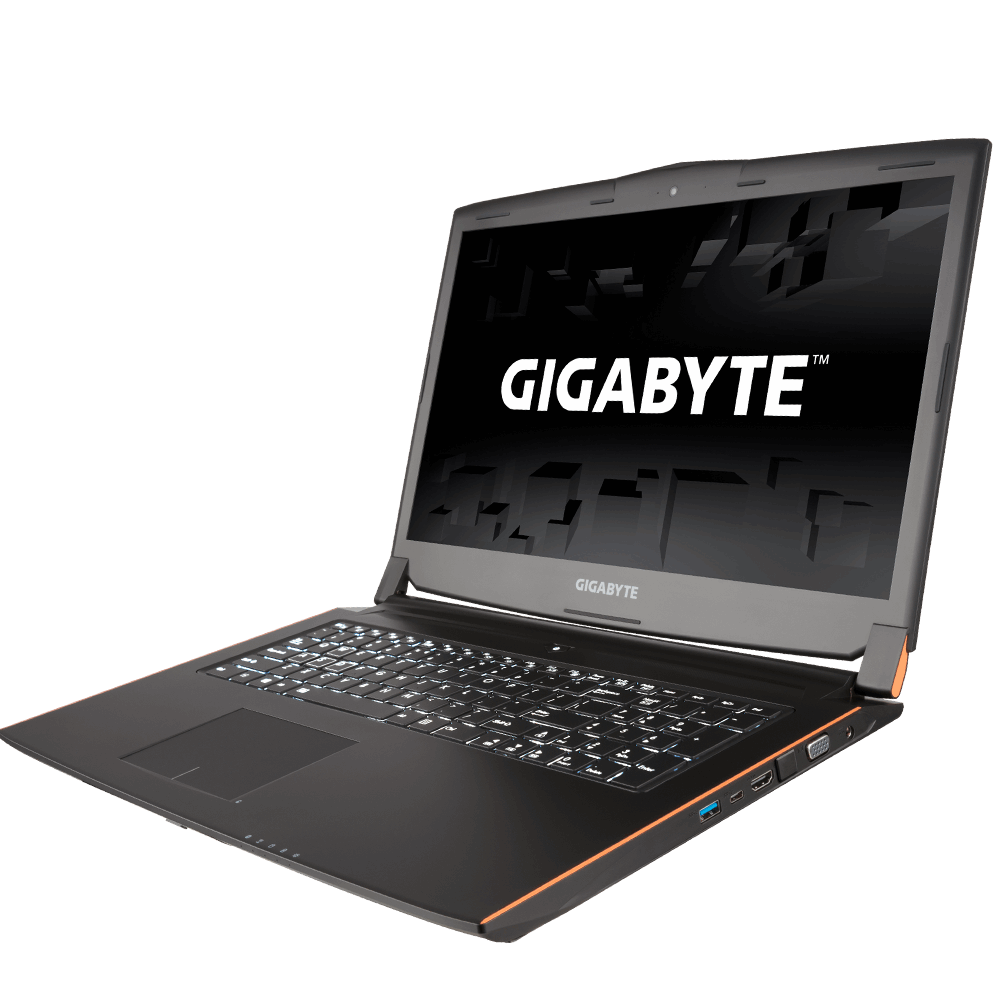
It’s a pretty big 17″ Laptop, with the new GeForce 10 series graphics cards built into it (a Geforce GTX 1070 to be exact). It’s a device of many firsts for me:
- My first gaming dedicated laptop
- My first $2500+ laptop
- My first 17″ laptop
- My first attempt at rolling everything I do into a single machine, realistically
It’s the fourth point that I’m going to be rambling on about today. Prior to owning this laptop, I was always a fan of the MacBook Air – using it in excess of 8 hours a day, I was essentially surgically grafted to it. It let me move around and still keep up coding.
The way I worked revolved around a core desktop setup (5 monitors, nice keyboard, etc) and I would float around coding on my laptop during the day. But unfortunately, I noticed something:
- I would splurge on my desktop, and it was great, but…
- I spent more time on my laptop than at my desktop at home
- I couldn’t do everything on my laptop (like photoshop, gaming, etc)
- At eLeague.gg events I ended up bringing both desktop & laptop
So I figured that I would really need something that could let me roll everything into one. How fortunate it was for me then, that NVIDIA rolled out its 10 series GPU into laptops that essentially, had all the clout of modest desktop gaming PCs with minimal compromise. Hence, I’m now a primary laptop user, back in the Windows ecosystem.
The benefits are pretty amazing so far, and I haven’t even had an opportunity to attend a LAN yet:
- My laptop replaces my current primary machine at work, and is far and away the most powerful machine in the office.
- At eLeague.gg I can now focus on immediately using my laptop to begin management and deployment of the event’s technical features without having to wait for the team to roll out network and power functionality. More time for management, less time in labour means I can focus on refining the event for both our (growing number of!) attendees, and sponsorship commitments.
In the spirit of brevity, I’ll go over how things are changing in our development and workflow, especially on a code level in another post, for now – this laptop appeared at a time of drastic change in how things work for us here at eLeague.gg