So, it’s been about a week since I’ve been back from Taiwan, and I’ve finally had a moment to catch my breath with work and all the things that happened while I was away from the office, life and such.
To basically sum everything up – Project Cloud Citizen works. It meets my needs with my work and media requirements. Between the Nintendo Switch, mobile and iPad itself, my gaming needs are met too. There’s a few caveats however…
Caveats for why Cloud Citizen is a ‘success’
I’m no longer a hardcore gamer
This is probably the biggest caveat I can think of. Gone are the needs of 100% minimal input lag gaming; I’m not cruising around in some competitive FPS, and most of my gaming needs can be very casually met. I was satisfied mostly gaming on the Nintendo Switch, and the occasional odd iPad game.
I’m not as media creative focused anymore
I still tinker around every now and then in Photoshop and with some graphics; I don’t think this’d be possible with full blown video editing suites. Rudimentary graphic design is still very much possible, as long as you’re willing to compromise with colour reproduction and image quality while editing your work. The finished product will very much still be to spec, but due to the nature of streaming, you might not see your work with perfect clarity.
Cloud Citizen works for me
Photos
I was able to upload and retrieve just about every photo I took within a few seconds, on-demand during the trip. Taiwan has cheap, unlimited 4G for tourists (Alice and I picked up a 10-day SIM) with extremely consistent coverage everywhere in Taipei and Hualien. Whilst this is mostly a success due to the availability of mobile internet; the usability is a success from my phone/iPad with Cloud Citizen.
Remote Work
Whilst I was overseas, my team deployed a new project that had been in the works for about half a year. Thanks to Cloud Citizen, I was able to remote into my server, and via a remote setup on my iPad with a mouse — I was able to contribute meaningfully to the processes.
I could indeed use my iPad as my main computing device, as long as it’s backed up by the power of a full fledged desktop environment back at HQ…
If it’s a success, does that mean…?
That I’ll be using my iPad as my main device? After this whole experience, I feel that yes, I could indeed use my iPad as my main computing device, as long as it’s backed up by the power of a full fledged desktop environment back at HQ. It has made me reassess my needs (and wants) for mobile computing; and I come to the conclusion that I need something a little more robust.
My work, and often whatever I’m doing digitally, tends to be code based. And my workflows currently involve a lot of Docker container usage for my work. The #1 issue that I have with the iPad is that I have no way for testing my PHP code locally. Sure, this could be overcome by remoting into a PC and doing everything from there, and whilst it’s not terrible, it’s also not ideal (for example, if I’m overseas I might not have access to the internet, or be on a very data-restricted plan).
This, in essence, makes my choice for me going forward into 2019… I’m going to need to return to using my laptop. It’s no slouch, and it’s comfortably going to run all the Docker stuff I need; combined with some other applications – I think I should be quite comfortable with development on the go with it.
It’s unfortunate that yes, while I consider Cloud Citizen a success; it’s only a partial success with the particular ecosystem I brought with me to Taiwan.
So, over the next couple of weeks, I’m going to be travelling overseas to Taiwan. It’s a vacation, my first in nearly a decade; and since my last vacation, a lot of technology has changed that perhaps makes this journey a little more comforting to a reclusive geek like myself. The airline I’m flying with, provides a USB socket in its international economy seats, with 5V DC and 500mA charge, meaning I can power a device somewhat comfortably to enjoy a variety of media, and entertainment. So without further ado, I’m going to go into something of a diatribe about preparing for the trip to soothe my inner geek.
The constraints
There’s a number of limitations on this vacation, predominantly governed by my travel arrangements (flights, trains, etc.) so listing them out:
- Portability; I’m using a Crumpler 8L backpack; the “Low Level Aviator”
- Power; My gadgets need to last a while, and/or be charged with in-transit USB (5V DC, 500mA – about the same as a USB 1.1 port)
- Media; and Storage for photos and videos from my phone
- Entertainment; I don’t expect to have much time, but in the down time and flights I might watch a show, or three…
- Gaming; of course 🙂
The goal of this post is to put down my thoughts so that I can build up an EDC kit for my trip.
The EDC Backpack
Aside from my wallet – “The Pilot” by Andar; and my iPhone on my person – I’ll have most of my gear in my backpack with me:
- iPad Pro 9.7″ – it’s only 32GB, but it should hold enough of my notes and such to continue being useful!
- Nintendo Switch – previously in Project Cloud Citizen, this would’ve been my GPD-WIN PC, more on this later;
- Bullet Journal – my bujo, I carry this with me pretty much everywhere
- Pen cases – will hold my pens of course, and insulin injection pens, as well as some bandaids and what have you
- Screwdriver kit – this is a little portable kit with a combined tape measure that I will keep with me just in case
- Glasses case – obviously, for the glasses I wear, as well as a spare pair inside
- Battery Pack
- Cables for iPhone/iPad/Switch
This trip is a good opportunity to really see what there is that I can and can’t do when I’m truly away from my home desktop, and must rely on Project Cloud Citizen. I’m packing quite lightly with this trip, and my day-pack is smaller than my usual laptop bag. I’m also trying to ditch the laptop in favour of the lighter-weight iPad, and gaming/entertainment is handled by both the tablet and my Nintendo Switch instead.
In my last Cloud Citizen post I mentioned that I was going to use my GPD-WIN for my gaming purposes; but I am actually thinking more along the lines of no longer using it. For a few reasons:
- Its battery is good, but not as great as the Nintendo Switch or the iPad
- It’s far more general purpose, and far more of a compromise in power/features – so I feel like I’ve sacrificed too much to use it
- The iPad can truly connect with my Cloud Citizen server as a remote client now
For anything really PC related or desktop related, I can actually use my iPad now to remote into my server as needed using a piece of software called Jump Desktop, it works great with a specific bluetooth mouse and my iPad, and should satisfy any mobile needs I might have. In fact, I intend to work on this site and blog while I’m in Taiwan to try and get a feel for it.
So as it seems, I’m going to start using just my iPad and Switch, for this trip. It’s a 9 day long trip; so it’s a fairly valid testing opportunity!
I’m thrilled to announce that I’m going to be launching a Conan Exiles server personally for friends and family to play on. As a fan of the survival game genre – Conan Exiles offers a pretty unique blend of resource gathering, adventuring, and exploring a wilderness filled with monsters, animals and gods.
Just for my own reference – the server settings (in their unedited form) are below. An explanation of the settings is available here:
MaxNudity=0
ServerCommunity=0
ConfigVersion=9
BlueprintConfigVersion=19
PurgeNPCBuildingDamageMultiplier=(5.000000,5.000000,10.000000,15.000000,20.000000,25.000000)
PlayerKnockbackMultiplier=1.000000
NPCKnockbackMultiplier=1.000000
StructureDamageMultiplier=1.000000
StructureHealthMultiplier=1.000000
NPCRespawnMultiplier=1.000000
NPCHealthMultiplier=1.000000
CraftingCostMultiplier=1.000000
PlayerDamageMultiplier=1.000000
PlayerDamageTakenMultiplier=1.000000
MinionDamageMultiplier=1.000000
MinionDamageTakenMultiplier=1.000000
NPCDamageMultiplier=1.000000
NPCDamageTakenMultiplier=1.000000
PlayerEncumbranceMultiplier=1.000000
PlayerEncumbrancePenaltyMultiplier=1.000000
PlayerMovementSpeedScale=1.000000
PlayerStaminaCostSprintMultiplier=1.000000
PlayerSprintSpeedScale=1.000000
PlayerStaminaCostMultiplier=1.000000
PlayerHealthRegenSpeedScale=1.000000
PlayerXPRateMultiplier=1.000000
PlayerXPKillMultiplier=1.000000
PlayerXPHarvestMultiplier=1.000000
PlayerXPCraftMultiplier=1.000000
PlayerXPTimeMultiplier=1.000000
DogsOfTheDesertSpawnWithDogs=False
CrossDesertOnce=True
ThrallExclusionRadius=500.000000
MaxAggroRange=9000.000000
FriendlyFireDamageMultiplier=0.250000
CampsIgnoreLandclaim=True
AvatarDomeDurationMultiplier=1.000000
AvatarDomeDamageMultiplier=1.000000
NPCMaxSpawnCapMultiplier=1.000000
serverRegion=0
RestrictPVPTime=False
PVPTimeWeekdayStart=0
PVPTimeWeekdayEnd=0
PVPTimeWeekendStart=0
PVPTimeWeekendEnd=0
RestrictPVPBuildingDamageTime=False
PVPBuildingDamageTimeWeekdayStart=0
PVPBuildingDamageTimeWeekdayEnd=0
PVPBuildingDamageTimeWeekendStart=0
PVPBuildingDamageTimeWeekendEnd=0
CombatModeModifier=0
ContainersIgnoreOwnership=True
LandClaimRadiusMultiplier=1.000000
BuildingPreloadRadius=80.000000
ServerPassword=
ServerMessageOfTheDay=
KickAFKPercentage=80
KickAFKTime=2700
OfflinePlayersUnconsciousBodiesHours=168
CorpsesPerPlayer=3
ItemConvertionMultiplier=1.000000
ThrallConversionMultiplier=1.000000
FuelBurnTimeMultiplier=1.000000
StaminaRegenerationTime=3.000000
StaminaExhaustionTime=3.000000
StaminaStaticRegenRateMultiplier=1.000000
StaminaMovingRegenRateMultiplier=1.000000
PlayerStaminaRegenSpeedScale=1.000000
StaminaOnConsumeRegenPause=1.500000
I’m a bit of a purist and don’t want to detract too much from a vanilla experience. Likewise, I may also work towards doing a server reset on a fairly long schedule (unsure yet, but I’m thinking every 90 days).
So, I’m going into the final month of probation at my current job; my project Cloud Citizen deployment has actually already started upgrading and now I’m moving from a laptop system to a desktop system to host my personal cloud services. The machine itself is a gaming-grade desktop, running Windows 10 Professional, and I’ll be enabling Docker on it to provide additional services I might need.
Specifications
- AMD Ryzen 7 1800+ CPU (3.6GHz)
- 16GB DDR4 16-18-18-36 3200MHz RAM
- 2 x 10TB HGST 7200RPM HDDs with 256MB Cache
- 1 x 250GB Samsung Pro M2 SSD
- ASUS Turbo Geforce 1070 GTX 8GB Card
It’s significantly more powerful than my laptop, with enough resources to last me a couple of years I’m hoping. It’s sitting in an old Fractal Design Core 1000 case (circa 2008) that’s really, just barely holding together, haha! I’m using the AMD Wraith Max from my recent home desktop upgrade (AMD Ryzen 7 2700+) to cool the Ryzen 7. It seems to be working extremely well!
It’s all in the Services
So, unlike the laptop implementation of my Cloud core for Cloud Citizen, I’m going to be rolling out services on JT-CXS almost entirely exclusively for myself, and provide provisional, temporary access to others as needed. I’ll be running a number of consistent apps that passed muster when I was running on the more fiddly JT-NXS system.
Services
- Plex – personal media streaming and organisation
- Ubooquity – personal eBook/Manga library resource
- Parsec – 60fps 1080p gaming streaming to my devices at home, and on-the-go
- Jump Desktop – iOS compatible desktop streaming at high FPS
Primary Roles
Cloud Citizen’s new machine – JT-CXS – still maintains it’s role of being my core computer, to enable me to work remotely from anywhere with a reasonably fast internet connection. It should let me:
- Develop software projects (Git, Visual Studio Code, Git Bash, Sublime Text, WinSCP)
- Plan the software projects and ideas I have (Zenkit, Visio)
- Work on Documents, and Publications (Office)
- Work on Media Production and Development (Adobe Creative Cloud)
All in all, with the extra grunt this machine provides – I’m really looking forward to being less restricted in all the things I can do over a cloud connection; and really, start looking towards using my iPad or ultralight notebook as my primary physical device.
An Every Day Carry (EDC) Kit
So – with my gadgets, I’m hoping to eventually reconstruct an EDC Kit that I can use to travel with. It’s all a little interconnected really – the investment in Cloud Computing means I can offset the processing power I need on-the-go; and make a lighter EDC kit for myself so that I can catch public transport, and manage myself when I’m out and about – which in turn means I’m more likely to use my car less (thus lessening my carbon footprint, and saving some dollars in the bank).
As the final component of Project Cloud Citizen – I think it’s pleasing to say that in this final week, a device has surfaced (from when I was cleaning my room and assembling a shiny new wardrobe system) that provides an answer to the gaming shortcomings I had previously by basing myself entirely on an iPad!
My EDC is very technical and work focused – and the three primary pieces of equipment in it, are the GPD-WIN, my iPad, and my journal. These are discussed below.
Introducing the GPD-WIN
For solely gaming – the GPD-WIN is the device I’ll use.
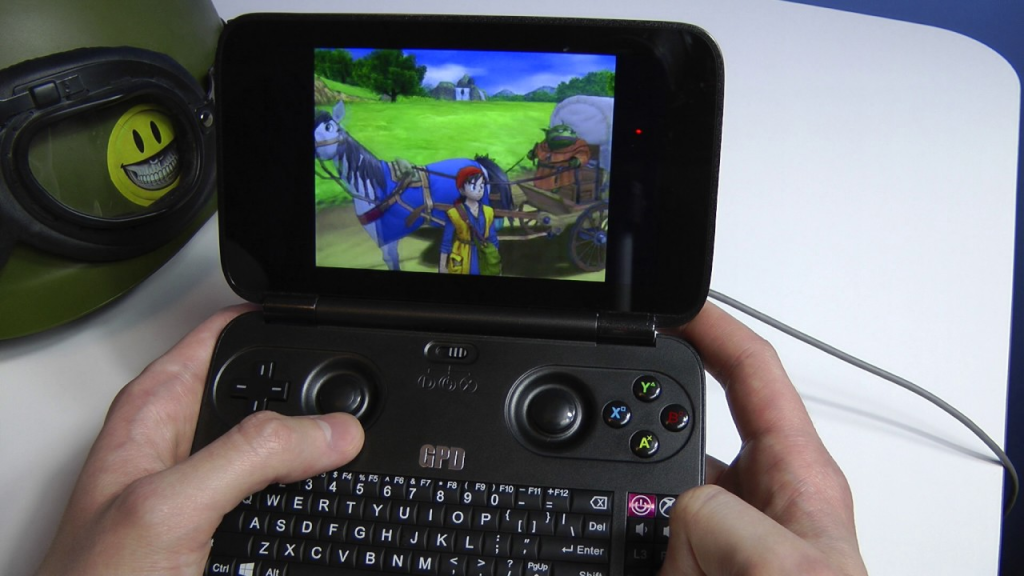
It was a perfect solution to being able to carry a device everywhere that’d let me game via the built-in Xbox Controller, and if need be, I could plug in a keyboard and mouse!
So, a couple of years ago, I bought a GPD-WIN, to try and carry around a pocket console for emulation and on-the-go coding, etc. Now at the time, I didn’t have JT-CXS to offload all the GPU processing to, so I was limited in the extreme to whatever the GPD-WIN itself could handle. Which really, was pretty much nothing beyond PS2 ROMs.
However, the device was capable of running Windows 10, and while that left next to nothing for storage, I didn’t need the storage – I could use the device as a thin-client for access to JT-CXS. It was a perfect solution to being able to carry a device everywhere that’d let me game via the built-in Xbox Controller, and if need be, I could plug in a keyboard and mouse! This meant that whilst I’m out and about and on-the-move, I had full access to my Game Libraries, and could play most modern games (and by a stretch I could use the terrible joystick-mouse mode, to play non-WASD games such as Civilization VI).
The iPad, that old workhorse
My iPad is a pretty special solution – it’s the entry-level iPad Pro 9.7-inch from 2017, and surprisingly, it’s been extremely helpful, despite a lack of 4G. When I get a chance to upgrade, I will be sure to get a device with Cellular capabilities.
The iPad will primarily be used for:
- Coding on-the-go
- Browser/Media Consumption
- Design + Planning
- Forex trading and financial management
The Bujo (Bullet Journal)
Bullet Journalling has changed my life. Seriously, it’s become a day-to-day system that helps me manage and self-reflect on a level that no digital system has ever been able to achieve. It’s a simple (or as complex as you want) system of writing a daily log in a book that helps you compartmentalise and keep track of all the crap that’s flying around in your life. I’ll probably blog a bit more about this later on, but here’s the intro ‘how-to’ video:
I use the Moleskine Soft Squared Notebook (L) to keep my Bujo in order; expensive, but I love the feel of the book in general, and its simple, unassuming, no-nonsense design. In fact, I’ve just made a note to myself to start working on buying more of these notebooks so I don’t run out in the future.
And so we come to the end of Project Cloud Citizen. Sure there are tweaks and fixes needed, but for the overall part I’m able to travel around with a newly organised EDC bag, and perform all the duties and tech work I need, without breaking a sweat, or being chained down to a desk now. It’s not complete freedom, it’s just usingi the power of the cloud to extend that ‘leash’ I have to my work, so that I can move around and enjoy what I need, whever I need.
So, this afternoon, I picked up the Samsung Dex Pad. Some of you will recall my earlier blog post bemoaning whether or not I can survive on just a tablet, and whilst I actually have a Citrix M1 Mouse for the iPad on its way, I also decided to pick up the Dex Pad, as a potential thin client replacement for my bedroom.

This little doohickey is the next revision of the Dex Station which was released with the Samsung Galaxy/Note 8 series. This version, released with the Galaxy 9 series – requires any 8 series devices to have Android Oreo as a base release for the OS for backwards compatibility.
It supports up to 2K resolution, has a built in cooling fan, and uses a platform based docking form factor, instead of a puck-shaped vertical factor. It makes a lot of sense actually, as it lets the phone be used as a trackpad or keyboard as required, should no extra input devices be available. It’s a very clever idea, one that I’m sure would be welcome to a lot of semi-mobile workstation users.
I’m actually writing this post at around about midnight, and it’s quite late, having just received the device to take a look at, the initial overall impression of the device, having spent about 10 minutes with it.
First off, this is what the browser looks like, running on a 1080p screen:

It’s perfectly usable, and I have no issues writing posts (in fact, this very post is being written via the Dex) for my blog, or doing basically productivity work. Where the big test comes in, will be on remote streaming for desktop, and gaming.
Dex MAX – an invaluable tool
So, to my horror, a lot of the apps on Dex don’t support full screen resolution – including Microsoft RDP. To fix this, I actually had to download this 3rd party companion application, Dex MAX – it’s a life saver. I probably would have returned the Dex Pad if this app did not exist.
It tries to force the apps to run full screen, and if it doesn’t work – you can enter expert mode and modify the manifests in the APKs to force a full screen mode! If that doesn’t work, then the devs will need to add native full screen support in a new version of the app.
Remote Desktop (Microsoft RDP Client)
As one of the primary reasons for an enterprise environment etc, I know a lot of organisations out there use Citrix, VMWare, etc. but you’d think that getting basic Dex support with Microsoft would be a key step. Especially considering how prolific the operating system is…
However, no, it doesn’t work without being modded by Dex MAX. Here’s a screenshot of it working in Dex MAX:

Now, it works perfectly fine as an RDP client, meaning about 90% of what I do is sorted. Productivity wise, I can scrape by as well as needed!
So all in all, it’s a pretty stable experience. It’s not the ultimate replacement, but for everything non-entertainment wise or just general browsing, it’s fine. It’s usable, and I probably will use it.
In part 2 – I’ll update my findings on gaming, which works (with many many caveats).
This is mostly a personal note on how to setup a workflow with my Web Development (PHP/MySQL & Docker based) projects. Usually, with pretty much any project, the workflow goes as follows:

Figure: My workflow prior to this article
To host my own repositories of codes per project, I actually use GOGS which is short for Go Git Service – it’s written of course, in google Go, and is essentially a self-hosted Github clone. It’s by one of the devs from the Gitlab team, and it’s far more lightweight and easier to use in a personal scope, than Gitlab (Gitlab is still wonderful, but I think it’s better suited to teams of 2 or more people).
Git hooks are amazing!
The above workflow diagram though, is missing one really critical stage – getting the code to production – a.k.a. deployment. Typically on any deployment, after the above workflow, I’d either remote in, or set up a cron job to pull from master. There’s some problems with this method of doing things:
- I’m doing a git pull which is based on merges, and can really cause some shit if there’s a conflict (there shouldn’t be, but just in case)
- I’m remoting into the server each time I have to pull for some commits, this takes up time. I’m a serial commit/push-as-save person
- It’s completely against the ethos of a developer. If I’m doing something repeatedly, I should find a way to automate it!
So, enter stage – Git hooks. Git hooks are amazing! They’re actually natively supported by Git (powered by Git) and I only really just started learning about using them. I vaguely recall encountering them earlier in my growth as a dev, but I must’ve shelved it at some point and given up trying to learn hooks (probably around the same time I cracked it at Drone CI, and Jenkins CI/CD).
Anyway, the overall concept of using a Git Hook is that I reach the final stage of the workflow I drew at the start of this article Git push to remote repository – the idea is that the Git repo then registers this push in something called a post-receive hook. It then performs some functions and essentialy plonks a pull of the latest code of my repo, into the production environment.
At first, I started off with something super simple, from my jtiong.com (this website!) repository as an example:
#!/bin/sh
ssh [email protected] 'cd /var/www/jtiong.com && git fetch && git reset --hard origin/master'
Unfortunately, this didn’t seem to work. I kept getting remote: Gogs internal error messages, and figured out it was something to do with my SSH keys not working in the authorized_keys and known_hosts files of the docker container to server shell and vice versa. After a lot of Google-fu and tinkering around, I eventually came up with the following which worked (note, it’s been edited to be a generic solution).
#!/bin/bash
ssh -o StrictHostKeyChecking=no [email protected] -p 22 -i /home/git/.ssh/id_rsa 'cd /project/folder/path && git fetch && git reset --hard origin/master'
It’s not entirely necessary, but I used the -p and -i options to specify both the SSH port and identity file used with the SSH connection (just for greater control, you should be able to remove them, your results may vary). The key section of the above command that I want to highlight is the -o StrictHostKeyChecking=no option that I’ve set. This got rid of any Host Key issues between the docker container and the host server for me. So if you’re encountering issues with your Host Key Verification or similar, this might fix your problems!
With the git command now, I used git fetch && git reset --hard origin/master instead of just doing a git pull. Why? Because git pull uses merge methods and can result in some conflicts with code, and issues that are just messy and a bad experience to untangle. Using git reset, moves the code’s pointer to a different commit without merging anything. It just overwrites it, making it slightly safer for deployment!
But of course… Why do things in just a simple way? This particular hook configuration is great for something like my personal site where I don’t mind if I’m pushing breaking bugs to production (within reason). However, when I’m doing work for clients, I need to be a little bit more careful – and I use a more typical production, staging, development branching method with my Gitflow.
Here’s what I use now:
And wonderfully – this lets me have separate branches, as required and updates the appropriate (sub)domain as needed! The wonder of Git Hooks has now streamlined how I develop projects, and deploy them in a much more pain-free manner! And so I dramatically take another step in my journey and growth as a developer haha 😛
So, I’ve started dabbling in games development with a few game ideas I’ve got bouncing around in my head. And whilst I wanted to make wonderful, amazing, visual feasts of games – I also wanted to start a bit slower and ease myself into what is essentially the most difficult discipline of software engineering around.
Cue, LÖVE – an engine dedicated to 2D games (there are 3D libraries available for it). It uses LUA, and pretty much encourages diving straight into the code and learning how to make a game, as opposed to learning the tools and figuring out how to use a suite of (albeit amazingly powerful) tools.
I worked on some basic tutorials last night, and I’m enjoying learning both LUA and the engine right away. It’s quite logical from what I can tell so far and I found a few tutorials especially helpful in understanding what’s going on:
- this tutorial about Tilemaps by Kikito helped me understand how to use spritesheets, and make use of them effectively
- your first game in 200 lines by OSMStudios showed really, how quickly games could be thrown together (perhaps good for future GameJam participation?)
- basic platformer tutorial from OSMStudios also shows different kinds of movement and techniques
I’ll probably start blogging a little bit about my upcoming game idea and my adventures in tinkering around with the LOVE 2D engine. So stay tuned!
Remote Desktop more than covers my use of productivity on JT-NXS, my laptop system that’s based at the office. So far, I’ve been fortunate in the last 10 days or so since moving towards ‘Cloud Citizen’ status, that I’ve been at my desktop, JT-DXS and not needed to use JT-NXS as much for productivity.
The experiment so far has been a wonderful success, especially when it comes to Media Consumption – it’s been awesome being able to access a personal collection of media that some close friends and family are also able to access.
Gaming has been great, for anything that’s not on a pressured level (ie. competitive play like Overwatch, or CS:GO – even then, they’re fine, but I just feel more comfortable not leaning on the internet connection so much to remain competitive with other human players). Co-op games are a revelation with it, Parsec.tv have really outdone themselves in their compression algorithms and gaming performance over the net.
I think, if when I pass probation at my workplace, I’ll commit to buying a mini-ITX system to accommodate a spare GTX 1070 graphics card I have, and allow for a bit more storage space too (dual 4TB drives + 3TB existing storage)
I’ve got plans at least, to rearrange my equipment at home; to minimise waste, and reduce the soaring temperatures in my bedroom, too. Even in the dead of winter it’s still a warm toasty room that can get quite uncomfortably stuffy as well.
Anyway, 10 days in and I’ve started rolling out some productivity tools onto JT-NXS in anticipation of using the system for more work-related and project-related situations.
I’ve got:
- Git, with Git Bash as my terminal
- Adobe Creative Cloud
- Visual Studio Code
- Office365
For the most part, I actually already use Google Docs/Spreadsheets almost obsessively to manage my documentation, and I’ve got my own personal BookStack that I use as a personal Wiki and Knowledge Repository.
All in all, I’m slowly training myself to wean off my attachment to my desktop, and to be able to start working from anywhere on a laptop (an old Microsoft Surface Pro 1 – although I plan to use JT-NXS in 3 months time) or tablet (iPad Pro).
So, primarily to get away from my desktop (see my previous post below) – the solution appears to be resorting to Cloud computing in some shape or form.
Gaming Entertainment
The biggest issue currently, that will dissuade me the most from becoming a citizen of the cloud is that I won’t be able to play games with my low-spec terminal (in this case, in my room, it’ll be a 2012 Mac Mini).
Luckily for me; I actually stumbled across a wonderful solution! Parsec.tv – an amazing, free, 1080p 60fps cloud gaming application. Steam In-Home Streaming has never worked well for me, but this evening I gave it a go with a brand new release Sea of Thieves!
The experiment worked spectacularly – the quality of the game is more than adequate. My Laptop (off-site) reached on average about 40fps; and the input lag was more than acceptable for adventuring, fighting the undead and firing cannons to deal with opposing pirate crews.
The image quality was great – it was slightly higher than an average 60fps 1080p Twitch stream. Here’s a couple of example screenshots:


The strange blue ‘honeycomb’ icon in the top-left, is Parsec’s hot-spot; you can click that to disconnect/connect with the host machine; or you can recalibrate your gamepad controller – which gets input into the host machine as an XBOX Controller.
There was only one real concern – my laptop reaching 95 degrees in CPU temperature (Speedfan told me it was 88 degrees, but NZXT Cam monitoring told me it was 95). It looks like I’ll need a laptop cooling pad 🙁
Movies & Media Entertainment
The other thing I’d like to do, is somehow migrate my personal media collection, into the cloud. Something that’ll let me stream no matter where I am, should I be on holidays, or working.
Cue, Plex Media Server – a system so consistently awesome in delivering movies and shows across both a network and the internet, with built in media conversion and on-the-fly media management, I can’t really see myself needing any other system to deliver access to my collection of media to friends and family.
Whilst the quality isn’t terribly awesome (it’s slightly worse than Netflix is), it delivers a more than watchable result provided the source files themselves are of a high quality.
Here’s an example of one of my favourites, Kingsman: The Secret Service:

As you can see, it’s a little murky, but still delivers on the visuals enough. The source file isn’t in a 1080p resolution, but it is still clear enough to watch!
So, all in all – we got through all the fun stuff; being a netizen of the Cloud is a doable thing in Australia – provided you have a 1Gbit internet connection, I suppose.
I’m aware that I’m in an extremely fortunate position to be able to do this; and will continue my experiments and foray into being more integrated into The Cloud™ in time for when the NBN reaches (if ever) my residence.
I’m going to be updating this blog again shortly with some thoughts about being both a “Cloudygamer” and a “Low Spec Gamer” to better handle and optimise my graphical usage; so please stay tuned!
Some Interesting Reading
Since the start of the year, I’ve been working towards making the technology and capabilities of the tech I use in my every day life, a whole lot more comfortable and less cluttered.
I’ve been looking into a minimalist lifestyle after realizing whilst trying to plan on moving out – that I have way too much crap in my life to accommodate such a move.
There’s a pretty simple rule/goal I keep in mind now with each of the gadgets, tech or ideas I have:
It should, as seamlessly as possible, integrate into my everyday life and tasks. I shouldn’t have to worry about how I’m doing something, or if I can do something.
And the best way I can think of that, is to no longer be tied to a desk in order to do all the programming, design, development, gaming and media consumption.
It would enable me to have a much more enriched quality of life, being able to go out, and adventure around, and when it all gets a bit much, I can just reach through the internet and hug the comfort of my favourite IDE, or enjoy something from my personal, (and carefully) curated media collection.
I’m going to need to join The Cloud™. I’ll be calling this experiment, “Project Cloud Citizen“!
Sounds alright – and I think, very doable if you were based in North America, Western Europe, Korea, Japan, Singapore or Scandinavia. Coincidentally, friends in all those regions are the ones who talked to me about this.
It’s a way more difficult thing to achieve in Australia, where traditionally, the concept of a decent upload speed for data sharing and enrichment, hasn’t existed until the arrival of Netflix, and even then, leaders of society in Australia still think it’s just next-gen TV.
Getting away from the office desk at home
As it currently stands, I’m fortunate enough to work at an office that allows me to keep a laptop present in the office, that in theory, is connected at all times.
This laptop isn’t a snooze in terms of specs:
- Gigabyte Aero 14
- Intel i7-7700HQ
- NVIDIA GeForce GTX 1060
- Kingston 16GB (1 x 16GB)
- Gigabyte P64v7 Motherboard
- 500GB SSD (TS512GMTS800)
- Windows 10 Home
Why do this?
Reason #1
I want to be untethered from the restrictions of only being able to show friends & family games, or media that would be accessible within my home office.
I’d like to be able to develop code and access a remote system that is my own without having to carry around or go through an elaborate setup process.
Nowadays, more than ever, a combination of my iPad Pro and Samsung Note 8 cover all my usage that isn’t coding, or gaming. And even then, they begin to encroach on coding, and sometimes gaming!
Reason #2
Where I use my PC at home is an oven with my current PC setup; no joke, I run an incredibly complicated setup that I think is overkill for pretty much everybody except the most hardcore of PC gamers.
It’s messy, it’s finicky, it’s expensive as all heck and it provides the best damn gaming experience I’ve had the pleasure of using.
But in the sweltering Australian summer, it’s untenable with my neighbour’s air conditioning exhaust being about a metre away from my window, and the combined heat of my PC + 3 monitors, and consoles + TV, it becomes somewhat unhealthy, if not overly sweaty.
This is cheaper than buying air-conditioning myself
Reason #3
On a personal level, I feel like the majority of the time that I don’t want to go somewhere or spend time elsewhere outside of the haven I’ve built at home, is because I feel like I don’t have the access to my files and work to tinker with as I go along.
Coding and tinkering with various web projects has become an almost safety blanket to what I do.
The first test
Over the course of a weekend, I went ahead and did some very rudimentary testing of some functions I’d be performing.
Of course; a speed test is in order:

I’m pretty content with the speeds! My main concern was the upload speed of my laptop; which as you can see, can more than handle the 1080p streaming I was intending to do with it.
I’m surprised the USB 3.0 to Ethernet dongle I was using didn’t crap out! (cheers to my mate: Matt for providing the adapter)
Note to self though, in the future I’ll need to take photos or screenshots of my screen streaming for image quality comparisons (I know streaming will always be worse in terms of visual acuity, but by how much is worth quantifying)
Gaming
Over the weekend, I used a combination of TeamViewer, Hamachi and Steam In-Home Streaming to get a few games going. The image quality felt something akin to watching a twitch stream; there was occasional ribboning of colours in fast-moving games, but aside from that, it worked flawlessly. The almost low-spec restrictions of the laptop forced me to consider playing some of the more indie games in my backlog too.
Rocket League, Hammerwatch, Torchlight all got a go – and I have to say, the only times the frames or input stuttered were more the lack of power behind the laptop and its unoptimised configurations (they were all set to high settings etc.).
Media
Plex had a couple of movies I played to both a friend and myself (Kingsman is a great movie!) simultaneously.
The quality was superb, and stress on the laptop was more than manageable!
Productivity
Admittedly, I did this through TeamViewer, which is rubbish for such situations anyway. However, it was acceptable! There was some input lag, but that’s more TeamViewer’s crappiness as opposed to any other laptop issues. This I expect, should be resolved with proper Remote Desktop access (I’ll need to change to Windows 10 Pro).
Overall, I think the first test was a success, and it’s time to start planning a serious configuration for this application!
I’ll try to keep it well documented 😛